
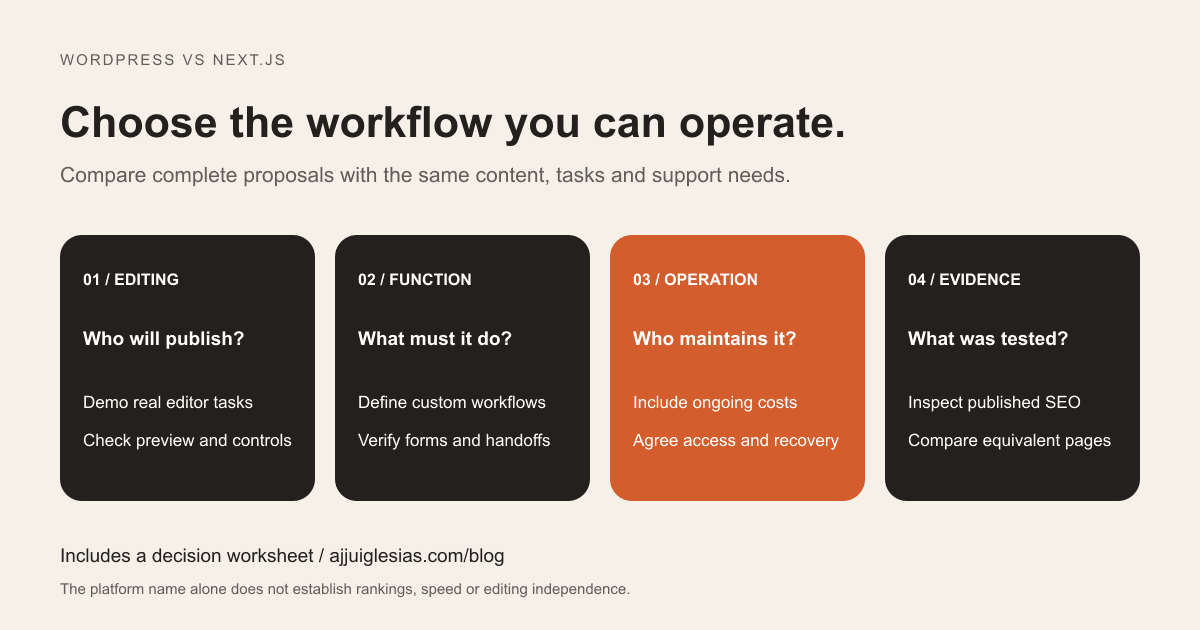
For a business website, the WordPress vs Next.js decision starts with how the site will be used and maintained. A team publishing service pages every week has different needs from a business building an interactive quoting tool with a custom account area.
WordPress includes content management and publishing tools. Next.js is a React framework used to build websites and applications; its editing experience depends on the CMS or other content workflow chosen for the project. Comparing them fairly means comparing complete implementations, including the parts that make daily work possible.
This guide helps you evaluate editing, SEO, performance, costs and ownership. Use the platform decision worksheet to record requirements and ask suppliers for evidence. The examples are hypothetical decision scenarios, not client results or benchmark claims.
Start with the next year's work
List what your team expects to do after launch. Include updating service descriptions, adding articles, changing navigation, uploading images and correcting contact information. Record who does each task and how quickly it needs to happen.
Then list any functionality beyond publishing: a pricing calculator, customer login, searchable catalogue or connection to operational software. Describe the task a visitor must complete rather than naming a preferred technology.
Separate confirmed needs from possible future ideas. A small service website should not inherit the complexity of an unapproved application simply because somebody might build it later. Equally, a confirmed application workflow deserves more investigation than a standard page template.
The website brief template can help turn that list into a scope suppliers can quote against. Use the same scope for both proposals so the comparison remains meaningful.
Understand the editing difference
With WordPress, ask which theme and editing approach the proposal uses. A block-based setup, a page builder and a custom theme can give editors different levels of freedom and different restrictions.
The official WordPress Site Editor documentation describes editing site elements with blocks and notes that the Site Editor requires an active block theme. Do not assume every WordPress proposal includes the same interface just because it uses WordPress.
With Next.js, ask where content lives. A project might use a connected CMS, Markdown files or another data source. Each arrangement changes who can publish, what can be previewed and whether a deployment is involved in an update.
Request a demonstration with your own representative task: create an article, replace its image, preview it and publish a correction. Check whether the intended editor can finish without asking a developer. A polished homepage demo does not answer that question.
Decide how much layout freedom you need
Some teams want to assemble new campaign pages from approved sections. Others need tightly controlled templates so content stays consistent. Both are valid requirements, but they lead to different implementations.
A WordPress proposal may offer reusable blocks or patterns, with controls to protect shared layouts. A Next.js proposal may provide structured CMS fields and a defined set of frontend components. In either case, ask which changes are available to editors and which require development.
Consider the consequences of changing a shared element. Can an editor update the header across the website? Can they accidentally remove an important enquiry link? Can a preview show the effect before publication?
Agree on a useful boundary between routine editing and structural changes. Unlimited editing freedom can create cleanup work, while an excessively restricted system can make simple content updates unnecessarily expensive.
Evaluate SEO through actual pages
Neither platform removes the need to plan useful content and make it accessible. Review page titles, descriptions, canonical URLs, internal links, image alternatives and the treatment of pages that should not be indexed.
Next.js provides a Metadata API for page information such as titles and descriptions. Those features still need a correct implementation and testing. A field existing in a CMS does not prove that its value reaches the published page.
A WordPress implementation also needs its SEO configuration checked, including the theme and any plugins involved. Ask who owns defaults, page-level overrides, sitemap generation and changes to URL structure. Avoid overlapping tools that output contradictory instructions.
Use Google's SEO Starter Guide as a reference for core practices. Platform choice should support the work; it cannot establish search demand, useful content or rankings on its own.
Compare performance with equivalent content
A lightly populated demo and a finished website are different workloads. Compare representative pages with the images, fonts, forms, analytics and third-party widgets that the business will actually use.
Ask for the test conditions: device profile, connection, page URL and whether results came from a lab test or real visitor data. Record the date and repeat the same conditions for a meaningful comparison. A single headline score is a starting point for investigation, not a universal performance guarantee.
For either platform, investigate large images, unnecessary scripts, excessive animation and unreliable third-party requests. A technically capable platform can still deliver a slow page when the implementation carries too much work.
Agree on a performance review after real content is added. If the proposal promises speed, ask how that promise will be evaluated and which external dependencies fall outside the supplier's control.
Check forms and integrations
Write down what happens after a visitor submits an enquiry. The form needs a dependable acceptance step, an appropriate confirmation and a route to the person responsible for replying.
WordPress may use a supported plugin or custom integration. Next.js may use server-side application code, a form service or a CRM-supported approach. Evaluate the full workflow rather than assuming one route is reliable because it uses less custom code or fewer plugins.
Test validation, unavailable services, duplicate submissions and notification delivery. Ask who maintains credentials and investigates a missing request. These responsibilities exist regardless of how attractive the form looks.
The website enquiry-to-CRM workflow guide explains the handoff in more detail. Include its requirements in both platform proposals if enquiries are a primary business goal.
Include hosting and deployment
Clarify the actual hosting arrangement and which features it supports. A supplier saying that hosting is included should also explain account ownership, access, backups, restoration and what happens if the maintenance contract ends.
Next.js can be deployed through managed services or self-hosted. Its self-hosting documentation discusses operational considerations including caching. The proposed environment must support the features the application uses; a deployment approach should be chosen for that implementation.
For WordPress, establish what the host manages and what remains the site's responsibility. Managed hosting arrangements vary. Ask specifically about core updates, plugins, backups, staging and recovery rather than relying on the word “managed.”
For both options, request a documented release process. Identify who approves changes, how the team checks them and how it recovers when an update causes a problem.
Budget for ongoing care
Compare a period of operation, not only the initial build. Include hosting, CMS subscriptions, paid extensions, monitoring, support, content work and the development needed for future changes.
For WordPress, review the proposed theme and plugins, their ongoing licences and the work needed to keep the combination maintained. The official plugin and theme update guidance is a useful reference when discussing ownership. Automatic updates still need an agreed operating plan.
For a Next.js implementation, ask about framework and dependency updates, the CMS connection, deployment configuration and any custom backend. A static-looking public page does not mean its supporting project has no maintenance needs.
Get scope-specific estimates rather than relying on a national average or a claim that one platform is always cheaper. The WordPress maintenance checklist covers questions to ask about an ongoing WordPress plan.
Use two realistic scenarios
Consider a hypothetical local service business with a small marketing team. It needs service pages, articles and an enquiry form. Staff want to publish independently, and there is no confirmed custom application requirement. A well-scoped WordPress implementation deserves serious consideration because publishing and routine editing are central to the project.
Now consider a different business with an approved interactive quotation workflow, account access and a maintained product team. A Next.js implementation may fit that team's frontend and application needs. The proposal still needs to explain content editing, data storage, access controls and support.
Neither scenario establishes an automatic winner. WordPress can be extended, and Next.js can power straightforward content websites. The decision depends on the effort needed to deliver the actual workflow and the team's ability to operate it.
Ask suppliers to explain why their suggested approach fits your scenario, including which requirements would make them recommend a different approach.
Consider a hybrid only when justified
WordPress can also serve as a content source for a separate frontend. That can preserve an existing editorial workflow while supporting a custom presentation layer, but it adds a connection and more components to maintain.
Ask how previews, media, publishing changes and redirects work across that boundary. Confirm which system owns page URLs and how the public website receives updated content.
Do not add a separate frontend solely because “headless” sounds more advanced. Compare its demonstrated benefit with the additional build, testing and operating effort. The headless CMS versus WordPress guide explores this architecture decision separately.
Protect an existing website during change
If this is a replacement website, document the current URLs, important content, forms and integrations before changing platforms. Identify which routes stay the same and which need deliberate redirects.
Preserve the content and functions that are already useful. A rebuild can introduce missing pages, changed titles or broken enquiry delivery even when the new design is stronger. Platform migration does not by itself justify discarding existing evidence.
Include launch checks, a recovery plan and post-launch monitoring in the scope. The website migration SEO checklist covers that work in detail. Keep migration effort visible when comparing the cost of staying with the current platform against replacing it.
Ask for evidence before choosing
Use the same practical acceptance tasks for both suppliers:
- An intended editor creates, previews and corrects a representative page.
- The published page contains the expected metadata and accessible content.
- A real enquiry workflow succeeds and a failed handoff is visible.
- A representative page is tested under recorded performance conditions.
- A content or code change follows the proposed release process.
- The business receives the access and instructions needed for handover.
Record missing evidence as an open question rather than awarding a platform points for capabilities that the proposal has not included. This makes the decision easier to review and reduces surprises after signing.
Download the WordPress vs Next.js decision worksheet to compare proposals. For help choosing an approach, share your editing needs, required functionality and current website. Those details provide a stronger starting point than a platform preference alone.


