
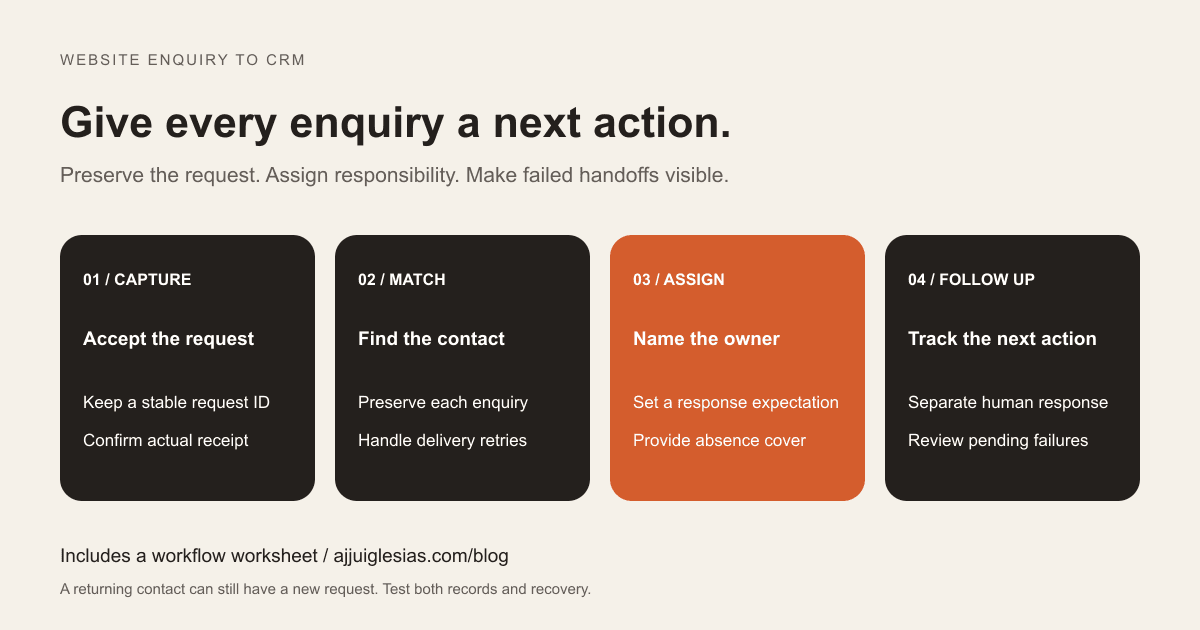
A website-to-CRM integration should turn an accepted enquiry into a visible request with an owner and a next action. Copying a name and email address into a contact list is only part of that job.
For a service business, the important questions are practical: did the request arrive, is its context intact, who will respond, and can the team see when the handoff fails? Lead follow-up automation is useful when it makes those answers dependable.
This guide explains how to scope that workflow before choosing a connector or commissioning development. It includes a clearly illustrative example and a website enquiry workflow worksheet. It is a planning guide, not a claim that an integration has been installed on your website.
Define what counts as received
Start by deciding when the website can truthfully tell a visitor that their request was received. That should correspond to a successful, durable acceptance step in the system you actually implement.
One design saves an accepted submission securely before sending it to the CRM. Another depends on successful acceptance by a supported CRM form endpoint. These have different failure paths and need different user messages.
A browser button changing colour or an email notification being attempted does not establish receipt. If the process cannot retain or accept the request, show a useful error and a way to try again. If the request is safely stored but CRM delivery is pending, the internal status should reflect that delay.
Record this boundary in the brief. It determines what happens during outages, what the confirmation message promises and which records the team uses to investigate a missing enquiry.
Separate contacts from enquiries
A contact identifies a person. An enquiry records what that person is asking about at a particular time. One person might request a website redesign today and maintenance help several months later.
Matching their email address to an existing contact can be appropriate. Replacing an earlier enquiry with the latest message may remove useful context. Decide how your CRM will represent each request: a related activity, lead, ticket, deal or another suitable record supported by your setup.
For example, HubSpot documents contact matching by email, including updates to existing contacts from form submissions. Its documentation also describes exceptions and different behaviour for some creation paths. Do not assume one matching rule applies to every object or connector.
Write two separate requirements: how to match the person, and how to preserve the new request. Test both with a returning contact before launch.
Collect enough useful information
Ask for the information needed to understand and route the request. For a service enquiry, this might include a name, a reply address, the service of interest and a short description. Make other fields required only when the receiving team needs them to proceed.
Avoid asking visitors to supply information merely because the CRM has a field for it. A long internal sales record can be completed after a conversation. Clear field labels and relevant helper text make the initial submission easier to understand.
Decide how the workflow handles a missing optional telephone number, an unfamiliar service selection or a message that needs clarification. Those are different cases from a request that cannot be accepted because required information is absent.
If poor enquiry quality is the underlying issue, review the offer and page content too. The guide to a website getting visits but few enquiries covers the earlier conversion problem; this article focuses on what happens after submission.
Map every field deliberately
Create a field map before configuring the connection. For each website field, identify the destination, expected format, allowed values and update rule. Include system-generated values such as a request identifier and acceptance time where the design supports them.
A service dropdown needs an agreed mapping. The website label “Website redesign” may correspond to a different stored CRM value. An integration should handle that translation intentionally and flag an unmapped choice instead of silently assigning an unrelated service.
Define what happens when a returning contact leaves an optional field blank. Should that blank erase an existing value, leave it unchanged or prompt review? Apply the same care to company names, telephone numbers and contact preferences.
CRM settings can also affect writes. HubSpot's API validation announcement describes enforcement of configured requirements in its 2026-09 API version. The broader implementation lesson is to test the actual endpoint and account configuration, then handle rejected writes visibly.
Keep source information honest
Preserve useful context such as the form name, page URL and acceptance timestamp. Campaign parameters can help explain a visit when available, but their absence should remain visible as unknown rather than being filled with an invented source.
Agree whether the record stores the source of this enquiry, the contact's original acquisition source or both. These answer different questions. A returning customer may arrive through a new campaign without becoming a newly acquired contact.
Treat browser-provided attribution as context rather than proof of identity or intent. Check which values your forms and CRM actually capture, how tracking settings affect them and whether redirects preserve the parameters you need.
Do not promise complete attribution simply because several fields appear in a dashboard. Test the relevant journeys and document the limits of the report.
Assign an owner and next action
Choose a routing rule that the team can explain. It might use the service requested, territory or a shared intake queue. Name the fallback destination for an unknown category or unavailable owner.
Receiving a notification is different from accepting responsibility. Decide where ownership is recorded, how a colleague claims an item and what happens when an assigned person is away. A shared inbox alone can leave everyone assuming somebody else will reply.
Set response expectations around actual operating hours and staffing. If the website promises a response window, make sure the team can support it and the workflow can highlight requests approaching that limit.
Every open enquiry should have a next action or an explicit review state. Avoid leaving a request indefinitely labelled “new” after a conversation has already started.
Handle repeats without losing requests
There are at least two kinds of repetition. A connector may resend the same accepted submission after a timeout. A person may deliberately send another enquiry. The workflow should distinguish those cases.
Use a stable request identifier through the handoff where supported. Reprocessing the same identifier should not create a second enquiry, duplicate tasks or repeated acknowledgements. Developers often call this idempotency; the business requirement is that retrying the same work does not multiply its effects.
A new request from the same email address needs a separate decision. It may be a follow-up to an open enquiry or a different project. Preserve its content and route ambiguity for review rather than discarding it solely because the contact already exists.
Also test partial completion. If the contact was updated but task creation failed, recovery should complete the unfinished step without duplicating the successful one.
Keep acknowledgement separate from response
A short acknowledgement can confirm acceptance and explain what happens next. Its wording should match the system's actual state. Avoid saying that a specialist has reviewed the request when only an automated receipt has been sent.
Decide when the acknowledgement is triggered and how duplicate sends are prevented. Keep the message focused on the enquiry and provide a practical reply route. Check that a reply reaches a monitored destination.
Track a first human response separately. A team member reviewing the request and asking a relevant question is a different milestone from an automatic email being queued.
Keep contact preferences and marketing subscription fields explicit in the data map. A request for a quote and a choice about promotional messages serve different purposes; do not collapse them into one undocumented flag. Review the wording and intended use before enabling additional messaging workflows.
Walk through a sample enquiry
Consider an illustrative service business receiving a redesign request from an existing contact. The visitor supplies their email, selects the redesign service and describes the pages they need to replace.
The website accepts the request under a unique identifier. The integration finds the existing contact, preserves the new message as a distinct enquiry and assigns it to the redesign intake owner. It creates a review task with the response expectation agreed by the business.
The acknowledgement confirms receipt. The owner then checks the request, asks for the current website address and records a next action. The original submission remains available according to the business's access and retention settings.
If delivery times out after the enquiry was created, a retry recognises the same request identifier. The acceptance test checks that the result is still one enquiry and one intended follow-up task. This is a proposed workflow example, not a report of measured client results.
Make delivery failures visible
Document the response to unavailable systems, rejected fields, expired connections and failed assignment. Each failure needs an identifiable affected request, a responsible person and a recovery procedure.
If your design includes a durable acceptance store, compare accepted requests against confirmed CRM deliveries. Investigate items that remain pending beyond the expected handoff time. Without that reconciliation, a workflow may appear healthy because recent requests succeeded while an older one remains stuck.
Keep diagnostic records useful without copying unnecessary message contents into broadly visible alerts. Restrict access to the stored submissions and document who can inspect them during support.
Email is one stage of this process, not the only evidence. If a notification is missing, the contact form email troubleshooting guide explains how to trace that part of the journey without assuming the underlying enquiry disappeared.
Test the complete handoff
Use clearly labelled test records and agreed destinations. Check the website confirmation, accepted record, CRM result, owner, task and acknowledgement together. A successful connector run alone is insufficient evidence.
Include these cases in acceptance:
- A new contact with a complete enquiry.
- An existing contact submitting a different request.
- The same request being delivered twice.
- An optional blank field and an unmapped service value.
- A rejected CRM write and an unavailable connection.
- A failure after one step succeeds but before the next finishes.
- An owner being unavailable and an acknowledgement reply arriving.
Confirm how test records are identified and cleaned up without removing real work. Keep the expected outcome beside each test so that another person can repeat it after a configuration change.
Measure the process before expanding
Start with measures the team can interpret: accepted enquiries, confirmed handoffs, pending failures, assigned requests and first human responses. Define each event consistently and include the relevant time window.
Review genuine enquiry quality separately from technical delivery. Spam, test submissions and unsuitable projects should not make the sales pipeline look stronger than it is. Record useful dispositions without pretending that every accepted form is a qualified opportunity.
Download the workflow planning worksheet to document fields, ownership, tests and recovery. If this is your first automation, the first business automation guide helps evaluate whether the scope is manageable.
For implementation help, share your website platform, CRM and current enquiry process. Include where requests get lost or delayed and who should own the next action. That gives the project a concrete outcome to build and verify.


