
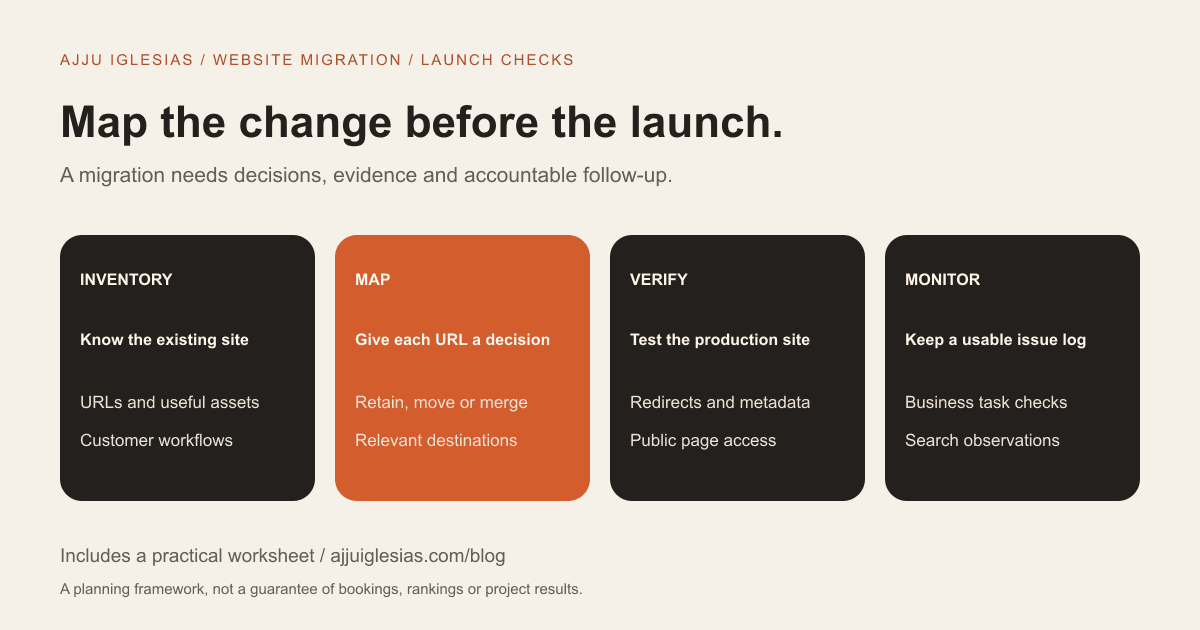
A website migration SEO checklist should connect the existing site's important URLs and content to the new site, verify what changes at launch, and define how problems will be monitored afterwards. It belongs in the project scope before the final design is approved.
A redesign, a hosting move, a domain change and a CMS migration can involve different technical work. Start by naming the change rather than assuming every launch needs the same checklist.
This guide is for business owners coordinating a migration with a developer or agency. It includes an editable migration handover checklist and a URL mapping CSV. Your developer should adapt the implementation to the actual platform.
Define the migration boundary
Write down what changes: domain, protocol, URL paths, platform, page structure, content or hosting. Also identify what remains stable.
A visual refresh that keeps the same public pages may need a different plan from moving a large catalogue to new URLs. A hosting change can still affect access, delivery and performance even when URLs remain the same.
Ask the supplier to separate design work from migration tasks in the proposal. If both are happening, name the person responsible for coordinating them. The redesign scope guide can help distinguish a refresh from a rebuild.
Use one shared document to record the intended change, launch dependencies, approval process and unresolved questions. It should explain what “ready to launch” means to the business.
Capture the current baseline
Record what the site does before changing it. Collect the current page inventory, important customer journeys, enquiry destinations, connected tools and available measurement reports.
For the business, this baseline helps distinguish an existing problem from a new one. If a form already fails occasionally, record that finding rather than expecting the launch to explain it later.
Include pages with useful enquiries or support value, not only the pages with the highest visitor counts. An instruction page or a specific service explanation may matter even if it attracts a smaller audience.
Keep the baseline tied to dates and known conditions. Note recent campaigns, tracking changes or seasonal activity so later comparisons do not treat every difference as a migration effect.
Build a URL inventory
Start with the URLs supplied by the CMS and existing sitemap, then add important pages and assets identified by the project team. The purpose is a usable inventory, not an unexplained export with thousands of rows.
For each URL, record its page purpose, owner and proposed treatment. Useful categories include retain, move, merge, rewrite and remove. Link those decisions to the content brief.
Do not overlook documents and images people may reach directly. A linked download can matter independently of the page that originally introduced it.
Google's site-move guidance recommends planning old-to-new URL mappings and preparing the new site before a move. Use that as the technical reference while keeping the inventory understandable to the people approving the content.
Give every changed URL a decision
The mapping should tell the developer what happens to each important old URL. If a genuinely equivalent page exists at a new address, identify that destination. If content has been consolidated, name the useful replacement.
Do not automatically send every removed page to the homepage. Ask whether the proposed destination actually answers the old page's purpose. When there is no relevant replacement, the developer should choose an appropriate removal response.
Keep editorial decisions separate from implementation. “Merge these two service pages” is a content decision; how the old addresses respond is a technical task. Both need an owner and a test.
The CSV provided with this guide includes fields for the old URL, destination, action, rationale, owner and verification result. Replace the illustrative rows with your real site inventory.
Test redirects as journeys
For content that has permanently moved, the developer should use the appropriate permanent redirect behaviour. Google's redirect documentation explains how redirect types are interpreted.
The acceptance test should start from the old address and finish on the intended useful page. Check the destination content as well as the browser's address bar.
Look for unexpected intermediate hops, loops and destinations that fail. A rule working for one example does not prove that every old path is handled correctly.
Ask for results against the actual mapping sheet. A clear record of tested URLs is more useful than the general assurance that redirects have been “set up.”
Preserve useful page information
A new layout should not accidentally remove the information that helps customers understand the service. Compare old and new pages for essential descriptions, relevant evidence, contact information and the intended next step.
Create a page-level acceptance record for priority content. It can note what was retained, what changed, who approved it and what still needs editing.
Review titles and descriptions as part of the new content, rather than blindly copying every old field or replacing everything with a generic template. The new metadata should describe the page that visitors will actually receive.
This editorial comparison also catches problems search-focused reports may miss: an important phone number replaced with a placeholder, a room feature omitted, or a contact instruction no longer matching the form.
Check canonical signals
A canonical annotation expresses which URL you prefer for duplicate or similar content. During a migration, verify that production pages do not point to a staging domain, an old address or the wrong page.
Google's canonical guidance recommends consistent signals, including internal links and canonical preferences. A canonical is a signal, not an unconditional instruction that guarantees Google's selection.
Have the developer check representative templates and priority URLs. One correct homepage tag does not establish that service pages, articles and other templates are correct.
Record the expected address in the mapping or page inventory. That gives the test a definite target rather than a vague requirement to “check canonicals.”
Review indexing controls
Test environments often need restrictions while a project is in development. The launch plan must identify which restrictions should remain and which should be removed for public content.
Check the actual production responses. Do not assume a setting labelled “launch” changed every relevant template or HTTP header.
Google's noindex documentation explains how indexing exclusions work. In particular, blocking crawling and excluding a page from search are different mechanisms; the implementation needs to match the intended result.
Private or operational pages may still require protection after launch. The goal is not to make every URL indexable, but to make public and restricted content behave as intended.
Update discovery paths
Check navigation and links within content against the agreed new destinations. Customers should not have to pass through old URLs unnecessarily to reach the current page.
Prepare a sitemap containing the public canonical URLs that should be discovered. Google's sitemap guidance explains supported formats and submission. A sitemap helps discovery; it does not guarantee indexing.
Review relevant verification and reporting access as part of the handover. The business should retain a way to inspect the site after the supplier's launch work is complete.
Where a domain move needs additional platform-specific steps, the developer should document them separately. Do not apply every migration feature merely because it appears in a general checklist.
Test the business, not just the pages
A technically accessible page can still fail the visitor's task. Use the workflows from the brief as acceptance tests.
- Find a priority service from the main navigation.
- Open a representative project or accommodation page.
- Submit a realistic test enquiry and confirm receipt.
- Complete a provider-supported test of a booking or payment handoff.
- Download an important document.
- Edit a sample page using the new content workflow.
- Follow a selection of important old links.
- Check those tasks on a phone.
Use agreed test accounts and provider-supported test modes where appropriate. Avoid sending unnecessary customer messages or creating real transactions merely to demonstrate that a checklist was completed.
Agree who can approve launch
Choose the people who approve content, design, customer workflows and technical readiness. These may be different people, particularly when the website connects to reservation or payment software.
Give each approval a defined meaning. A design sign-off should not silently stand in for a successful enquiry-delivery test.
List launch dependencies such as account access, provider support, final content, backups and the availability of staff who handle enquiries. A fixed launch date needs those dependencies managed, not simply repeated in meetings.
If an unresolved issue affects the main customer action, make the release decision explicit. Record whether to delay, reduce the launch scope or use a tested alternative path.
Prepare a recovery decision
The launch plan should describe what the team does if a critical problem appears. Name who can diagnose the issue, authorise a rollback and communicate with the business.
A rollback can have data implications. Restoring an earlier state after new enquiries or orders arrive is not just a visual change. Identify what new information would need preserving or reconciling.
The practical recovery approach depends on the platform and hosting. Ask the developer to document it before launch, when there is time to check access and assumptions.
For continuing recovery and care responsibilities, review the maintenance plan checklist. Maintenance and a migration are different scopes, but both need clear ownership.
Monitor with a usable record
After launch, keep an issue log showing the affected URL or workflow, observation time, evidence, owner and resolution. Separate confirmed failures from questions needing investigation.
For search checks, URL Inspection can help examine particular URLs and their reported indexing information. Use representative pages and important exceptions rather than assuming one inspected URL represents the whole site.
Compare search and business data with the baseline while considering other changes. A new campaign, altered analytics configuration or seasonal shift can affect the figures.
Google notes that search results can fluctuate while a significant move is processed. Do not promise a fixed recovery date or describe every temporary change as proof that the migration failed.
An illustrative acceptance record
Imagine a consultancy moving three service pages to clearer addresses. The team first decides which content remains distinct and which duplicated explanations should be merged.
The mapping sheet records each old URL and its intended destination. The content owner verifies the new explanations. The developer tests the redirects, metadata and public-page accessibility. The sales owner submits a test enquiry and confirms that it arrives in the correct workflow.
At launch, the team records any exceptions and uses the same list for follow-up. This example describes a coordination process, not a claim about a client project or a guarantee that rankings remain unchanged.
Scope your migration before design approval
Send your current site, the intended changes, priority content and connected systems when requesting a proposal. Ask for URL mapping, launch testing, recovery planning and monitoring responsibilities to be included explicitly.
Use the website brief and the worksheets in this guide to organise the conversation. If you need help, share your migration requirements and review the redesign and migration service.
Sources and limits
The linked Google documentation was checked on 15 October 2026. The project worksheets, acceptance process and example are editorial coordination tools. They complement a platform-specific technical plan and do not guarantee unchanged search traffic or rankings.


