WordPress website recurring costs are easier to manage when every renewal has a purpose, an owner and a date. The launch invoice is only one part of the picture. Hosting, domain registration, selected software, external services and ongoing care can follow different billing schedules.
Start with the services your website actually depends on. Some features may be included in hosting or a support agreement; others may not be needed at all. A generic list of tools is not a reliable annual budget.
This guide explains how to build a renewal inventory, compare annual cost with cash payments and review what you are paying for. It includes three diagrams and a renewal planning worksheet. The worked rupee amounts are invented arithmetic examples, not market averages, provider prices or an offer from Ajju Iglesias.
Separate the software from running the site
WordPress.org describes WordPress as free, open-source software on its About page. That does not mean every service used to operate a particular website is free. The software, hosting environment and professional work are separate parts of the budget.
Also distinguish a self-hosted WordPress setup from a packaged service sold by a hosting or website provider. Similar product names can hide different inclusions, restrictions and responsibilities.
Write down what the business is buying: infrastructure, a software licence, a connected service or someone's time. This helps you compare proposals without assuming that two items labelled “WordPress package” contain the same work.
Keep the original build cost separate from the recurring operating budget. A redesign, new integration or content project can be planned as additional work rather than quietly absorbed into a maintenance line that never included it.
Build an inventory from real accounts
Collect the current agreements, invoices and provider account details. Record the business account owner and recovery contact without putting passwords or secret keys in a shared budgeting document.
For each item, note its purpose, provider, plan, billing currency, current renewal amount, billing period and next due date. Add the source and date of the price check so another person can verify the entry later.
Include who authorises the renewal and who can change or cancel it. The person paying the bill is not always the person who knows what the service supports. Both responsibilities matter when a renewal notice arrives.
If an agency purchased something on your behalf, clarify the arrangement. Is it your own account, a licence allocated under their agreement or a service they resell? Record what happens if the support relationship changes. The website handover checklist helps organise those ownership questions.
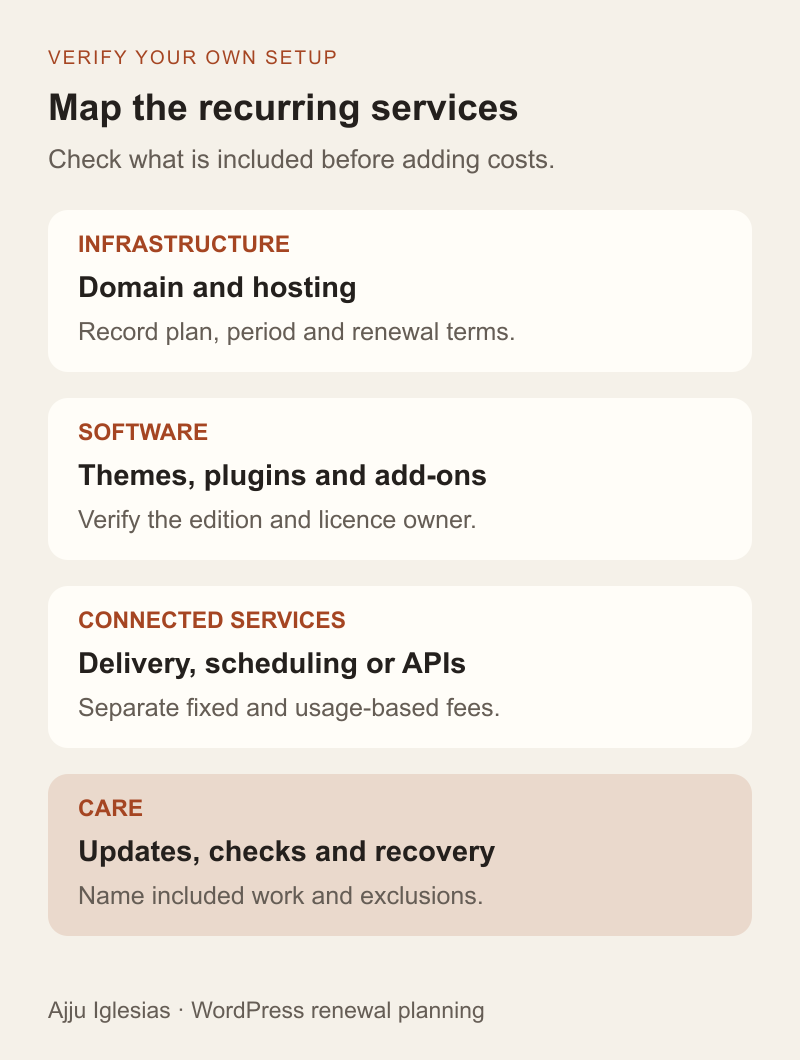
Check the domain and hosting separately
For the domain, record the registrar, exact name, renewal date and verified renewal terms. Do not copy the original promotional registration amount into the next year's budget without checking the account.
For hosting, identify the actual plan and billing term. Check the renewal amount alongside the resources and services the website needs. Include any paid additions that are genuinely in use, such as extra storage or a separately billed environment.
Look carefully at what is bundled. Email, backups, certificates, caching or a staging environment may be included, optional or supplied elsewhere. Avoid adding an independent charge simply because a general cost checklist mentions the category.
Record the consequence of losing each service. A failed hosting renewal and an unused optional tool have different implications. This is a prioritisation aid, not a reason to assume every renewal email is urgent or authentic.
Review licences and connected services
List the paid themes, plugins and add-ons the website relies on. Confirm the licence edition, covered sites and renewal terms. An initial project price may include a first licence period without covering future renewals.
Ask what changes if the licence is not renewed. Continued operation, updates, support and a hosted feature can have different conditions. Verify the particular provider's current terms instead of assuming that all plugins either stop immediately or continue unchanged.
Then trace external services. A form might use a delivery service; an appointment flow might use a scheduler; another feature might depend on an API or remote storage. Record fixed subscriptions and any usage-based charges separately.
For usage billing, note the unit, included allowance, limit and alert owner. Estimate using your own observed or planned activity and show the assumption. Do not treat an unverified low-usage estimate as a guaranteed fixed annual cost.
The WordPress plugin selection checklist covers evaluating a new candidate. Here, the task is to understand the dependencies and renewal commitments already in the operating budget.
Define what ongoing care includes
A support fee needs a scope beside it. Identify which updates, checks, monitoring and response responsibilities are included, along with allowances and exclusions. The fee alone cannot establish the amount of care provided.
Backups deserve particular clarity. WordPress's backup guidance discusses backing up the database and files. Ask what your arrangement covers, where copies are kept and who handles recovery. Do not assume a storage charge also pays for someone's restore work.
Check whether application care overlaps with the hosting agreement. If a provider covers one layer and a freelancer covers another, name the boundary. Two responsible people can be useful; two invoices for an assumed task that neither performs are not.
Use the WordPress maintenance plan checklist when comparing care agreements. Keep routine operation distinct from new page design, content creation and feature development unless those are explicitly included.
Convert costs to a common period
An annual view makes unlike billing periods easier to compare. Multiply a stable monthly charge by twelve. Divide a multi-year charge by the number of years covered to obtain a simple annual equivalent, while preserving the actual upfront payment in the cash calendar.
Do not mix currencies into one total without documenting how they were converted. Record the original currency and amount, the planning conversion assumption and the date used. Actual payment costs may differ, so refresh the budget when invoices or terms change.
Use a consistent basis for tax and other charges. State whether a figure is an invoice total or a base price that still needs additions. This is a budgeting method, not tax advice; use the amounts relevant to the business's own records.
Keep variable usage and unconfirmed renewals visibly separate from verified fixed charges. A precise-looking total can conceal weak assumptions if every estimate is presented as a confirmed bill.
Work through a clearly labelled example
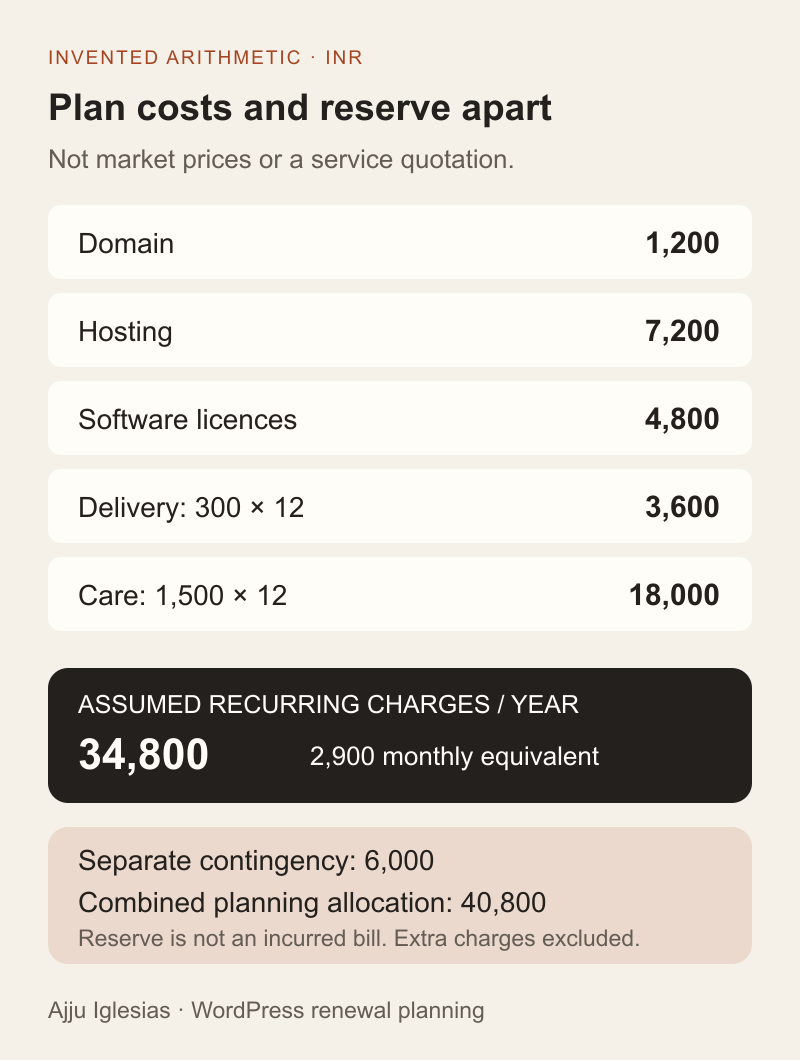
Imagine a fictional service-business website with the following annual planning inputs, expressed in INR. These invented figures demonstrate calculation only and do not describe a recommended package or current Indian market price.
- Domain: ₹1,200 per year.
- Hosting: ₹7,200 per year.
- Selected software licences: ₹4,800 per year.
- Connected delivery service: ₹300 per month, or ₹3,600 per year.
- Agreed care: ₹1,500 per month, or ₹18,000 per year.
The sum is ₹34,800 per year, equivalent to ₹2,900 per month for planning. That monthly equivalent does not mean all providers invoice monthly.
Suppose the business also sets aside a separate ₹6,000 contingency for unplanned work. The combined planned allocation becomes ₹40,800, but only ₹34,800 represents the assumed recurring charges. The contingency is reserved money, not an invoice already incurred.
Before using this structure, replace every amount with a verified figure from your own setup. The example deliberately does not model transaction fees, variable usage or additional charges. Add those where applicable and identify the assumption behind each one.
Keep a payment calendar as well
A monthly equivalent smooths the budget but does not show when cash leaves the account. Record actual renewal dates and payment amounts so several annual bills do not become a surprise in the same month.
For a separate hypothetical billing example, a three-year hosting payment of ₹21,600 has a simple annual equivalent of ₹7,200. The full ₹21,600 is still due when that invoice is payable. The annual allocation and payment amount answer different questions.
For each renewal, set an internal review date early enough to verify the service and resolve account or payment issues before the provider's deadline. Choose the lead time around your own process rather than treating an arbitrary reminder interval as sufficient for every service.
Check the account's current renewal settings, contact address and payment method. A calendar reminder does not prove a charge will succeed, and an enabled automatic renewal does not remove the need to review whether the purchase is still appropriate.
Compare the next term with the first
Compare offers over the same period and scope. An introductory discount, bundled first-year domain or prepaid term can change the launch payment without establishing the cost of the next term.
Record the verified next renewal amount where it is available. If it is not confirmed, label it unknown and assign someone to obtain the answer. Do not quietly extend a first-term promotion into a three-year forecast.
For two proposals, line up hosting, licences, external services, care, migration work and any relevant limits. Ask which fees are paid directly and which are included in a supplier's invoice. This prevents counting the same licence both individually and inside a package.
Also compare the route out. A lower subscription can be less useful if moving later requires unplanned content conversion or a service account you cannot access. Record those responsibilities without pretending every possible future migration cost can be predicted precisely.
Review renewals before cancelling
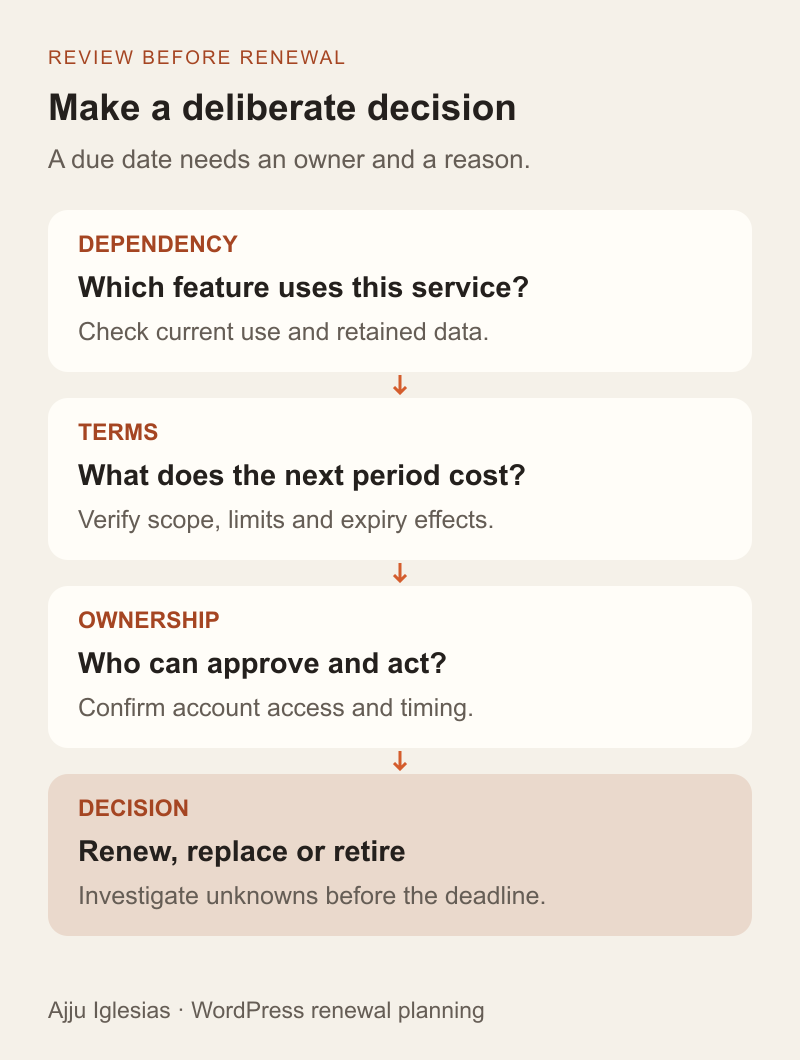
Identify the feature each paid service supports before removing it. Check whether anyone still uses it and whether its data or templates need to be preserved. An unfamiliar product name in the accounts is not proof that the purchase is unnecessary.
For a possible cancellation, document the replacement or the decision to retire the function. Verify export and removal behaviour in an appropriate environment before making a change that could affect the live site.
Ask whether a bundled alternative meets the same requirement. Consolidation can be useful, but a cheaper line item does not establish equivalent service. Compare workflow, access, recovery and support before treating it as a saving.
Keep the decision record: renew, replace, retire or investigate. Assign an owner and date. The aim is an understandable operating budget with deliberate choices, not simply the smallest number of subscriptions.
Turn the inventory into an operating plan
Complete the WordPress renewal budget worksheet with your current agreements. Keep the annual equivalents, cash dates, included services and unverified estimates distinguishable.
Review the inventory when a service, supplier or business workflow changes, as well as before major renewals. A new booking integration can introduce external costs; a retired feature can leave a subscription behind unless someone updates the record.
If you want help reviewing a WordPress setup, send the website and describe the services you currently pay for. Share account categories and scope first, rather than passwords or private billing documents. We can use that outline to identify questions, responsibilities and a sensible review scope before proposing changes.