

A website content inventory helps you decide what a redesign must preserve, improve or replace before anyone starts moving pages into new templates. It is a record of existing material and the decisions needed to make it useful in the next website.
Without that record, a project can look complete in a design review while still missing an important service explanation, a linked document or the only photograph approved for publication. These gaps become harder to resolve when launch is approaching.
This guide explains how to collect the material, review its purpose and turn decisions into assigned work. Use the inventory CSV template and review worksheet. Examples are illustrative; the templates contain no invented traffic figures or client results.
Define the inventory boundary
Write down which website, sections and asset types the review covers. Include relevant subdomains or connected content destinations when they form part of the customer journey. State what is outside the current project so nobody mistakes a partial list for a complete audit.
Decide what one row represents. A page, downloadable brochure and reusable image can each need their own record, while a shared contact block may be documented once with references to affected pages.
Separate public content from private operational material. The inventory should identify a dependency without copying customer records, credentials or private enquiry messages into a general project document.
Name a person responsible for maintaining the list. A spreadsheet that is accurate only on the first day becomes less useful as editors publish corrections and designers change the proposed structure.
Collect from more than one source
Start with the CMS, available sitemaps and the navigation visitors can use. Then inspect linked downloads, campaign pages and other sections that may not appear in the main menu.
Where access is available, use analytics, search reports or server records to discover additional URLs and understand their use. Record the source and date of an export. A page absent from one report may still exist or serve a purpose outside that report's coverage.
The collection diagram below combines discovery sources with a review queue. It does not imply that every small website requires every possible data source. State which sources were available and which gaps remain.
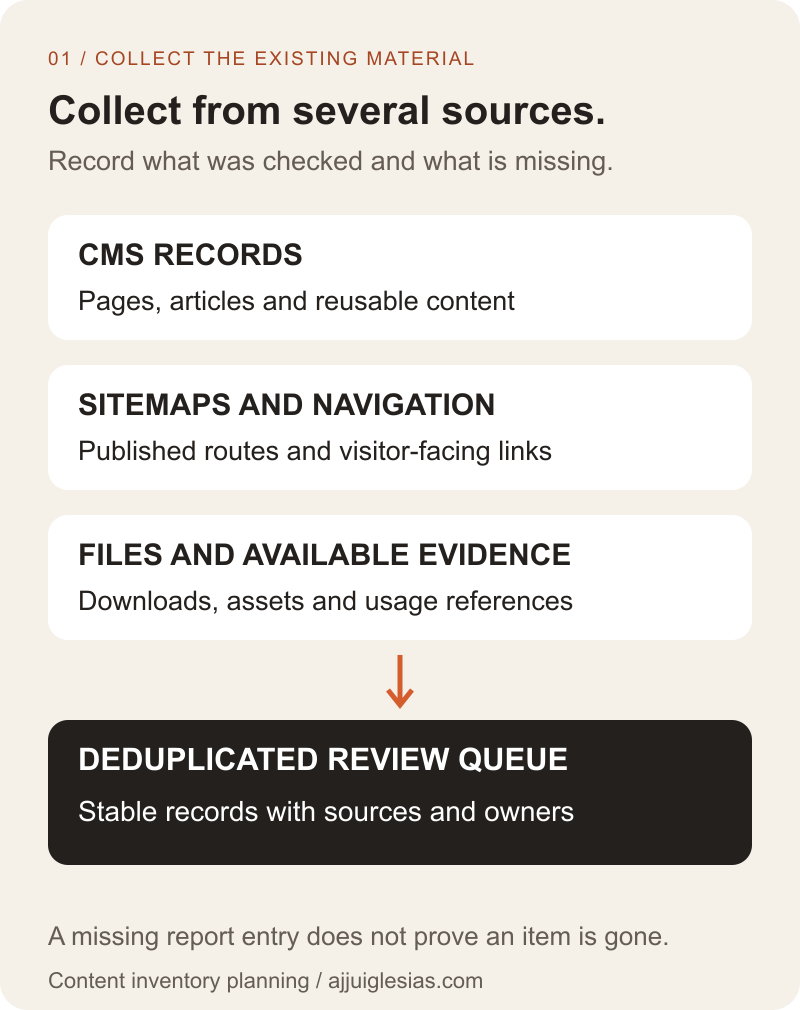
For projects changing URLs, Google's site-move guidance describes collecting existing routes and planning their destinations. The inventory supplies useful inputs to that work, while the actual migration needs its own implementation and verification.
Give each item a stable record
Assign an inventory identifier and capture the current URL or asset location. Add the title, content type, section, owner and date checked. These fields make it possible to discuss the same item even if its proposed title changes.
Record the visitor question or task it supports. “Service page” identifies a format; “help a hotel owner assess a direct-booking website” describes a purpose that can be reviewed.
Add linked assets and important dependencies. A room page may depend on a category-specific gallery and an external reservation destination. A service page may link to a brochure whose information needs separate approval.
Keep proposed destinations in a different field from current locations. That distinction prevents an unapproved draft URL from being mistaken for the page that exists today.
Inspect the content itself
Read representative content and check factual details with the responsible person. Review service availability, contact details, descriptions, examples and the next action offered to visitors.
Identify claims needing evidence or correction. An old project result may still be valid, but it needs its context preserved. A service the business no longer offers needs a deliberate decision rather than a fresh layout around obsolete copy.
Google's people-first content guidance offers questions for evaluating usefulness and reliability. Use that as a reference alongside actual customer needs; it is not a scoring formula or a guarantee of rankings.
Mark uncertainty explicitly. “Needs service-owner confirmation” is more useful than a confident keep-or-delete decision made by someone who does not know whether the offer remains current.
Use traffic as evidence, not a verdict
If measurement is available, record the time period, metric and limitations. Search clicks, page views, enquiries and internal use answer different questions. Do not combine them into an unexplained popularity score.
A low-traffic page may help a small number of customers make an important decision. A supporting document may be sent directly by staff. A seasonal page can appear quiet outside the relevant period.
Conversely, a heavily visited page can contain outdated information or attract an audience the business cannot serve. Traffic does not settle accuracy or suitability.
When a metric is unavailable, leave it unavailable. Ask what decision can be made from the evidence you have and what further review is necessary. Invented estimates create false certainty without making the redesign easier to operate.
Choose a content action with reasons
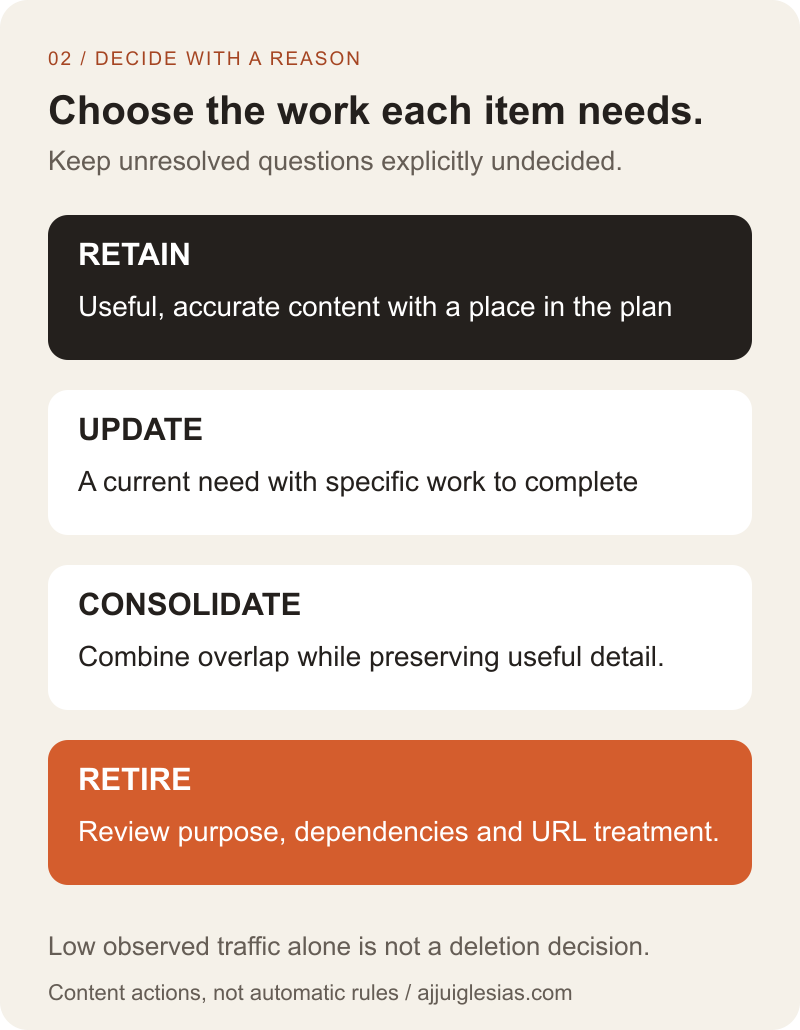
Use a small set of actions the project team understands: retain, update, consolidate or retire. Each needs a reason and an owner. An item can remain undecided while a material question is unresolved.
Retain content when it remains accurate and useful, while checking how it fits the new structure. Update material that serves a current need but requires corrections, stronger evidence or a clearer explanation.
Consolidate when multiple items answer substantially the same need and a combined destination can preserve the useful information. Record which details must survive. Retire content only after reviewing its purpose, dependencies and the appropriate treatment of the existing URL or asset.
The decision diagram summarises these actions. It is a planning framework, not an instruction to apply the same decision automatically to every page with a similar metric or age.
Review overlap before adding pages
Group items by the question they answer, not only by their current menu section. Two differently named pages may explain the same service, while pages using similar keywords may address different decisions.
Identify which page should own the main explanation. Supporting resources can answer narrower questions and link back to that destination. Avoid creating another general article merely because the old one is difficult to find.
Check the consequences of consolidation. Preserve useful examples, important distinctions and links people rely on. A proposed combined page should improve the answer rather than become a longer collection of repeated paragraphs.
For planning the next structure, read which pages a small business website needs. The inventory establishes the current material; the new structure should organise it around the intended customer journey.
Include downloads and shared assets
List documents that visitors or staff still use. Record the file location, publication context, owner and any information that needs verification. A redesign can change the webpage while leaving an outdated brochure one click away.
Review image associations as well. A useful photograph may belong to a particular room, product or project. Preserve that context so it is not moved into an unrelated section simply because it fits a new card shape.
Document shared content such as contact information and repeated calls to action. Decide whether it will be managed centrally or copied across pages, and identify the places that need checking after a change.
Keep approved source materials separate from web exports. The hotel photography planning guide provides an example of preserving the relationship between original assets, reviewed selections and published crops.
Assign the work before design depends on it
Turn an action such as “update” into a concrete deliverable. Identify what must change, which evidence is needed, who writes it and who approves publication.
Set due dates around the work the content supports. A representative service description may be needed before the layout is approved; final corrections may have a later review window. State which version is available for each stage.
Distinguish missing content from approved omissions. A page waiting for a photograph is not necessarily excluded from launch. The release scope needs an explicit decision if required material will not arrive.
Connect these tasks to the website development timeline. Listing every page is useful, but an assigned writing and approval plan is what allows the inventory to guide delivery.
Keep content decisions separate from routing
An approved content action does not implement a redirect or remove a published page. Record the intended treatment of the old location and pass it to the person responsible for the technical plan.
For a retained page, confirm whether its URL stays the same. For consolidated material, identify the approved destination and any content that must move before the old route changes. For retired material, review the appropriate response instead of sending every obsolete URL to an unrelated homepage.
The handoff diagram below separates current records, approved decisions and implementation evidence. It helps reviewers see whether a change is proposed, ready to implement or actually checked.
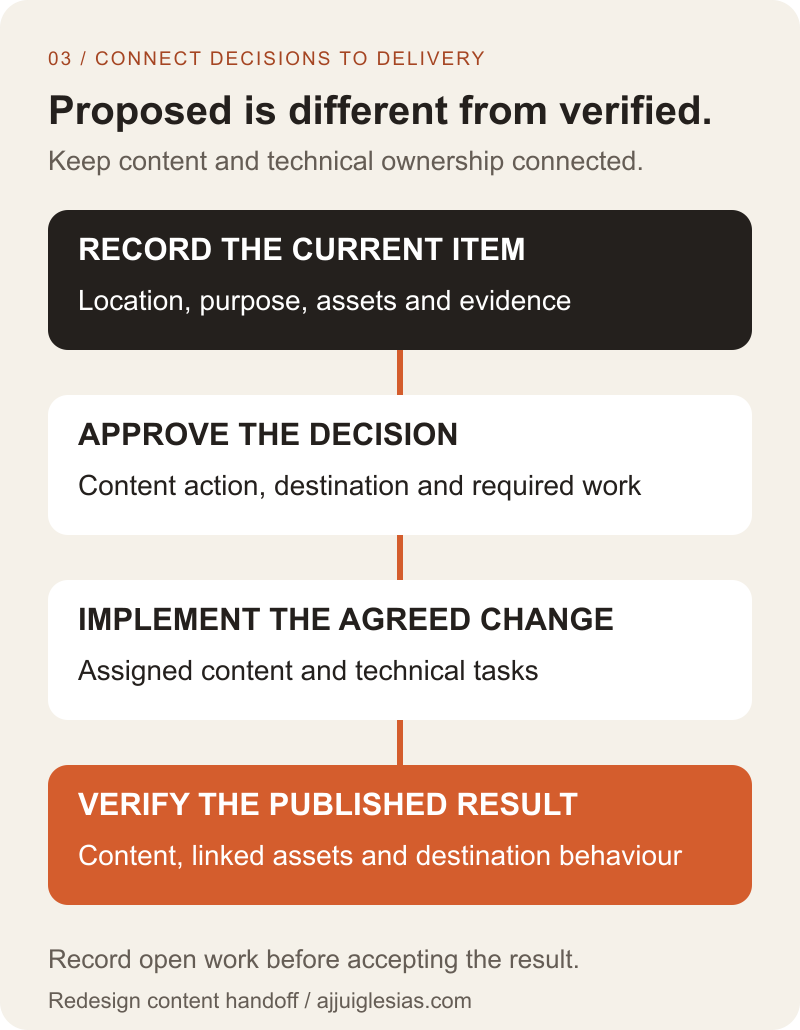
Use the website migration SEO checklist for technical mappings, launch checks and follow-up. This guide supplies the content decisions rather than repeating that execution process.
Work through a representative example
Imagine a hypothetical service business with a current redesign page, an old campaign page and a PDF describing an earlier offer. The owner confirms that part of the campaign's explanation remains useful, but the PDF's service details need correction.
The team retains the main service destination, assigns a rewrite incorporating the useful explanation and gives the PDF a separate review owner. It records the proposed handling of the old campaign URL for technical review.
That sequence avoids two shortcuts: discarding useful material because it looks old, and copying everything unchanged because it already exists. The example illustrates a decision process, not a completed client audit.
Sample one complete content group first if the site is large. Use what the team learns to refine the inventory fields and review instructions before applying them to the remaining sections.
Verify and maintain the record
Before acceptance, compare approved decisions with the published result. Check content, linked assets, destinations and the assigned editing owner. Record any unverified items and their effect on launch readiness.
Archive an agreed baseline of the inventory and maintain the current working version. Explain where future changes should be recorded so the next review does not start from scattered exports and memory.
Download the inventory template and review worksheet to organise the first pass. Use the website handover checklist to connect approved materials with the accounts and responsibilities needed after launch.
For help scoping a redesign, share the current website, the sections changing and the content decisions still unresolved. Those details provide a practical basis for planning the work before new layouts depend on missing or inaccurate material.


