
How long does it take to build a website? The useful answer is a schedule tied to a defined scope, an available team and decisions that can be made on time. The number of pages alone does not establish a reliable launch date.
A five-page site with approved content and a familiar enquiry workflow is a different project from five pages that require photography, translations and a new booking integration. A website development timeline needs to make those differences visible.
This guide explains how to plan the work and review an estimate. It includes an illustrative 20-working-day schedule, not an industry average or a delivery promise. Use the timeline planning worksheet and sample dependency register to adapt the approach to your project.
Define what launch must accomplish
Start with the visitor task the website needs to support. For a service business, that might mean understanding the offer, checking relevant evidence and submitting an enquiry that reaches the responsible person.
List the pages, templates, content and supporting functions required for that task. Include editing access, form delivery and the basic operational arrangements needed after launch. Record later ideas separately.
Agree what “ready” means for each deliverable. A contact page is not ready merely because its layout exists. Its details need approval, the form needs testing and the response route needs an owner.
The website brief template helps define requirements. The timeline then assigns those requirements a sequence, dependencies and review points. Keeping these roles distinct prevents a date from becoming a substitute for an agreed scope.
Establish when the clock starts
Ask whether the proposed duration begins at booking, kickoff or a readiness milestone. A supplier may reserve capacity after payment but still need content, access or decisions before the planned build can proceed.
Record the actual start conditions. These could include an approved page list, a named reviewer, access to required systems and a first batch of usable content. If an input is still being prepared, give it an owner and due date.
Use working days and calendar dates deliberately. Twenty working days do not always equal four calendar weeks when holidays, part-time availability or planned absences are involved. State the working calendar used by the team.
Also distinguish effort from elapsed time. Two days of design work can occupy a longer calendar period if a review must happen between them. A schedule needs to show both the work and the waiting it depends on.
Reduce uncertainty before estimating
Identify decisions that could change the implementation: which booking system will be used, whether two language versions are required, who supplies content and whether existing URLs must be preserved.
Investigate the important unknowns before treating the full delivery date as firm. A short technical check or representative page can reveal a constraint while the scope is still easy to revise.
The GOV.UK discovery guidance describes understanding the problem and constraints before committing to building a service. Its government-service process is not a timetable for a small business website, but the planning principle is useful here.
Separate estimates based on known work from allowances for unresolved questions. If an integration has not been checked, label that uncertainty and schedule the check instead of hiding it inside an apparently precise launch date.
Put content on the schedule
Treat copy, images and documents as deliverables with review dates. “Client to provide content” does not explain when the team will receive it or whether it will be ready to use.
For each page, name the author, the person checking accuracy and the person approving publication. Identify missing photography, project permissions or product information early. Translations need their own review and implementation checks.
Agree which content is needed for design and which can arrive later. A representative service description can help test a layout, but the final content may reveal longer headings or missing sections. Leave time to review the layout with real material.
Use a content status such as drafting, under review, approved or placed on staging. These states make the remaining work visible without treating a document sent by email as automatically approved for publication.
Plan reviews with actual decision-makers
Reserve review windows in advance. Ask who consolidates feedback and who can approve the next stage. If several people need to comment, give them a shared review point and a clear decision owner.
Request feedback against the agreed purpose and acceptance criteria. A useful design comment explains the problem, such as a primary enquiry action being difficult to find. Conflicting instructions from separate reviewers need resolution before implementation.
Record the number and scope of planned review rounds. Also agree how late feedback affects the next milestone. Silence should not become an assumed approval unless that process has been explicitly established.
Keep a short decision log. A confirmed navigation structure or content choice should be easy to find later, reducing the chance that an already resolved question reopens because nobody can locate the approval.
Use a sample schedule carefully
Consider a hypothetical service website with five agreed pages, existing brand assets, approved core copy and one straightforward enquiry form. Assume the team is available, access is ready, reviewers respond in reserved windows and no custom integration or URL migration is required.
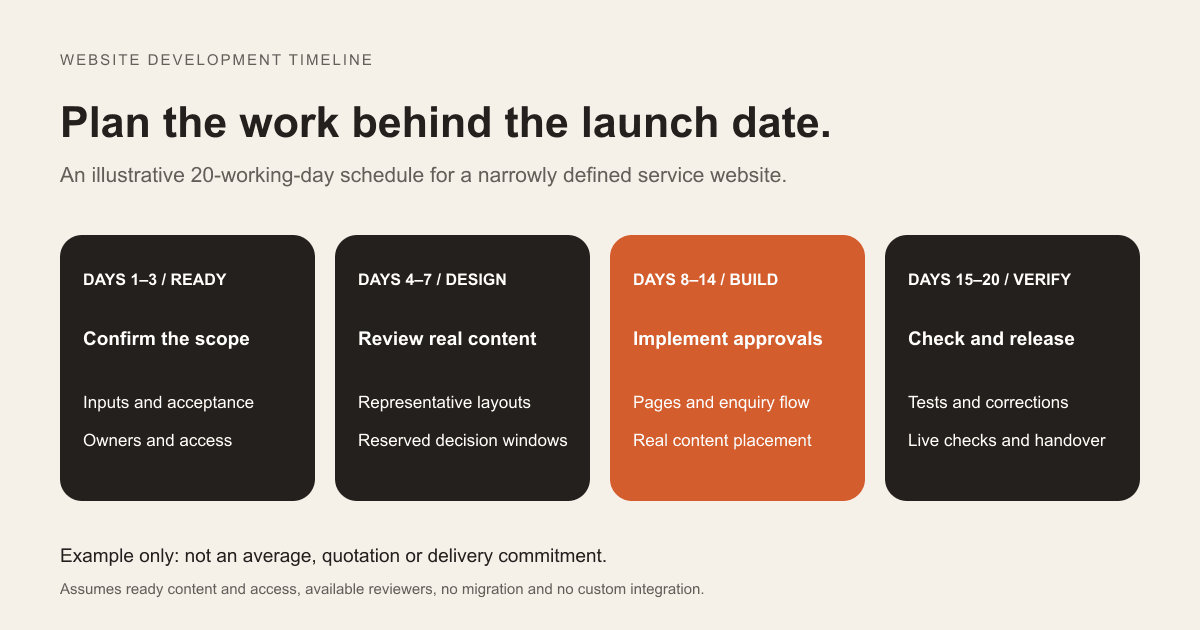
For this example only, a 20-working-day plan could allocate:
- Days 1 to 3: confirm scope, content readiness and acceptance checks.
- Days 4 to 7: prepare and review representative page designs.
- Days 8 to 14: implement approved layouts and place the remaining content.
- Days 15 to 18: test visitor journeys, editor tasks and published page details.
- Days 19 to 20: complete the release review, deploy and verify the live result.
These durations are chosen to illustrate sequencing. They are not measured project results or a price-package commitment. A real estimate needs the supplier's capacity and evidence about your requirements.
The example also assumes review and correction fit inside each window. It contains no separately reserved contingency. If the team needs contingency for specific risks, it should add that allowance visibly rather than pretending every day is already spare capacity.
Follow dependencies, not just dates
A task depends on another when it cannot responsibly finish before that input is ready. A service page may require approved copy; an enquiry test may require a configured destination and account access.
In the sample plan, suppose the agreed design approval moves from day 7 to day 10 and the build cannot start without it. If the remaining work stays the same and there is no spare capacity or safe overlap, the launch moves from day 20 to day 23.
That is a hypothetical consequence of the stated dependency, not a rule that every delay moves a launch day for day. Some work can proceed independently. The team should identify what can safely continue and what is actually blocked.
Use the sample dependency register to document inputs and owners. Replace the example rows with the dependencies in your own scope.
Check integrations early
If the website relies on a CRM, reservation system, payment service or external data, verify the required connection before scheduling it as routine implementation. Identify account access, test environments, required permissions and any provider approval steps.
Test the exact operation needed. A platform having a named integration does not establish that it supports every field or action in the planned workflow. Schedule a representative proof before dependent design or development decisions become expensive to change.
The website enquiry-to-CRM guide shows how much can sit behind an apparently simple form connection. Its contact matching, assignment and recovery requirements belong in the project schedule when they are part of the scope.
Track external waiting separately from development effort. Provider approval or missing business access needs a responsible contact and an escalation route; adding more design hours does not resolve that dependency.
Treat additions as schedule decisions
New requirements can be worthwhile. The useful response is to estimate their effect on the current plan before accepting them into the release.
Ask what work the addition creates, which completed decisions it changes and whether it affects testing or content. A new language version may involve more than translating a few paragraphs. A customer login introduces different tasks from a public information page.
Then choose explicitly: extend the timeline, replace another planned item or schedule the addition after launch. Keep the decision and its assumptions visible to everyone relying on the date.
If you are planning a first product release rather than a marketing site, the MVP feature prioritisation guide explains how to preserve a complete useful workflow while reducing scope.
Reserve verification and recovery time
Do not make testing the activity that receives whatever time remains. Define checks throughout the project and reserve a final review using real content and the intended configuration.
Include mobile layouts, keyboard use, form behaviour, editing tasks, links, metadata and representative performance checks as appropriate to the scope. Record defects with an owner and a launch decision rather than leaving comments scattered across messages.
For a replacement website, add URL mapping, redirects and migration verification. Google's site-move guidance describes preparation and monitoring for URL changes. Those tasks need time; they should not appear as an unplanned addition on release day.
The website migration SEO checklist covers that work separately. The sample 20-day schedule above excludes a URL migration, so do not copy it unchanged for a rebuild that needs one.
Make the launch decision explicit
Before release, review the agreed acceptance criteria and open issues. Identify anything that prevents the primary visitor task, anything requiring a business decision and any lower-impact work deliberately scheduled later.
Name the people approving release and performing the deployment. Confirm access, recovery steps and availability for the live checks. A fixed campaign date is a constraint to plan around, not evidence that the website is ready.
After deployment, verify the actual public site: important pages, links, enquiries, measurement and the expected published content. Launch is a process with a checked result rather than simply the moment somebody presses a button.
Schedule operational handover and the first follow-up review. The website handover checklist helps make sure the team can operate the site after the build work ends.
Ask for a plan you can update
A useful progress update names the completed milestone, the next required decision, the current blocker and the forecast effect on launch. A percentage-complete label rarely tells the business which action it needs to take.
Keep the forecast current when assumptions change. If the date is at risk, discuss a smaller complete release, a new date or a different allocation of work while there is still time to choose.
Download the timeline worksheet to prepare for a project discussion. For a scope-specific estimate, share the pages, functions, content status and date you are working toward. Include what makes that date important so the plan can address the real constraint.


