

The essential pages for a small business website are the ones that help a visitor understand what you offer, decide whether you are suitable and take a useful next step. Start with those questions before buying a package based on page count.
A business may answer them through five carefully planned pages. Another may need separate service pages, detailed project evidence and a booking journey. More pages are useful when they make the decision clearer and contain worthwhile information.
This guide focuses on a service business website. The diagrams show illustrative structures, not a compulsory template. Use the page-planning worksheet to decide what belongs on your own site and what can wait.
Map the questions before the menu
Write down what a prospective customer needs to know before contacting you. For example: do you provide the service they need, who do you work with, what does a project involve, and what information should they send?
Then identify the evidence available to answer those questions. You might have project photographs, a documented process, an example deliverable or an explanation of service boundaries. Distinguish material you can publish now from material that still needs preparation or permission.
Group questions that belong together. If customers compare two closely related services, an overview can help them choose. If one service requires a substantially different explanation and enquiry route, it may need its own page.
The result is a content structure with a purpose. Navigation labels come afterward, once you know which destinations help the visitor complete their task.
Start with a connected structure
A useful starting point is a homepage connected to service information, business evidence, an about page and a contact route. The services section can contain more detailed pages when the offer justifies them.
The sitemap below illustrates that arrangement. The homepage introduces the business; service pages explain the offer; project evidence and about content support the decision; contact information provides the next step. Relevant links also connect these pages directly, so visitors do not have to return to the homepage after every question.
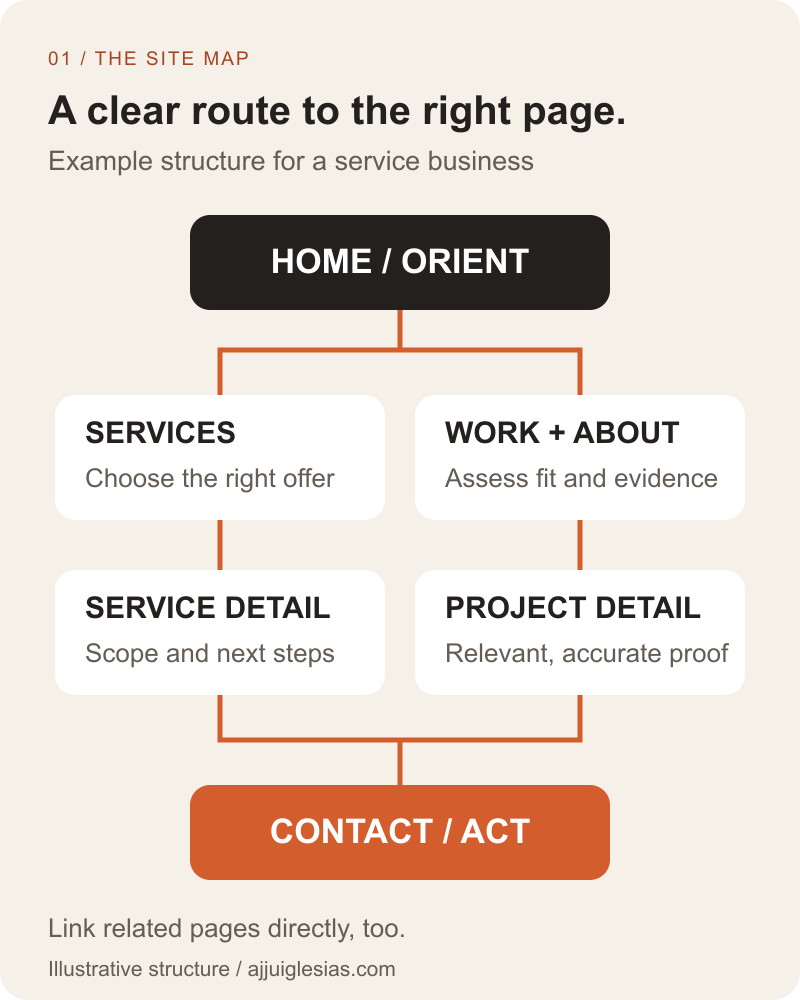
Treat the diagram as a planning aid. A photographer may organise evidence differently from a consultancy, while a hotel needs room and reservation information. The structure should reflect the business rather than force every business into the same menu.
Give the homepage a clear job
The homepage should quickly establish what the business does, who it helps and where a visitor can go next. It can introduce key services, selected evidence and a clear enquiry or booking action.
Avoid asking it to contain every detail. A long list of unrelated offerings can make the first decision harder. Use concise summaries that lead to the appropriate explanation.
Check the page with someone unfamiliar with the business. Can they describe the main offer and find a relevant next step without you explaining the navigation? Record where they hesitate rather than assuming the heading is clear because the team understands it.
The homepage also serves returning visitors who need contact details or a specific service. Make those routes easy to find without requiring everyone to follow one prescribed sequence.
Build service pages around decisions
A service page should explain the problem the service addresses, the work included, relevant boundaries and how a customer can proceed. Use the language customers understand before introducing internal terminology.
Give practical detail. For a website redesign service, that might include what happens to existing content, which integrations need review and what the business needs to supply. Explain variables affecting scope rather than displaying a price without context.
Support the explanation with relevant evidence. A real project, a representative deliverable or a clear process can help. Label examples accurately and avoid presenting hypothetical work as a completed customer result.
The wireframe below groups those needs into a possible reading order. It is an information outline rather than a final visual design; the enquiry action may also appear earlier when useful.
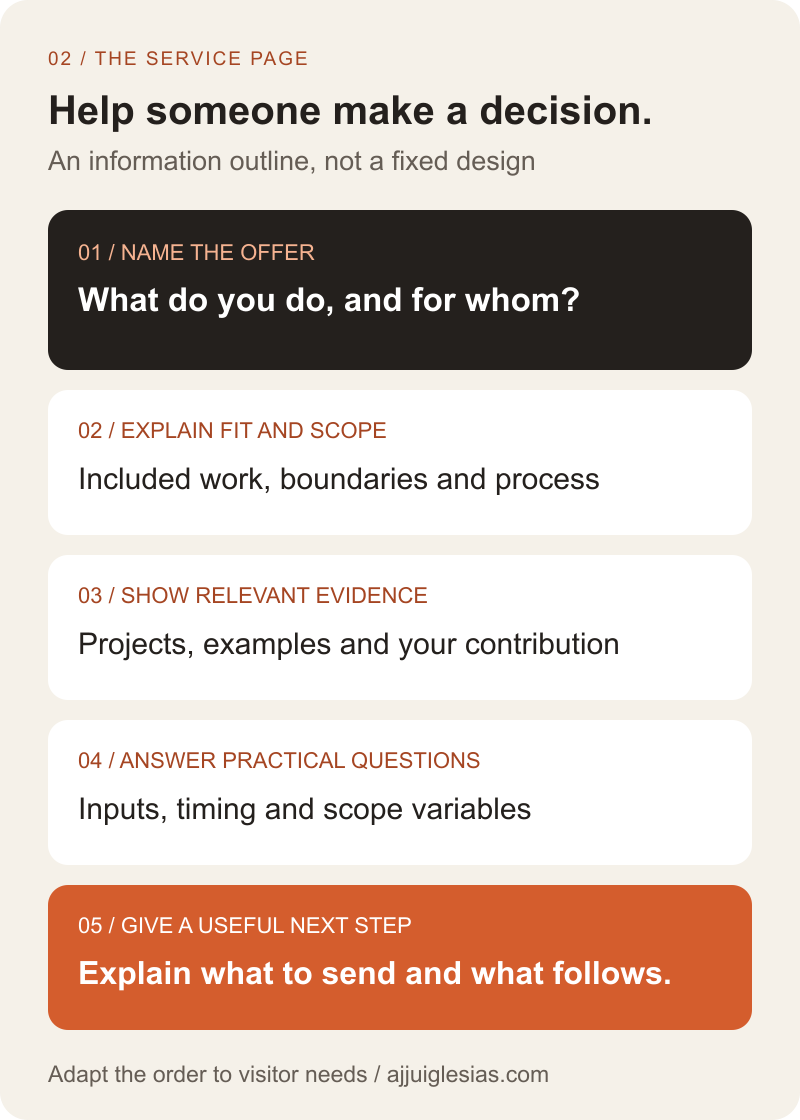
If visitors already arrive but rarely enquire, review the guide to websites getting visits but few enquiries. Adding another page will not automatically solve an unclear offer or an unreliable contact path.
Make evidence easy to evaluate
Use a work, projects or case-study section when there is material that helps customers judge suitability. Describe the problem, your contribution and the work delivered. Include outcomes only when you can substantiate them.
An image gallery can show visual quality but may leave the business context unclear. Add enough explanation for a prospective customer to understand whether the example relates to their own needs.
Be precise about roles. If a project involved other people, identify your part rather than implying you delivered everything. If customer information is not available for publication, choose an example you can explain accurately.
Link evidence from the relevant service page as well as the main projects listing. Someone considering maintenance work should not have to inspect every unrelated design project to find the evidence that helps their decision.
Explain who is behind the business
The about page should help visitors understand the people, experience and way of working behind the offer. Use specific information that is relevant to choosing the business.
For an independent professional, explain who handles the work and how the relationship operates. For a team, clarify responsibilities and how customers communicate with the people delivering the service.
Avoid replacing useful detail with broad claims such as being the best or offering every possible solution. A clear explanation of fit and limitations can answer more questions than a list of unsupported superlatives.
Connect the page to relevant work and a practical contact route. Visitors who want to check the person behind a service should be able to return to the offer without searching for it again.
Make contact a complete task
The contact page needs more than a form layout. Explain which enquiries are welcome, what information helps you assess them and what the visitor can expect next. Publish only response expectations the business can support.
Choose fields around the receiving team's needs. A required telephone number may be unnecessary if the first response happens by email. A useful project description can be more informative than several dropdowns whose answers nobody uses.
Provide appropriate alternative contact details and check that they are correct. Test the journey through to the receiving person or system, including the confirmation and any reply route.
The website enquiry-to-CRM workflow guide covers the next stage: preserving the request, assigning an owner and tracking the next action. The page structure and the operating workflow should support one another.
Decide when a topic needs its own page
A separate page is justified when it answers a distinct visitor need, has enough useful material and can be maintained. If the answer is only a short clarification within an existing service, a section may work better.
Use the decision guide below to review proposed additions. First identify the question. Then decide whether an existing page already answers it. If the need is distinct, check that there is information and evidence to support a useful destination before adding it to the structure.
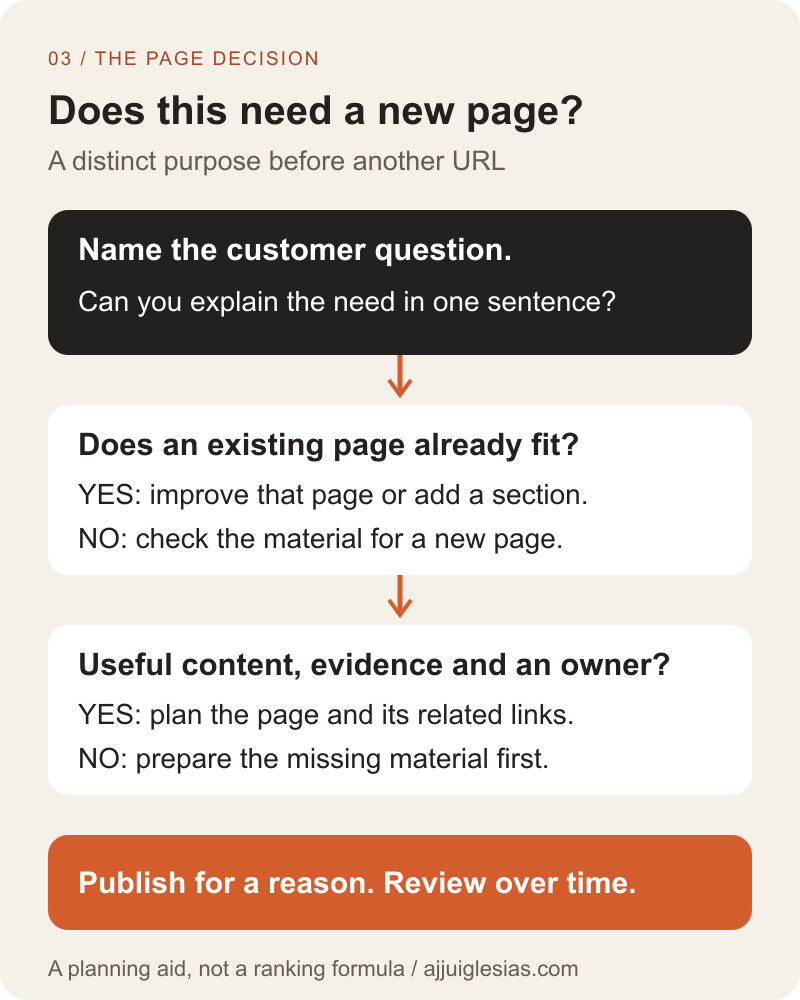
For example, a business offering three clearly different services might need three detailed service pages. A business offering one service in slightly different packages may explain them more clearly on one comparison page. Neither structure wins because it has more URLs.
Keep navigation understandable
Use labels that describe the destination. “Services,” “Work” and “Contact” can be easier to interpret than inventive names that require visitors to guess. Test wording with the audience rather than choosing labels only for their visual character.
Keep the main navigation focused on important destinations. Supporting documents and secondary information can have an appropriate place elsewhere, provided visitors can find them when needed. Check the mobile menu, keyboard operation and visible focus as part of implementation.
Use contextual links in page content. A service explanation can point to a relevant project and then to an enquiry route. Google's guidance on sitelinks recommends a logical structure and relevant links to important pages. That practice does not guarantee any particular search appearance.
Avoid orphan pages that are published but have no useful internal route from related content. A sitemap file serves a different purpose from helping a customer navigate the site.
Add articles when they serve a purpose
A blog or resource section can answer questions that deserve a fuller explanation than the main service pages allow. Choose topics connected to actual customer decisions and link them to the relevant part of the offer.
It is reasonable to launch a focused service website before a resource library is ready. An empty blog or a collection of generic filler does not improve the customer's ability to choose the business.
Assign an owner for reviewing published material. Product details, examples and references can become outdated. A resource section creates an ongoing editing responsibility as well as an opportunity to answer useful questions.
When articles contain diagrams, keep the explanation available in ordinary text. The W3C guidance for complex images explains the value of text equivalents for detailed visual information. The diagrams in this guide summarise the adjacent explanations rather than replace them.
Plan a useful first release
Prioritise the pages needed for a complete customer task. Publish accurate service information, usable evidence and a tested contact path before expanding into every possible topic.
Keep a list of missing material and decide whether it blocks launch or belongs in a later release. A project page without approved evidence should not be padded with invented results merely to fill a slot in the menu.
Record page purpose, content owner, evidence, next action and review status in the page-planning worksheet. Use the website development timeline guide to schedule the content and approvals once the structure is agreed.
For help planning the structure, share your services, intended customers and available content. Those details give the project a stronger starting point than deciding the page count first.


