
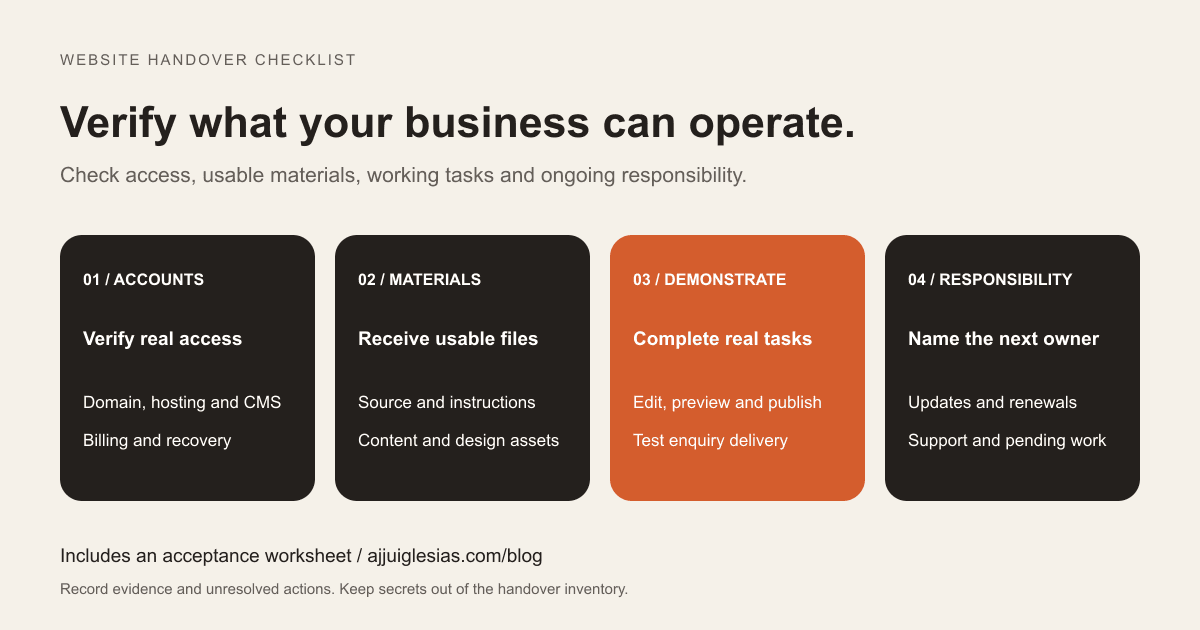
A website handover is complete when your business can perform its agreed tasks and knows who maintains the systems behind them. A folder of files and a message containing a login are useful starting points, but they do not demonstrate that the website can be operated or recovered.
Use this website handover checklist before accepting a new site, changing suppliers or taking over an existing project. It covers practical access and operating responsibilities. Record the agreed deliverables separately so that the handover can be checked against the actual project scope.
Download the handover acceptance worksheet and account inventory template. Both are designed for recording status and responsibility, not passwords or private customer data.
Start with an account inventory
List every service needed to keep the website working. Include the domain registrar, DNS provider, hosting, CMS, source repository, deployment service, enquiry delivery, analytics and any paid extensions. Some websites combine several of these in one service; others use separate accounts.
For each system, record its purpose, account reference, business contact, access level and renewal responsibility. Name the person who can recover access if the usual administrator is unavailable. Link to the approved secure credential location without copying secrets into the inventory.
Mark each item as verified, pending or not applicable. An invitation sent to an old address is still pending. A service being visible in somebody else's screenshot does not prove that your business has access.
This inventory also reveals dependencies. If the website sends enquiries through a supplier-controlled email service, that connection needs an explicit continuation or replacement plan.
Verify domain and DNS access
Identify where the domain is registered and where its DNS records are managed. These may be different providers. Confirm that an authorised business representative can access the relevant account and receive renewal and recovery notifications.
Record expiry information, renewal settings and the billing contact. Check that the recovery arrangement remains usable if the website or its email service is unavailable. The ICANN registrant information centre provides background on domain registration responsibilities and account concerns; follow your registrar's own procedures for the actual account.
Ask for an explanation of the important DNS records and the services they support. A change intended for the website can affect email or another connected service if somebody replaces records without understanding them.
Logging in is an appropriate first verification. Do not make an unnecessary DNS change merely to prove that a button works. Plan any required transfer or configuration change as a separate, documented task.
Check hosting and billing separately
Confirm the hosting provider, the relevant website or project and the person responsible for payment. Ask which resources belong to this website and whether the supplier's account also contains unrelated client projects.
Where direct account transfer is unsuitable, document the arrangement clearly: what business access is available, what the supplier manages and how the site can be moved later. A dashboard invitation and a billing transfer can be separate processes.
List recurring charges and renewal dates where known. Include paid themes, plugins, CMS plans, email delivery and external tools, with the person responsible for each. Do not assume that a licence used during development remains available after the support agreement ends.
Before cancelling an old service, confirm that the replacement is working and that required data has been retained. Handover should establish continuity rather than trigger a collection of uncoordinated account changes.
Demonstrate ordinary editing tasks
Have the intended editor sign in using their own account. Ask them to correct a service description, replace an image, preview the result and publish an agreed test change. Use a staging environment where appropriate, or a planned reversible change on the live site.
Check the tasks your team actually needs. Adding a blog post may involve a different screen from editing a service page. Updating a shared navigation item may require more permission than changing a paragraph.
Record what editors can change independently and what requires development. Include image dimensions, text guidance and any restrictions that protect shared layouts. A short task-based guide is often easier to use than a long recording with no index.
Agree where questions go after training. A successful demonstration should leave the editor able to repeat the task, rather than merely having watched the supplier complete it.
Receive files you can actually use
Identify the source repository or delivery archive and the version corresponding to the published website. Check that the business has the agreed access and knows whether ongoing work is stored elsewhere.
For a custom application, request the installation or build instructions, supported runtime information and configuration variable names. Secret values should be transferred through the agreed secure method. Include the required database or content source and explain how the application receives updates.
For a CMS website, identify custom themes, plugins, templates and other project-specific work. Distinguish these from third-party components and document any subscriptions needed to maintain them. A CMS content export may not include every part required to reproduce the site.
Ask for evidence that the delivered package supports the agreed setup process. A source archive that nobody can build or install leaves an unresolved handover task, even if all its files downloaded successfully.
Preserve content and design assets
Collect the approved logo files, website images, fonts and relevant design documents included in the project. Record their locations and any supplied licence or purchase references. Note which assets came from your business and which were supplied through another account.
Keep a content inventory for important pages, articles and downloadable documents. Include where each item can be edited and any source material needed for future revisions.
Document dependencies on external media libraries or supplier subscriptions. If continued use relies on an ongoing arrangement, make that visible before the supplier relationship changes.
The practical goal is a usable set of materials with a clear explanation of restrictions and exclusions. Do not assume a collection of exported images includes the editable design sources or every asset mentioned in an earlier proposal.
Test enquiries from beginning to end
Submit a clearly labelled test through each important enquiry path. Confirm what the visitor sees, where the request is retained, who receives it and who is expected to respond. Include links to external booking or quotation services when they form part of the customer journey.
Check a notification reply as well as the original submission. A message can arrive in an inbox while replies go to an unmonitored address. Record the supported response route and the backup contact.
Ask how failed delivery becomes visible and who investigates it. If the website connects to a CRM, verify the contact, enquiry record, assignment and next action. The website enquiry-to-CRM guide provides a detailed workflow checklist.
For missing email notifications, use the contact form troubleshooting guide. Record the test outcome in the handover rather than treating an untested form configuration as accepted.
Retain access to measurement tools
Identify the correct analytics account and property, the website it measures and the access granted to the business. Confirm that the intended person can open the property and perform the management tasks they need.
Google Analytics access documentation distinguishes account and property access and explains the permissions needed to manage users. Seeing a report does not establish that somebody can administer access. Record the relevant role and scope.
Check Search Console separately. Its owner and user documentation explains verified and delegated owners and how verification tokens can permit access to be regained. Review the actual ownership setup before changing access or removing verification records.
Also inventory tag-management and connected reporting tools if used. Preserve access to the existing measurement history where the project arrangement supports it, and document any tracking changes made during handover.
Ask for backup evidence
Record what is backed up, where the backups are held, how long they are retained and who can retrieve them. Include databases, uploaded files and configuration dependencies as appropriate to the website.
For WordPress, the official backup guidance distinguishes the database and files. Establish which parts the chosen backup method covers rather than assuming a single export contains the whole site.
Ask when restoration was last tested, what environment was used and what was checked afterward. A backup file existing is evidence of a file; it is not by itself evidence of a successful restoration. Mark missing restore evidence as pending.
Keep a restore exercise separate from routine handover checks and use an appropriate isolated environment. This checklist does not claim that a restore has been performed or provide a substitute for a platform-specific recovery procedure.
Review access without breaking services
After business access and recovery methods are verified, review who still needs permission. Keep named accounts and roles aligned with the maintenance arrangement. Document any supplier access that remains necessary and when it will be reviewed.
Investigate service dependencies before removing a person or account. A deployment connection, form integration or scheduled job may depend on credentials established during development. Plan replacement credentials and test the service before retiring the old connection.
Where credentials need to change, coordinate the change with the systems that use them. Store recovery information through the approved business process. Do not circulate secrets in the general handover worksheet or screenshots.
The purpose is a controlled transition with clear accountability. Removing access rapidly without understanding dependencies can leave the website looking healthy while a background process has stopped working.
Name the ongoing responsibilities
Write down who handles updates, monitoring, enquiries, renewals and incidents after acceptance. Specify the support contact and the information needed to report a problem. Include operating hours and agreed response expectations where a support arrangement exists.
Separate a response from a resolution. Acknowledging a broken form does not establish when it will be repaired. Make the escalation route and interim workaround clear for functions that matter to the business.
Record the boundary between included support and a new change request. A new page layout, content update and service outage may follow different processes. The WordPress maintenance plan checklist offers further questions for a WordPress support arrangement.
Schedule a follow-up review after the team has used the site. It can uncover missing instructions or responsibilities that were less obvious during the launch demonstration.
Finish with a signed-off task record
Imagine a hypothetical business receiving a finished website. The owner can edit pages, but domain renewal still goes to an old supplier address and enquiries depend on an undocumented connection. A handover meeting should expose those two gaps and assign actions; it should not label the entire project complete because the homepage loads.
Use the acceptance worksheet to record each check, its evidence, the responsible person and the due date for unresolved work. Mark items as not applicable only when there is an explicit reason.
For help reviewing a handover, share the website platform and the access or documentation that is missing. Describe the gap without sending passwords or private customer records. That provides a concrete starting point for checking what the business can operate and what still needs to be delivered.


