

If a landing page is not converting, trace the journey before changing the button colour or rewriting every headline. A visitor needs to recognise the offer, decide whether it fits and complete an action the business can receive and follow up.
That journey can fail at several points. The page may attract the wrong audience, leave an important question unanswered or display a successful-looking form that never produces a usable request. Those problems need different fixes.
This guide is an audit for a service-enquiry landing page. It includes three diagrams and a downloadable enquiry-flow worksheet. Examples are illustrative; they are not measured client results or promised conversion improvements.
Define the outcome first
Write down the business outcome you want the page to support. For a service offer, that might be a request with enough information for someone to assess the project and respond. For another offer, it could be a booked consultation or a completed application.
Separate that outcome from earlier interactions. A visitor opening a form is not the same as submitting it. A request being accepted is not the same as the team reviewing it. An automatic acknowledgement does not prove the lead is suitable.
Decide which events the audit will inspect and which evidence establishes each one. This avoids a common reporting problem: improving the number labelled “conversions” while the business still receives too few worthwhile enquiries.
For a broader website review, see why websites get visits but few enquiries. Here, the scope is one landing page and its complete enquiry path.
Check how visitors arrive
Record the page's main entry routes: a campaign, a search result, a referral or a link from another page. Inspect the actual message a visitor sees before arriving and compare it with the destination.
If a campaign offers help with a particular problem, the landing page should make that connection understandable. A visitor should not have to search through unrelated services to discover whether the advertised help exists.
Review traffic groups separately where the evidence allows it. Returning customers and unfamiliar visitors may need different explanations. A campaign sending people outside the service area can produce an apparent page problem that a layout change will not resolve.
Keep unknowns visible. Do not assign a confident source or intent to visits when the tracking or referral context does not support it. Write the assumption down and identify what would help test it.
Make the first screen understandable
Check whether someone unfamiliar with the business can identify the offer, intended customer and next action from the opening section. Use a specific explanation rather than a broad promise that could belong to any supplier.
For example, “Discuss a website redesign” describes a different commitment from “Get an instant quote.” The page and the next step need to match the wording. If a person must review the request before pricing it, explain that process.
Use imagery that supports the offer and label illustrative work accurately. A decorative cover can establish visual character, but it should not be mistaken for a completed client project or evidence of a service result.
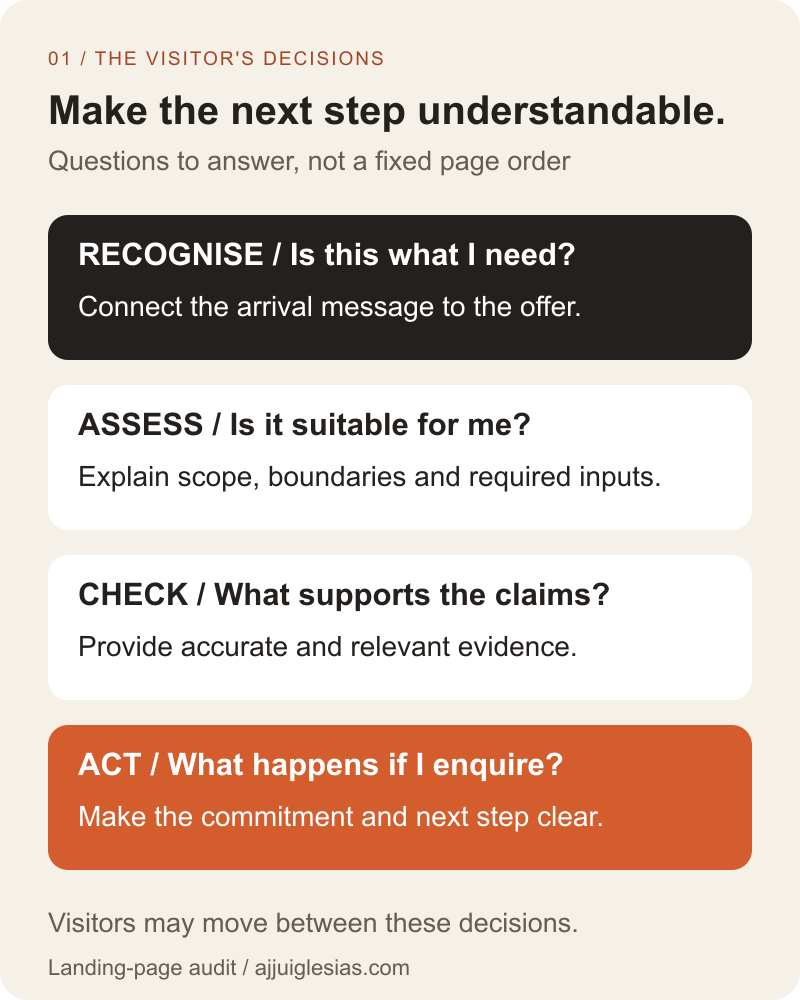
The decision map below provides a review sequence: recognise the offer, assess fit, check evidence and act. It represents questions the page should answer, not a mandatory section order or a claim that every visitor reads linearly.
Explain fit and scope
Give visitors enough detail to judge whether the offer addresses their situation. Describe the work included, important boundaries and information that affects the next conversation.
A redesign enquiry page might explain whether it can include content migration and existing integrations. It can also clarify the inputs needed to assess the project, such as the current website and the reason for changing it.
Avoid using a fixed page length as the main quality target. Some offers need a short explanation; others require more context before a visitor can make an informed request. Review whether each section answers a useful question.
When price depends on scope, explain the variables and how the estimate is prepared. The landing-page design cost guide covers commissioning and budget scope separately from this conversion audit.
Put evidence beside the claim
Identify the claims that need support. If the page says a service includes a particular workflow, an example or clear explanation can make that statement easier to evaluate.
Use relevant projects, genuine testimonials where available, representative deliverables or a documented process. State your contribution accurately and avoid inventing outcomes to make the page appear more convincing.
Look at placement as well as quantity. A relevant example near the service explanation may answer a question more directly than a large unrelated gallery. Make further details available when the visitor needs to inspect them.
Do not remove useful evidence merely to enforce a rule that every landing page must have no other links. Keep the primary action clear while preserving routes that support an informed decision, including important business and service information.
Review the action and its destination
Inspect the action label, the destination and what happens after activation. A button that says “Book a call” should lead to a clear booking process or explain the intervening step. A request form should not imply that an appointment is already confirmed.
Check repeated actions for consistency. They can appear at useful points in a longer page, but visitors should understand whether they perform the same task or lead to different commitments.
Review mobile overlays and sticky elements. They should not cover form controls, evidence or the information needed to complete the task. Check the actual viewport rather than judging a desktop mockup alone.
Also verify keyboard operation and visible focus. A visually prominent button still needs to be usable by the people interacting with the page in different ways.
Ask for information the team needs
For each form field, identify the decision it supports. A reply address may be essential. A project description may help the team route or assess the enquiry. Other details might be more appropriate in the first response.
Explain required fields and any unfamiliar terms. A visitor should not have to infer a field's purpose from disappearing placeholder text. The W3C guidance on form labels explains associating labels with controls so their purpose is available across different interactions.
Do not assume the shortest possible form produces the best business outcome. Removing useful context can shift work into follow-up messages. Conversely, requiring information nobody uses creates unnecessary effort for the visitor.
Review the receiving team's experience alongside the form. Ask whether recent requests contained enough detail to respond and which fields were routinely ignored. Use that evidence to propose a change rather than guessing from field count alone.
Test every form state
Walk through the form with valid sample information, missing required information and an unavailable destination. Inspect the messages the visitor receives and what the system actually retains.
Define what counts as accepted. If the system cannot retain or accept the request, the interface should not announce receipt. If it safely accepts a request for later processing, the internal workflow needs to show its pending state.
Provide clear error instructions and preserve appropriate entered information so visitors can correct a mistake. The W3C form-notification tutorial discusses feedback for errors and successful completion. Test how that feedback is presented, rather than reviewing only its written wording.
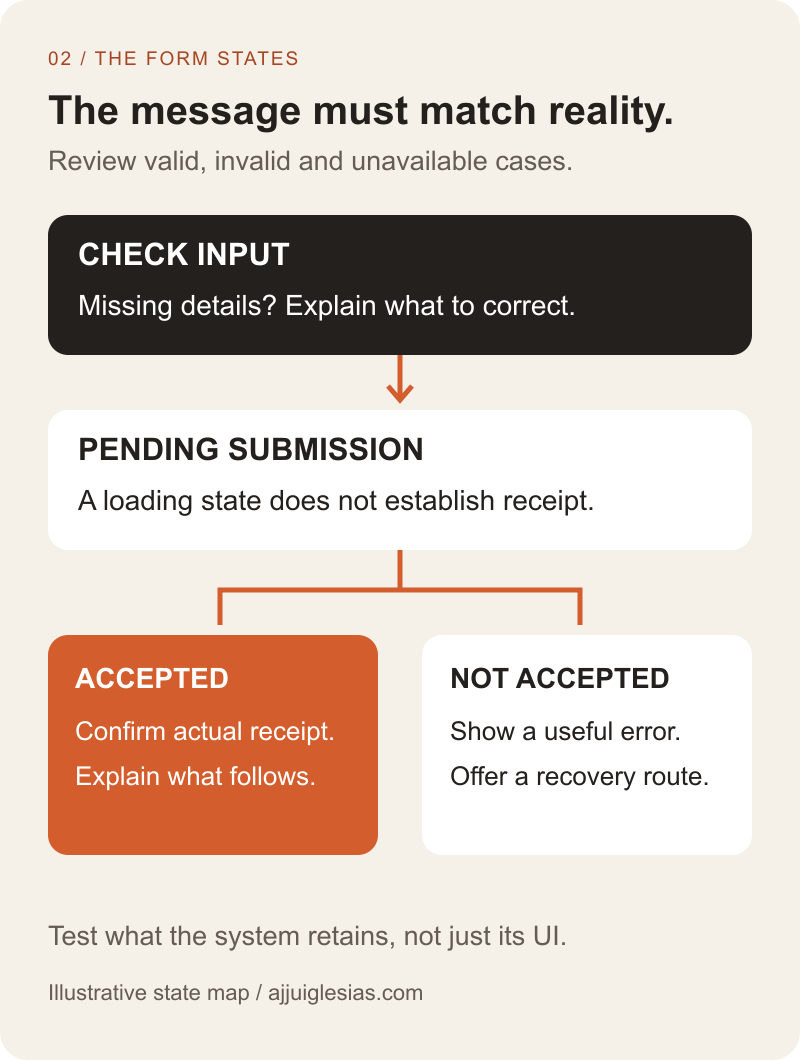
The state diagram below separates correction, pending submission and confirmed acceptance. The exact implementation depends on the system; the audit asks whether its visible messages match reality.
Confirm the business receives the request
Send a clearly labelled test enquiry and follow it through to the receiving person or system. Check that the submitted context survives the handoff and that someone knows what to do next.
Inspect notification replies and any acknowledgement. A request can arrive in one inbox while replies go to an unmonitored address. Confirm the usable response route and the expectations shown to the visitor.
If a notification is missing, trace the affected stage rather than immediately redesigning the page. The contact-form email troubleshooting guide covers that diagnostic work.
For ownership, retries and CRM delivery, use the website enquiry-to-CRM guide. A landing-page audit should verify the handoff, while a separate implementation plan can define the detailed integration.
Measure stages without confusing them
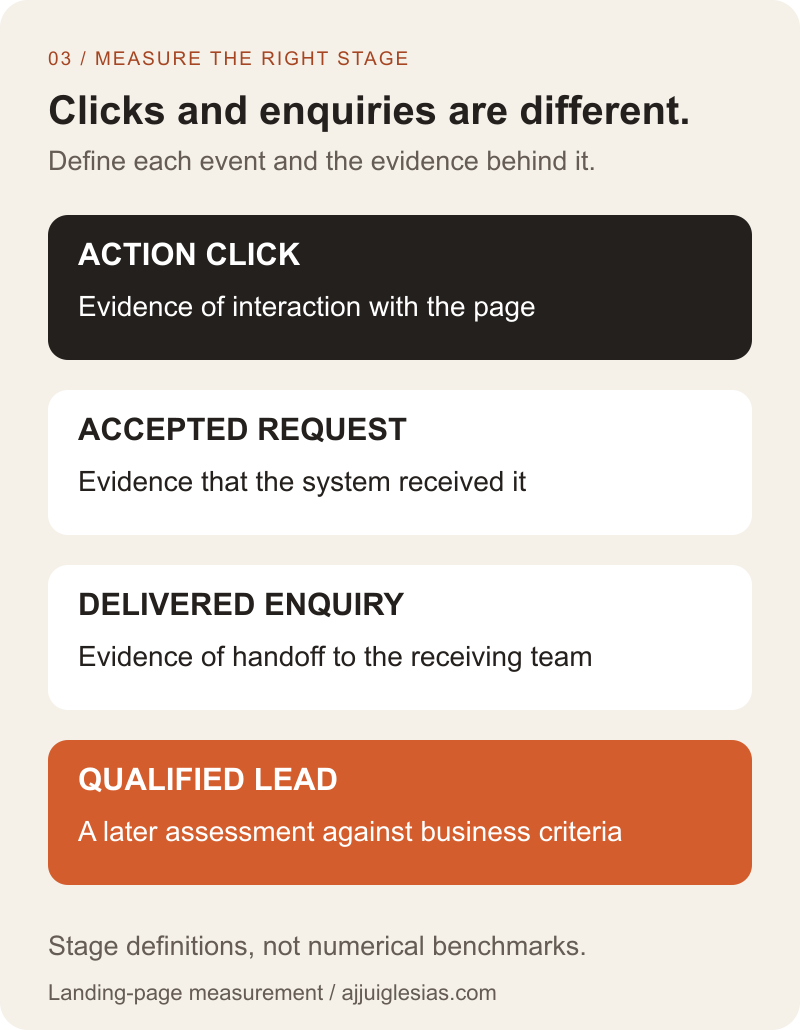
Track the milestones needed to understand the journey: the primary action, accepted request, delivered enquiry and assessed outcome. Give each a clear definition and record where its evidence comes from.
Google Analytics documents separate recommended lead-generation events, including generate_lead and qualify_lead. Choosing an event name does not validate the business event behind it. Check the trigger and current configuration before trusting the report.
Avoid sending names, email addresses or free-text enquiry contents as analytics event data. Use an appropriate measurement design that does not depend on copying private form contents into reports.
The measurement diagram distinguishes interactions from received and qualified enquiries. Its stages are definitions to agree, not numerical benchmarks. Traffic volume and lead quality need to be interpreted with the offer and audience in view.
Choose one change with evidence
Group findings by their likely effect. A broken submission path needs repair. Unclear wording needs a proposed explanation. An untested concern about evidence placement needs an observation or a defined experiment.
For a hypothetical redesign landing page, suppose test enquiries arrive correctly but reviewers cannot identify whether existing content will be migrated. The next change could clarify that scope question near the offer, with an accurate explanation of how it is assessed.
That example does not prove the change will increase enquiries. It creates a specific hypothesis that can be reviewed against visitor understanding and subsequent enquiry quality. Record other changes made during the same period so results are not attributed to one edit without support.
Use the audit worksheet to record evidence, priorities and the next action. For help reviewing a page, share its URL, intended audience and the enquiry you want it to support. Those details make it possible to investigate the actual journey rather than apply a generic conversion formula.


