
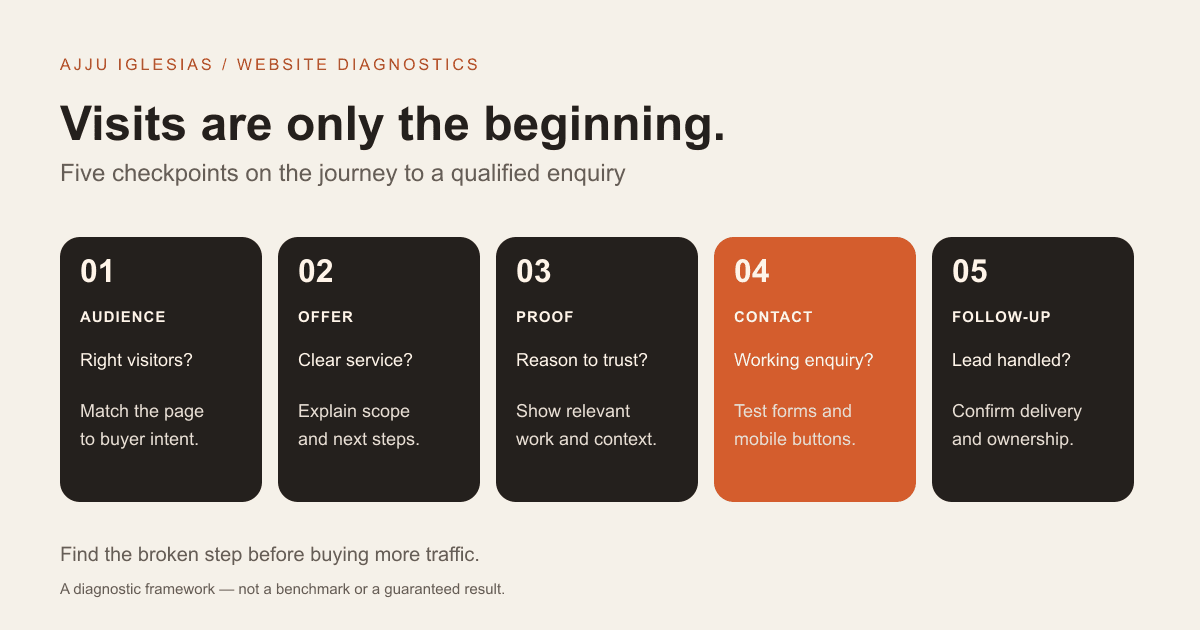
If your website gets visits but few enquiries, start by checking whether the right people arrive, whether they understand your offer, and whether they can contact you successfully. More traffic will not repair a broken form or an unclear service page. A redesign may help, but only after you identify where the customer journey breaks.
This guide is for small business owners, consultants, hotels and service teams who want qualified quote requests. You can use the checks below before commissioning a rebuild or increasing your advertising budget. The aim is to find a specific problem you can test, rather than guess from your homepage's appearance.
Define a qualified enquiry
A website visit is not a lead. A button click is not necessarily an enquiry. A submitted form is not necessarily a suitable project. Decide what matters to your business: a room reservation request, a consultation booking, or a quote request with enough information to assess the job.
Keep three counts separate: visitors to the relevant service page, successfully received enquiries, and qualified enquiries. For a small website, a spreadsheet can record the enquiry date, source when known, service requested, suitability and next action. Do not include spam or your own tests in the business totals.
For example, imagine a service page receives 200 sessions and delivers four real enquiries. The session-to-enquiry rate is 4 ÷ 200 × 100 = 2%. If only one enquiry fits the offer, the qualified-enquiry rate is 0.5%. These are hypothetical figures, not a performance benchmark or a result from my portfolio.
There is no single conversion rate that every business should achieve. Intent, traffic source, service price and the action being measured all affect the number. With a small sample, one extra enquiry can change the percentage considerably. Use the figures to investigate your own journey over time.
1. Attract the right visitors
A tutorial can attract readers who want to learn a skill. A supplier comparison can attract people preparing to buy. Both are useful, but they arrive with different goals. If most of your visitors read a broad informational article, do not expect them to behave like visitors searching for a quote.
Look at the pages receiving visits and the sources sending people there. Search Console can show search queries and landing pages for Google Search. Your analytics can help you compare traffic sources and page behaviour, subject to consent and measurement limitations. Keep these tools' definitions separate; their totals will not always match.
Ask whether each popular page serves someone you can help. An article about hotel booking systems should lead naturally to relevant hospitality work. A general coding tutorial should not force readers into an unrelated sales pitch.
Practical check: list your five most visited pages, the question each answers, the intended reader and the next useful page. If you cannot connect a page to a relevant customer decision, treat its traffic as awareness rather than proof that your sales journey is failing.
2. Clarify your offer
A visitor should be able to explain what you provide, who it is for and what to do next. Headlines such as “We create amazing digital experiences” can sound polished while leaving all three questions unanswered.
Try a concrete service statement: “Website redesigns for service businesses that need clearer enquiries and easier content editing.” The surrounding copy can explain scope, examples and constraints. You do not need to cram every detail into the hero or turn the page into a wall of keywords.
Read your service page without the navigation, logo or decorative graphics. Does it still describe the work? Then ask someone unfamiliar with the business to explain the offer after a short look. A wrong answer is useful feedback about the page, not the reader.
Put important buying information where it belongs: scope on the service page, evidence in case studies, and practical requirements near the enquiry step. If the structure itself needs work, review the approach behind website design for growing businesses.
3. Match visitor intent
Someone clicking an ad for a hotel website should arrive at a page that discusses hotel websites. A homepage listing six unrelated services makes that visitor search again for the promised information.
This applies to organic search too. If a page title promises a pricing guide, give readers a useful explanation of scope and costs. If it promises a comparison, explain the tradeoffs and who each option suits. Hiding the answer behind a contact form weakens the reason to trust the page.
Check one traffic source at a time. Compare the search query, advert or referral message with the landing page headline, examples and call to action. The wording does not need to be identical, but the offer should continue the same conversation.
For paid campaigns, a focused page can be appropriate. For broader organic discovery, an informative service page may be the better destination. Choose based on the customer's task; see landing-page design for the service scope.
4. Build trust with evidence
Visitors may understand your offer and still hesitate because they cannot judge whether you can deliver. Generic claims such as “best quality” do little to explain the work.
Show relevant projects with a clear account of the requirements, your contribution, the delivered features and the limitations. Describe the process buyers will experience: discovery, scope agreement, review points, launch responsibilities and handover.
If you display a testimonial, use an authentic quote with permission and useful context. If you report an outcome, state what was measured and over what period. A screenshot proves how a page looked; it does not prove an increase in revenue.
Browse the project portfolio for examples of delivered work. When comparing suppliers, ask whether their examples resemble your workflow and whether they explain their role. A smaller relevant project can be more informative than an impressive image with no context.
5. Make the next step clear
A page can ask visitors to call, email, book, subscribe, download and chat at the same time. Each action may be valid, but equal emphasis can make it harder to decide what happens next.
Choose the primary action for that page. “Request a website quote” is clearer for a ready buyer than “Learn more.” “Discuss your booking setup” may suit a hotel owner who needs help defining requirements. Keep an alternative contact method available for people who cannot use the main route.
Explain the next step beside the action. What information should the visitor send? Will they receive a call or an email? Is the first conversation a scoping discussion? State response-time promises only if you can reliably meet them.
The aim is to remove uncertainty, not manufacture urgency. Avoid countdowns, false scarcity or pressure that makes the contact decision feel risky.
6. Test the mobile experience
Open the page as a new visitor, preferably on a mobile connection. Find the service, inspect an example and try to contact the business. Notice whether sticky banners cover buttons, text is hard to read, content shifts or the keyboard obscures the form.
Performance tools can help diagnose delays. Google's Web Vitals framework covers loading, responsiveness and visual stability through LCP, INP and CLS. A useful score supports a smoother experience, but it cannot explain every conversion problem or guarantee enquiries.
Compare field data from real users with lab tests where available. A fast test on your laptop is not a substitute for trying the actual contact path on a phone.
Fix obstacles in order of impact: an unusable submit button comes before a decorative animation. If performance and usability problems are widespread, a website redesign or migration can be scoped around the findings.
7. Check enquiry delivery
Submit a realistic test enquiry. Check the confirmation shown to the visitor, the destination inbox and any CRM record. Include the spam folder and any forwarding rules. If you have several forms, test each one.
A successful-looking screen does not prove that a notification arrived. Conversely, a visitor may submit correctly while analytics fails to record the event. Distinguish delivery, storage, notification and tracking when diagnosing the issue.
Test validation errors as well: an invalid email address, an omitted required field, a long message and a retry after a connection problem. A visitor should know what to correct without losing their work.
Keep required fields tied to the first decision you need to make. Name, contact details and a short project description may be enough for an initial quote conversation. Additional qualification can be useful when it has a clear purpose; there is no universal ideal number of fields.
For telephone and WhatsApp links, verify the number, country code and behaviour on mobile. A click shows intent to contact, not proof that a conversation happened.
8. Follow up reliably
Some websites generate leads that disappear after submission. An inbox nobody owns, a missed notification or an unclear handoff can make a functioning website look ineffective.
Assign someone to review new enquiries and record the next action. Acknowledge receipt accurately, explain the next step and keep a record of whether the request was suitable. Do not promise a response time the team cannot support.
If a prospect is unsuitable, record why: outside your service, unrealistic timing, spam or insufficient information. That pattern can help you improve qualification copy without blaming the contact form.
Automation can route messages or create reminders, but it also needs monitoring and an owner. Start with a process that works manually before adding more tools.
Your diagnostic checklist
Use this sequence before buying more traffic:
- Submit a test enquiry and confirm it arrives.
- Complete the contact journey on a phone.
- Check whether the landing page answers the traffic source's promise.
- Ask a new reader to explain your service and next step.
- Inspect the relevant case studies and scope information.
- Compare received enquiries with recorded analytics events.
- Review who handles follow-up and what happens to unsuitable requests.
Do not score these checks into a universal “SEO rating.” Write down the observed problem, the affected page, the evidence, the proposed fix and the person responsible. That makes the audit actionable.
Prioritise your fixes
Start with failures that block contact completely: broken forms, incorrect phone links and inaccessible buttons. Next, repair a mismatch between the visitor's intention and the landing page. Then improve unclear scope, missing evidence and confusing calls to action.
Change one meaningful element at a time when traffic permits, and record when it changed. Compare equivalent periods and account for campaigns, seasonality and changes in visitor mix. If traffic is sparse, usability checks and confirmed delivery tests may tell you more than a short A/B test.
A focused landing-page improvement can solve a local problem. A rebuild becomes more reasonable when navigation, mobile usability, editing limitations and technical failures affect the whole site. Define the problem before deciding the size of the project.
If you want help, send your website and project context. Include the page you want assessed, how visitors currently arrive and what a suitable enquiry looks like. That gives us a concrete starting point for a scoped discussion.
Sources and measurement notes
The checklist and examples in this article are editorial guidance. The numerical example is illustrative, and no conversion improvement is claimed. Technical measurement references were checked on 14 October 2026:
- Google's Web Vitals framework explains loading, interactivity and layout stability.
- Google Search Console performance reporting explains search clicks, impressions and query reporting.
- Google Analytics recommended events documents the generate_lead event. Record it after a genuine successful submission, and never send contact-form personal information as analytics parameters.


