

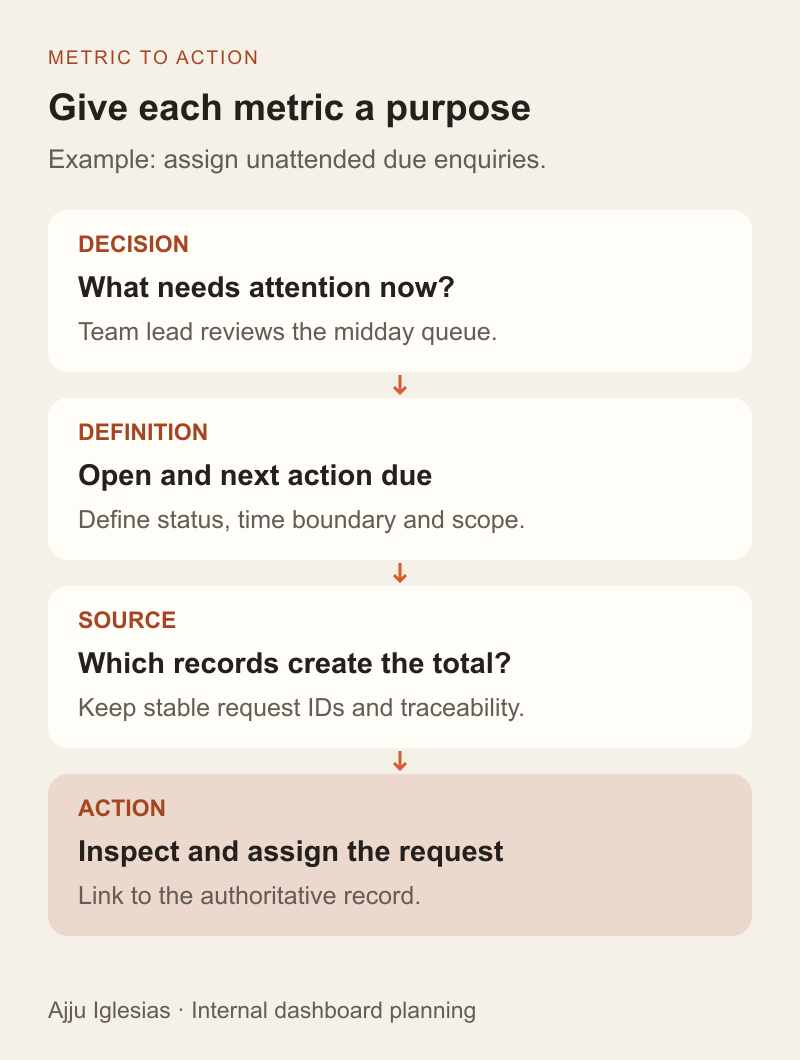
Internal dashboard development should begin with a decision someone needs to make. A service manager might need to assign unattended enquiries before the afternoon shift. The useful screen shows which requests need attention, why they are included and what the manager can do next.
Starting with a list of charts reverses that process. You can build an attractive overview without agreeing what an enquiry means, when a follow-up becomes due or whether the displayed information is current enough to use.
This guide develops a small, fictional enquiry dashboard to make those choices concrete. It includes three diagrams, a six-record sample dataset and a requirements worksheet. The numbers are illustrative, not client results, benchmarks or evidence of a deployed application.
Name the user and the decision
Choose one primary user for the first screen. A team lead assigning work needs different detail from a founder reviewing monthly demand. Combining every audience immediately can create a page where nobody knows which information matters most.
Write a decision statement: “At the midday review, the team lead identifies open enquiries whose next action is due and assigns any that have no owner.” That sentence gives the screen a purpose, a moment of use and an expected action.
Ask what happens after the review. If the manager still needs to export a file, search an inbox and message a colleague to understand each request, the dashboard requirement may need a record detail view or a link into the existing CRM.
Keep the first release focused. The MVP feature prioritisation guide explains how to define a useful workflow without making every requested feature a launch dependency.
Define each metric in plain language
Create a definition before adding a number to the layout. Include what is counted, which records qualify, which records are excluded and the time at which the result is evaluated.
In this example, one row represents one enquiry identified by a unique request ID. “Open” means the status is new, contacted or qualified. Closed requests do not count as open. “Due now” means an open enquiry has a next-action timestamp at or before the review time.
An enquiry with no next-action date should not silently become “not due.” It needs a separate data-quality rule. Otherwise, missing information can make a workload look healthier than it is.
Also distinguish people from requests. A returning customer can have two enquiries, and two messages may concern the same enquiry. Decide how the source system represents those cases before using a contact count as a workload measure. The enquiry-to-CRM workflow guide covers that upstream distinction.
Reconcile a small worked example
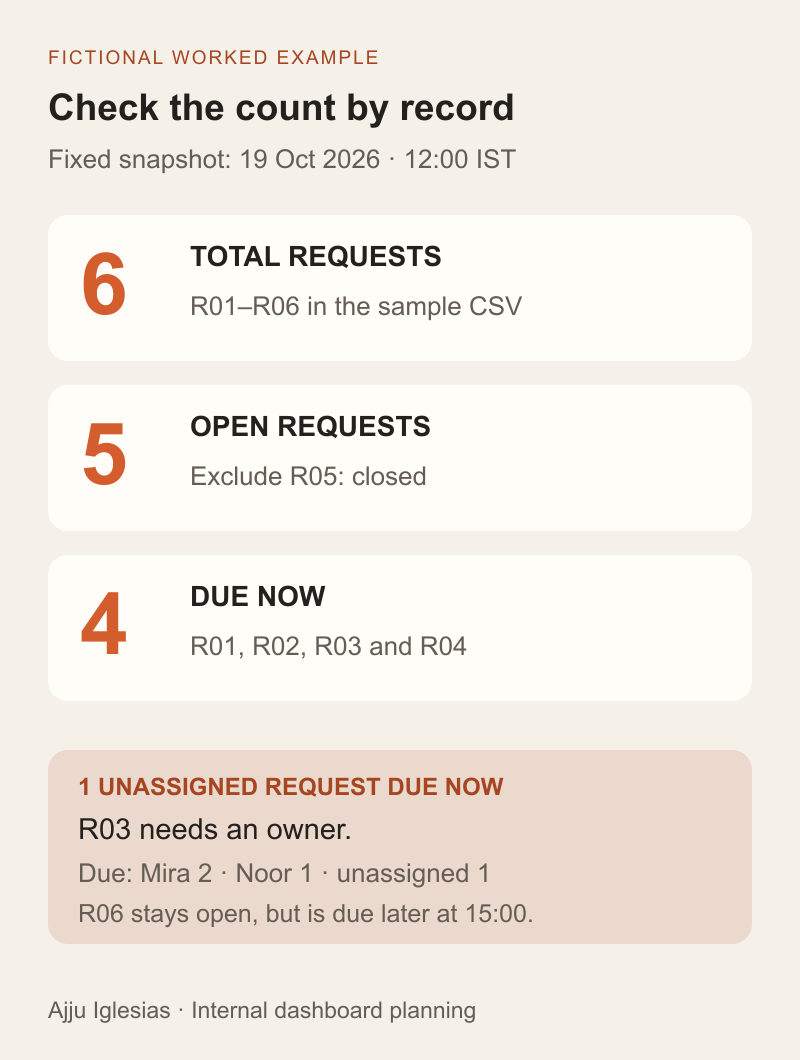
Use a dataset small enough to inspect manually before connecting the full source. Our fictional snapshot contains six requests and uses 19 October 2026 at 12:00 IST as its fixed review time.
- R01 is new, belongs to Mira and has a next action at 10:00.
- R02 is contacted, belongs to Mira and has a next action at 12:00.
- R03 is new, has no owner and has a next action at 09:00.
- R04 is qualified, belongs to Noor and has a next action at 11:00.
- R05 is closed and has no next-action timestamp.
- R06 is contacted, belongs to Noor and has a next action at 15:00.
Applying the definitions gives five open enquiries, four due now and one unassigned enquiry due now. R05 is excluded because it is closed. R06 remains open but is not due at noon. R02 is included because the rule uses “at or before,” including the boundary time.
The due-now detail list must contain R01, R02, R03 and R04. Its owner groups reconcile to Mira: two, Noor: one and unassigned: one. Clicking the headline should preserve the same time, scope and status rules as that list.
Download the sample CSV to inspect the records. In a real project, replace these definitions with approved business rules and reconcile representative source records. The calculation here establishes only what this deliberately small example should display.
Make filters and time rules visible
Filters change the meaning of a metric. Show the active team, date range and other important scope near the result. A user should not need to remember a filter set earlier in the session to understand the current count.
For this example, filtering to Mira changes due-now work from four to two. It does not change the definition of due. If the overview and detail page interpret the filter differently, the same label can appear to contradict itself.
Distinguish a snapshot from a period measure. “Due now” is evaluated at an instant, while “enquiries received this week” covers a date interval. Specify timezone, start and end boundaries and how timestamps without timezone information are handled.
Microsoft's dashboard design guidance recommends considering the audience, providing context and keeping time frames consistent. Those principles are useful when reviewing a custom dashboard too; they do not establish that a particular layout or platform fits every business.
Show freshness and incomplete data
Agree how current the information must be for the decision. A daily management review and a live dispatch queue have different needs. Requesting “real time” without identifying the consequence of delay leaves an important requirement undefined.
Show when the source was last successfully refreshed. Distinguish that from the browser's current clock and the time the page was opened. If the data is a noon snapshot, a later page view should not imply that its counts reflect subsequent changes.
Define a stale-data state and its consequence. Depending on the task, the screen might allow viewing with a clear warning, ask the user to refresh or prevent a sensitive action until the underlying record is rechecked. Choose the behaviour around the actual workflow.
Do not display zero when the source cannot be read. “No matching requests,” “data unavailable” and “some records excluded because required fields are missing” tell the user different things. Give each state a clear explanation and an appropriate recovery route.
Connect the overview to useful work
A headline should lead to an explanation or an action when the task requires one. For the unassigned-due count, the next view needs the matching request, its context and an appropriate assignment action.
Decide where the action belongs. If the CRM is already the authoritative place for ownership, linking to its record may be better than creating a second assignment workflow. A custom dashboard needs a clear reason to write data back.
If it does change records, define confirmation and conflict handling. Another person may assign R03 after the team lead opens the page. The application should check the current state and explain a conflict rather than silently overwriting a colleague's work.
Keep actions distinct from reports. Exporting a list, acknowledging an alert and assigning an enquiry have different consequences. Name the action precisely, show its result and specify who can perform it.
Design access around responsibility
List who may see the overview, inspect individual records, export information and change assignments. Those permissions are separate requirements, even when the first prototype gives them to one person.
Think about aggregate information as well as detailed records. A filtered team count can reveal business activity even if contact details are hidden. Decide which audiences need which scope rather than assuming summary data is appropriate for everyone.
Include the source API and export path in the implementation review. Hiding a navigation item is not a complete access rule. The application needs the appropriate server-side controls for the requested data and action.
Use the client portal permissions guide for a more detailed discussion of person, project, resource and action boundaries. Here, the dashboard brief should state the business access rules and ask for evidence that the implemented paths enforce them.
Choose readable views and alternatives
Use the simplest presentation that supports the task. A precise work queue often needs a list with clear status, owner and next action. A trend chart can answer a different question about change over time. Decorative variety is not a requirement.
Provide labels that explain what a number measures and do not rely on colour alone to communicate an exception. Make filters, detail links and available actions usable with a keyboard. Check how the view behaves on the devices the team actually uses.
For complex chart images, W3C's guidance on complex images describes short identification plus a fuller text alternative conveying essential information. Include an appropriate textual explanation or accessible data view in the dashboard specification rather than treating a chart screenshot as sufficient.
Test comprehension with a task: ask the intended user to identify the unassigned due request and explain why it appears. If they must guess the definition or timestamp, revise the presentation before adding more charts.
Write acceptance cases before the build
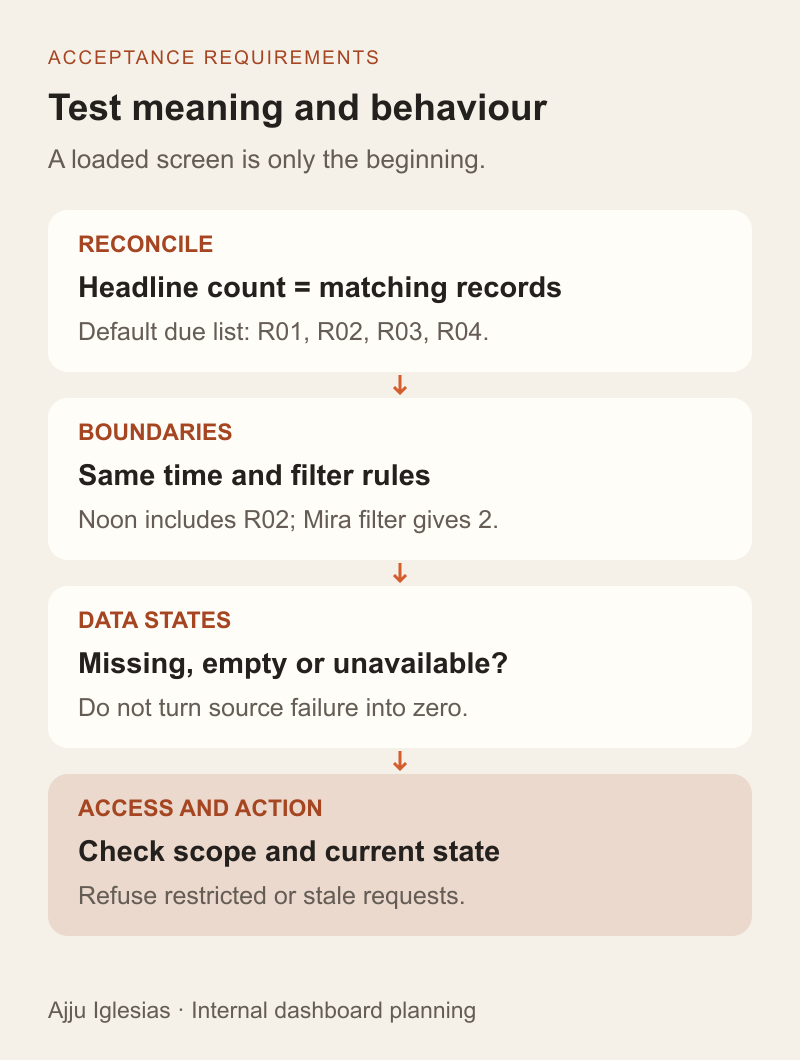
Turn the definitions into checks that can fail. With the sample dataset and fixed noon timestamp, the default view must show five open, four due now and one unassigned due-now enquiry. The detail IDs must reconcile to the total.
Add boundary and exception cases to the planned test suite:
- At the exact noon boundary, R02 is due.
- The Mira filter returns two due-now records, R01 and R02.
- A closed request is excluded even if an old due timestamp remains.
- An open request with a missing due timestamp is handled by the agreed data-quality rule.
- A source failure produces an unavailable state rather than a false zero.
- An unauthorised user cannot obtain restricted details or exports.
- A record changed by another user is rechecked before an assignment is accepted.
For each case, record the expected result and the observed evidence. These are proposed acceptance requirements for a future implementation; the article does not claim that a production dashboard has passed them.
Scope the first release and its owner
For this scenario, a first release might contain the due-work overview, a filtered detail queue, links to source records and visible freshness. Forecasting, custom exports and new assignment automation can be evaluated separately unless they are necessary for the agreed decision.
Start by checking whether an existing CRM report or saved view can support the workflow. The spreadsheet vs CRM guide and custom software vs SaaS guide help frame the wider choice. Combining several sources or needing a specific action flow may justify custom work, but a new dashboard is not automatically the best answer.
Name an owner for definitions, source changes and reported discrepancies. A dashboard can become misleading when the upstream process changes while the counting rules remain untouched. Review it when the business workflow changes, not only when the layout looks dated.
Complete the dashboard requirements worksheet before requesting an estimate. If you want help planning an internal tool, send the decision, current data source and one sample workflow. Those details give us a concrete starting point for scope, implementation options and acceptance checks.


