

A WordPress plugin selection checklist should help you decide whether a plugin earns a place in your business website. Start with the customer or staff task it must support, then check whether you can operate, maintain and eventually replace it.
The easiest plugin to install is not necessarily the easiest one to own. A short demonstration may show an attractive form while leaving delivery failures, renewal costs and data export unanswered. Those details matter when the feature becomes part of everyday work.
This guide focuses on evaluating a candidate before installation or replacement. It includes three diagrams and a downloadable evaluation worksheet. The examples are hypothetical planning exercises; no plugins were benchmarked or security-audited for this article.
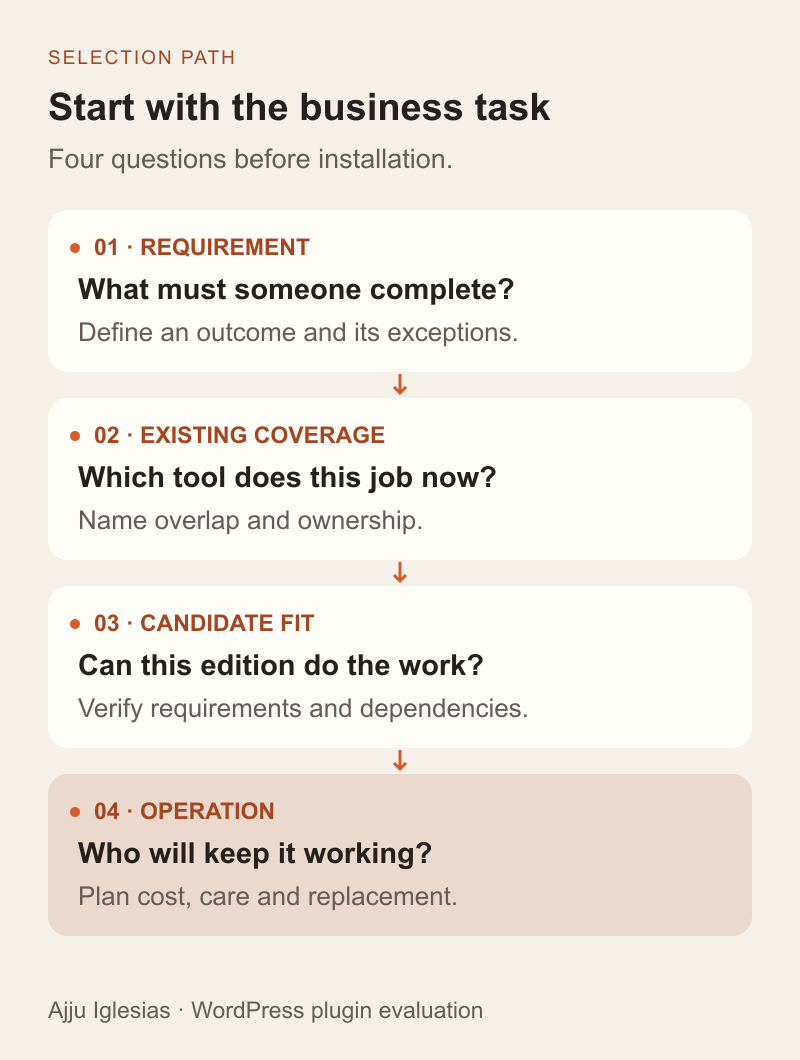
Define the job before the product
Write the requirement in one sentence that describes an outcome. “Let a customer request a quote and let the team recover the request if email delivery fails” gives you more to evaluate than “install a form plugin.”
List the essential steps, the people involved and the exceptions. For the form example, a customer submits details, the website confirms the result, an authorised team member receives or retrieves the enquiry, and someone owns the response. An attractive editor covers only part of that sequence.
Separate mandatory needs from preferences. Conditional fields might be essential for one business and unnecessary for another. A visual template library might save setup time without affecting whether the workflow succeeds.
Use this requirement to reject unsuitable options early. A plugin that cannot support an essential action should not win because its demonstration looks polished or its promotional price is lower.
Check what you already have
Before adding software, identify which tool currently owns the function. Your theme, hosting plan or an existing plugin may already provide part of the feature. Confirm whether that provision actually meets the requirement rather than assuming that another checkbox means equivalent behaviour.
Build a short responsibility list for forms, caching, redirects, analytics and other relevant functions. Where two tools can change the same output, name which one should be responsible and which settings need to be disabled elsewhere.
Overlap is a reason to investigate, not proof that two products always conflict. A form plugin and an email delivery integration may perform different jobs. Two independent tools both injecting the same tracking event may create a different problem. Explain the responsibilities before deleting either.
For a redesign, preserve this inventory alongside the website content inventory. A replacement page can appear complete while quietly losing a function that the previous setup provided.
Read requirements and release notes
Open the candidate's official listing and documentation. Record the version you are evaluating, its stated environment requirements and any required companion products. Include the WordPress, PHP, theme and integration versions used by your own site in the evaluation record.
WordPress's Manage Plugins documentation explains where compatibility information appears and notes that an untested plugin may have unknown compatibility. Treat the label as a useful signal, then verify the actual combination you plan to run. A compatibility statement does not describe every customisation on your site.
Read recent release notes for changes related to your essential workflow. Look for documented migration steps, changed dependencies and known limitations. If an important requirement is unclear, ask the provider a precise question before building around it.
Keep the answer with the selection record. A sales conversation that says “yes, we support integrations” is less useful than documentation explaining the particular action, supported version and failure behaviour you need.
Evaluate support with a real question
Reviews, installation counts and update dates can help you shortlist products, but none proves that your particular setup will work. Use them as context rather than turning them into a mechanical safety score.
Read support discussions that resemble your requirement. Notice whether the response identifies the problem, explains a workaround or points to a clear limitation. A difficult issue acknowledged honestly can be more informative than a page of vague praise.
For a business-critical requirement, ask a small, specific support question. For example: “If notification delivery fails after the form is saved, where can an authorised editor recover the enquiry?” The response should identify the documented behaviour and any plan or configuration requirement.
Check the support channel, eligible licence tier and stated availability. Do not assume that buying a licence includes emergency recovery or custom development. Your website support provider and the plugin vendor may have separate responsibilities.
Confirm the edition and operating cost
Compare the edition that meets the requirement, not merely the product name. A free version may demonstrate the editor while a paid add-on provides the export, integration or user permissions you need.
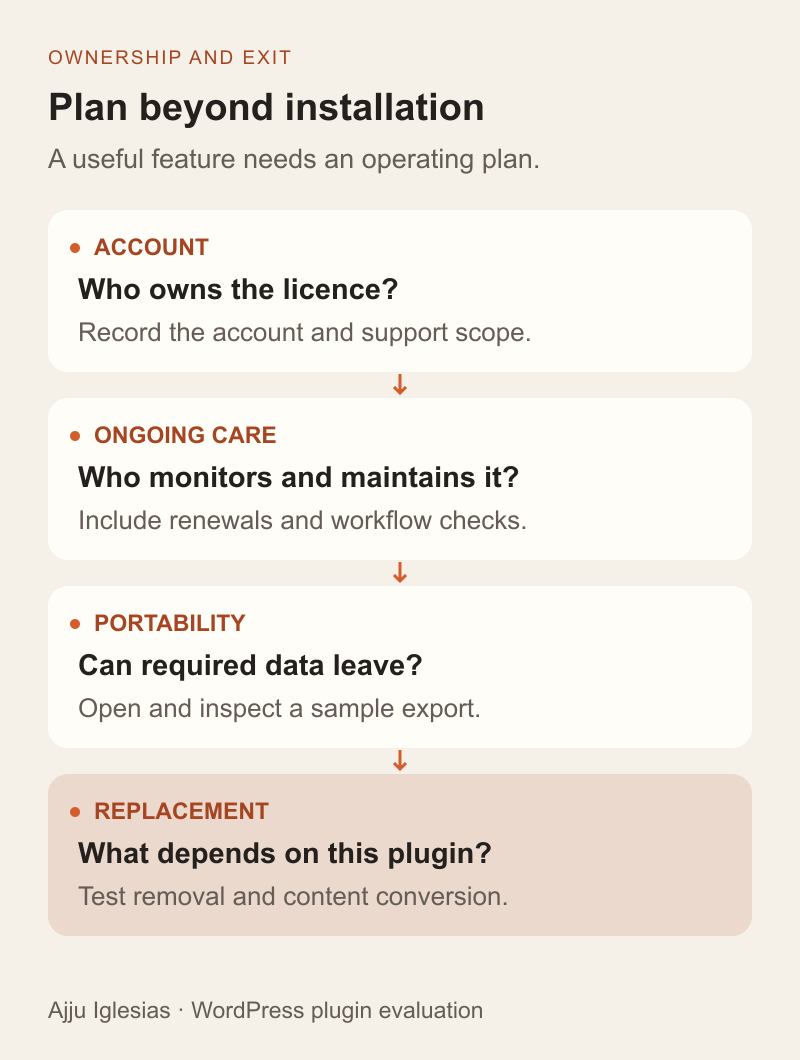
Create a cost record with separate lines for the licence, required add-ons, connected services, setup, testing and ongoing care. Write down the billing period, renewal terms, site allowance and who owns the purchase account. Verify current fees directly with the provider before making a buying decision.
Consider an explicitly hypothetical comparison: candidate A includes the required integration in its selected plan, while candidate B needs an additional extension and a separate service account. Compare those complete arrangements using the same business workflow. The cheaper headline licence does not settle the decision.
Also ask what happens if a subscription ends. Continued operation, access to updates, hosted services and support may have different rules. Record the provider's answer; do not assume every commercial plugin behaves the same way.
Inspect data and external connections
Map the information the proposed feature collects, stores and sends. A quote form may involve the WordPress database, an email service and a CRM. Name each destination and the account responsible for it.
Use sample data while evaluating the workflow. Confirm who can view submissions, change settings and export records. Check which credentials the integration requires and whether the selected access is appropriate for the task. Never put passwords or live API keys in the public evaluation worksheet.
Ask what happens when a connected service is unavailable. The customer-facing confirmation, saved record and staff notification should have meanings the team understands. If delivery is the main concern, use the missing contact-form email guide to trace the complete journey.
These checks support a selection decision. They do not replace a security review or determine the privacy requirements that apply to a particular business and its data.
Test the whole workflow on staging
Use a representative test environment with appropriate recovery arrangements and sample information. Match the important versions and configuration, while preventing test emails, payments or CRM records from being mistaken for live activity.
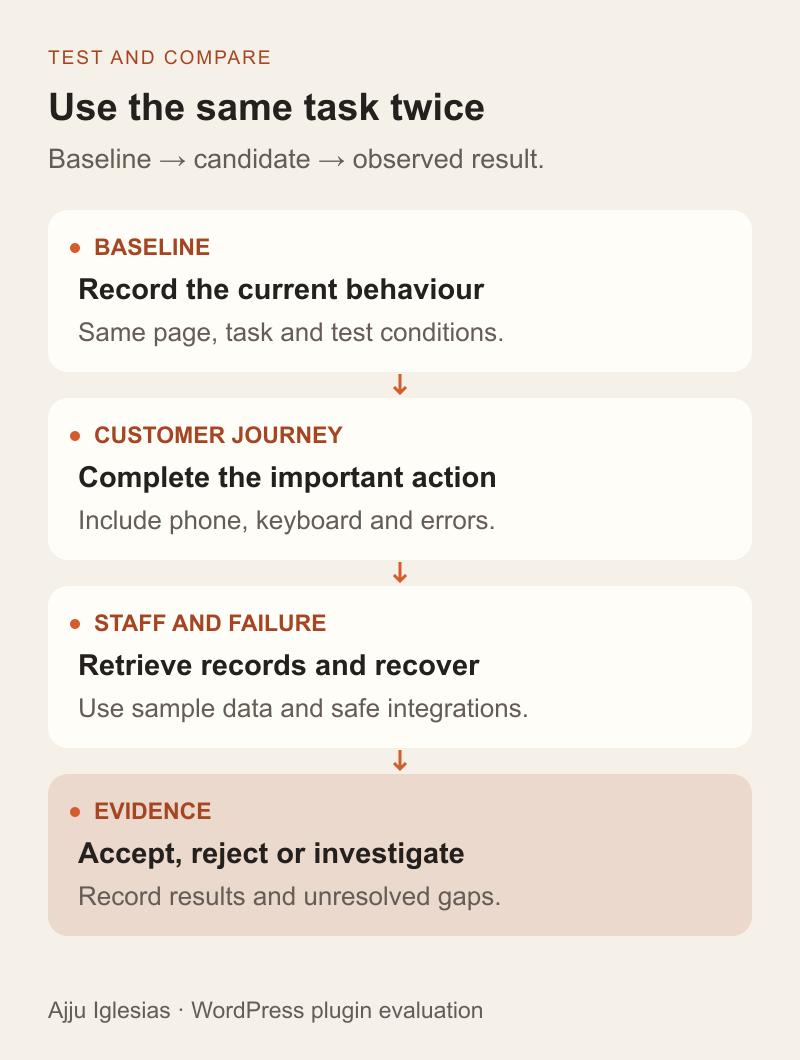
Take a baseline before installing the candidate. Record whether the current key tasks work and capture relevant measurements under consistent conditions. Then add the candidate and repeat the same tasks. Change one major variable at a time where practical so the results remain interpretable.
For a hypothetical enquiry feature, the acceptance checks might include:
- A visitor can complete the form on a phone and with a keyboard.
- Invalid entries show understandable errors without losing useful input.
- A successful submission creates the expected recoverable record.
- The intended staff role can find the enquiry without unnecessary permissions.
- Notification and integration failures follow the documented recovery path.
- Existing navigation, search and other important forms still work.
Include less frequent tasks such as editing the confirmation text or changing the recipient. A feature is difficult to operate if the business needs a developer for every routine adjustment. The CMS usability guide provides a structured way to test staff editing tasks.
Measure effects beyond plugin count
“How many WordPress plugins are too many?” is understandable, but the count alone cannot answer whether your site is working well. Different plugins perform different work and affect different parts of the system.
Inspect relevant pages and actions. A booking feature may matter most during a reservation request, while an editor extension may mainly affect administration. Compare the actual journey your visitors and team use rather than assuming every plugin has an identical performance cost.
Repeat measurements under consistent conditions and keep the context: page, device or test profile, cache state and candidate configuration. A single faster score does not prove a universal improvement. A functional regression can outweigh an attractive speed result.
If something breaks, investigate systematically. WordPress's lesson on plugin and theme conflicts describes an isolation approach. Perform disruptive checks in an appropriate test environment instead of casually disabling essential features on a trading website.
Agree who handles updates
Selection is incomplete until someone owns routine care. Name the person or provider who monitors relevant changes, applies updates, checks important tasks and responds if the feature fails.
WordPress provides controls for plugin auto-updates, documented in its auto-update guide. Decide how those controls fit your site's operating plan. Automatic updating does not remove the need to notice a problem, verify important workflows and recover when necessary.
Keep update planning proportionate to the feature. An enquiry route that the business depends on needs a clear check and escalation path. A rarely used cosmetic feature may have different business consequences, but it still needs an owner.
The WordPress maintenance plan checklist covers the broader agreement. This selection guide asks whether the proposed plugin fits that agreement before it becomes another unassigned responsibility.
Test the exit before committing
Ask how the business would leave the plugin. Identify which content, settings and records need to remain usable, and how another system would receive them.
Test an export using sample records with realistic fields. Open the result and check whether it preserves the information you need: dates, relationships, selected options and any relevant attachments. An export button is not enough if the exported data cannot support the replacement workflow.
Check the provider's documented behaviour for deactivation and deletion separately. Do not assume they have identical effects or that removing software preserves every record. Test the relevant process on a safe copy before changing the live site.
Include dependencies in the exit plan. If pages rely on special blocks, shortcodes or templates, inspect how those pages behave without the plugin. Budget for any necessary conversion rather than discovering the work during an urgent replacement.
Record a decision you can revisit
Finish with a short outcome: accept, reject or investigate further. Record the requirement, tested version, observed results, unresolved questions and the person responsible for approval. Avoid inventing a precise numerical score when the evidence is qualitative.
Use the plugin evaluation worksheet for your next candidate. Review the decision when requirements, dependencies or support arrangements materially change; yesterday's fit does not establish tomorrow's suitability.
If you need help assessing an existing WordPress setup, send the website and the task you want to improve. A useful starting point is one workflow, the tool currently responsible and a concrete example of where it falls short. That gives us something specific to evaluate before recommending another installation.


