

The spreadsheet vs CRM decision for a small business starts with the work the team needs to manage. A tracker can remain useful when enquiries are straightforward and responsibilities are clear. A CRM becomes worth investigating when the process needs capabilities the current setup cannot support reliably.
The number of rows is only one part of that discussion. A small team can lose track of a few important conversations, while another can maintain a larger structured list effectively. Look at the causes of missed work before choosing replacement software.
This guide focuses on service-business lead tracking. It includes three diagrams and a decision worksheet. The examples are hypothetical and do not claim measured savings or recommend a particular paid product.
Map what happens after an enquiry
Follow a recent request from arrival to its next action. Identify where the contact details, project context, assigned person and conversation history are stored. Ask how a colleague knows what to do when the usual owner is unavailable.
Record the actual process, including side channels. A spreadsheet may hold the latest status while the explanation sits in a private inbox or chat. The difficulty is then recovering the full context, not simply finding a row.
Choose a representative exception as well as an ordinary request. A returning customer with a second project can reveal whether the tracker distinguishes a person from a new enquiry.
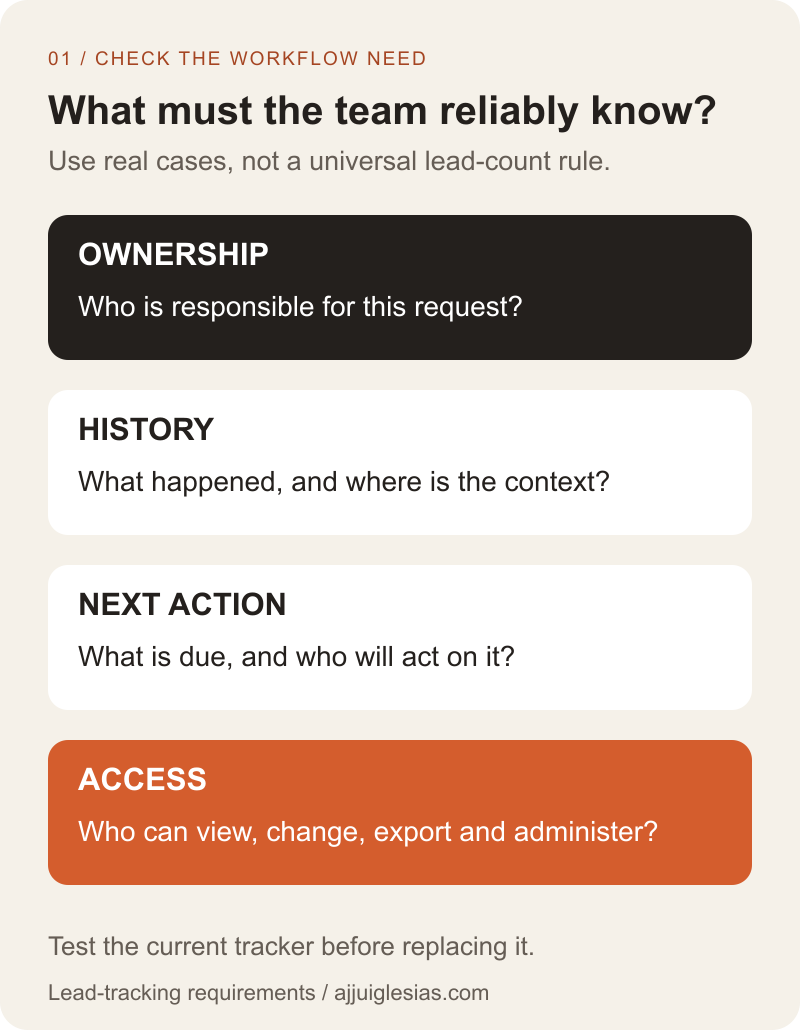
The first diagram summarises four questions: who owns the request, what happened, what comes next and who can access the information. Use observed cases to answer them rather than assuming a CRM will supply the missing process automatically.
Check whether the current tracker can improve
Before replacing the system, inspect whether the problem comes from inconsistent use. Unclear stage names, missing owners and optional follow-up dates can create confusion in either a spreadsheet or a CRM.
Agree a small set of fields the team understands. Define what an open request means, how ownership is assigned and where a next action is recorded. Remove fields that nobody uses unless there is a specific reason to retain them.
Review whether the team can work from one agreed source instead of copying the tracker into several versions. If a simple structural correction resolves the recurring problem, measure that result before commissioning a larger change.
Keep genuine limitations visible. Improving a list is different from expecting it to provide every record relationship, access boundary or activity feature the business may need. The decision should reflect demonstrated requirements rather than loyalty to the current tool.
Notice when ownership becomes unreliable
A lead needs a responsible person and a visible next action. If staff repeatedly ask who is handling a request, inspect the assignment and handover process.
Consider absence cover and reassignment. Can another colleague see the relevant context and take responsibility without guessing whether somebody has already replied? Does the original owner know the request has moved?
A CRM may support these tasks through its configured records and activity tools. Those capabilities still need to be included in the selected plan, set up appropriately and used by the team.
Write the requirement in business terms before testing products: “A colleague can identify all open enquiries assigned to me and take over one with its context intact.” That is stronger acceptance evidence than a demo showing a colourful pipeline board.
Separate contacts from individual requests
A person can send several enquiries over time. A business may also have multiple contacts involved in one opportunity. Decide which relationships the team needs to preserve.
If every new message overwrites the same notes cell, the tracker may lose the history that explains the current status. Adding more columns can postpone the issue without establishing a coherent way to manage those relationships.
Record how the proposed system represents a contact, an enquiry or opportunity, and the activities attached to it. Use terms the team recognises and identify which record owns the next action.
The website enquiry-to-CRM workflow guide covers the website handoff once a suitable CRM process exists. This decision comes earlier: whether the team needs the record structure and how it will operate it.
Review access as a separate requirement
Identify who should view, edit, export and administer the information. A business owner, salesperson and external supplier may have different responsibilities. Test the required boundaries instead of relying on the appearance of a hidden column.
Google's protected sheets and ranges guidance explicitly cautions against treating those features as a security measure. Editing restrictions and control over access to information are different concerns.
For a proposed CRM, verify the actual permissions available in the intended setup and subscription. A product offering advanced permissions somewhere in its range does not establish that the quoted configuration includes them.
Also identify the person who can recover access and manage staff changes. The operating model needs to survive a colleague leaving or a supplier relationship ending, whether the tool is a spreadsheet or a CRM.
Define a small useful pilot
Choose one bounded workflow and a representative group of records. Include a new contact, a returning person with another request, a reassignment and an overdue next action. Use sample data or approved test arrangements without copying private customer information unnecessarily.
Ask intended users to complete the tasks with their planned permissions. Check whether they can find the context, record an activity and identify what to do next. Observe where they need help.
The pilot diagram separates requirements, a controlled trial and the decision to continue. It prevents the team from treating a successful data import as proof that the new operating workflow works.
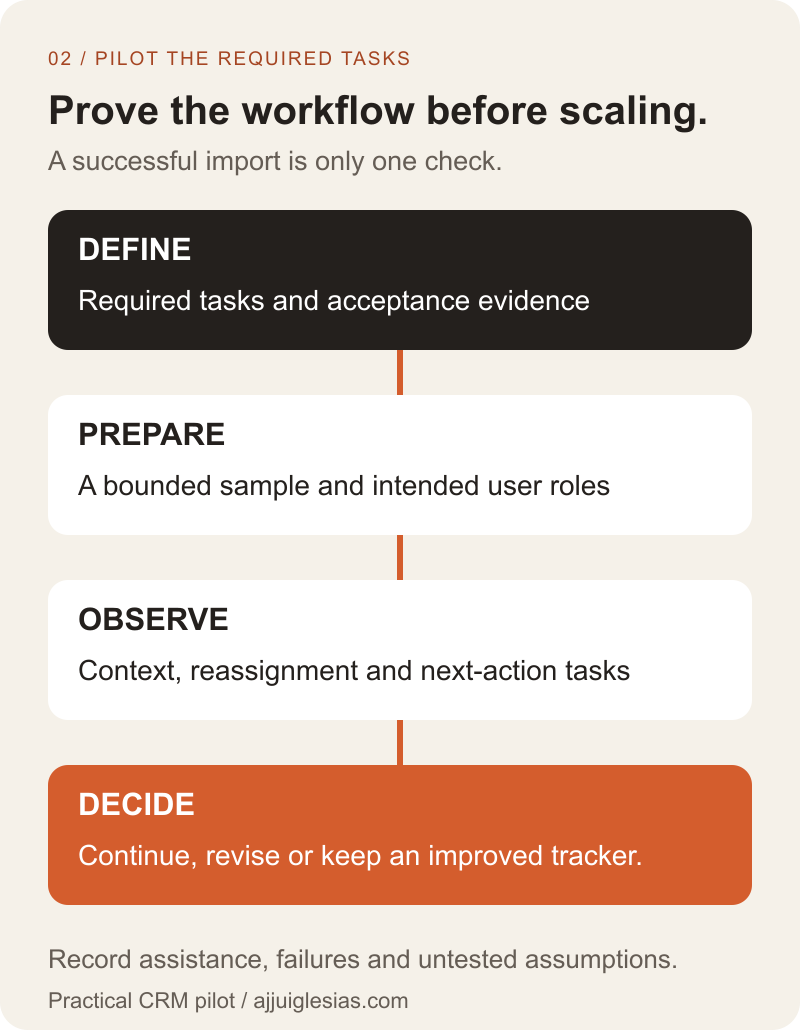
Set success criteria before starting. Examples include finding an overdue enquiry without asking another person or reassigning a request while preserving the relevant context. Avoid promising a sales improvement from the pilot alone.
Prepare data before importing it
Keep an agreed source copy and define which records belong in the pilot. Review field names, formats, missing values and conflicting statuses. Do not assume every historical row needs to enter the new system immediately.
Plan identifiers and matching rules. The system must distinguish updating an existing record from creating a new one. A repeated import should not silently multiply contacts or overwrite information the team needs.
For example, HubSpot's import-format guidance describes property formatting and unique identifiers used for updates. Follow the requirements of the chosen system and test its actual behaviour rather than applying another product's rules universally.
Inspect the result with the team. Confirm record relationships, owners, dates and notes, and reconcile rejected or unmatched rows. A tool reporting that an import completed does not establish that the resulting records mean what the business expects.
Decide which system is authoritative
Agree where current changes are made during the pilot. If the team updates both the CRM and the original spreadsheet independently, differences can accumulate without a clear way to resolve them.
Document the pilot boundary and the transition point. Identify who handles new enquiries during the change, which records remain in the old process and how staff know the correct destination.
Retain an appropriate reference copy without allowing it to become an unofficial competing live tracker. If the pilot does not meet requirements, the team needs a documented way to continue working and account for changes made during the trial.
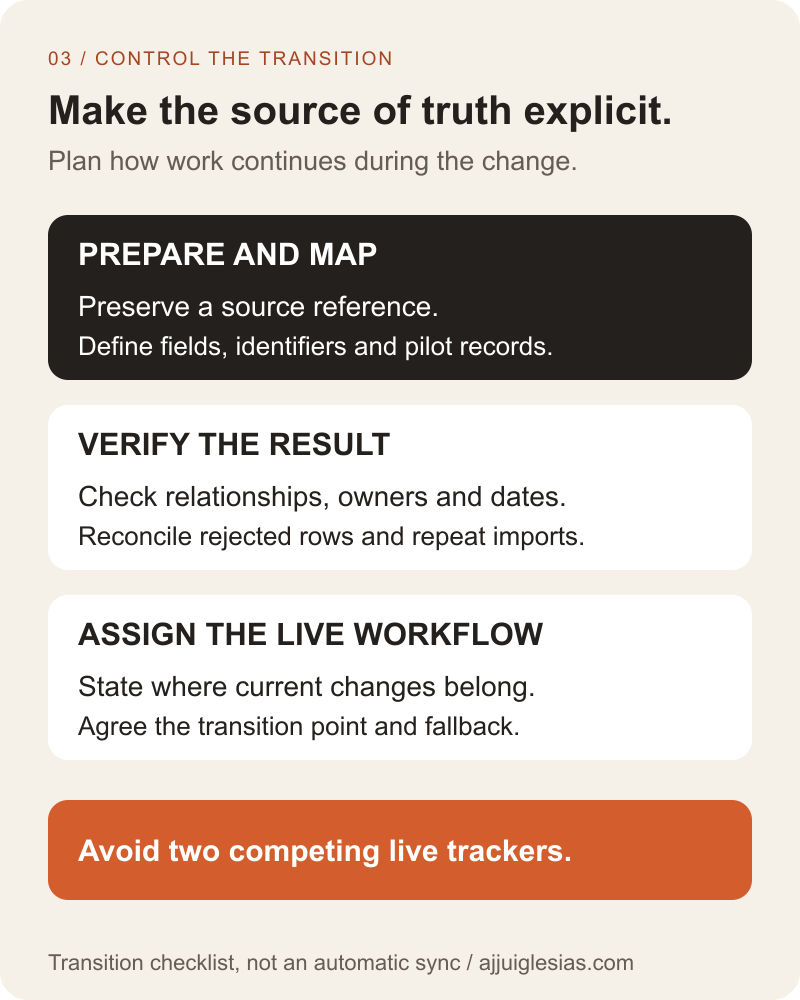
The transition diagram below keeps preparation, verification and the operating decision separate. It is a planning sequence, not a claim that data is moved or reconciled automatically.
Compare the full operating effort
Include setup, data preparation, training, recurring charges and ongoing administration in the comparison. Record who maintains stages, permissions, reports and integrations after the initial configuration.
If the proposed CRM saves manual work, measure the relevant task before and during the pilot. Include time spent correcting records, reviewing exceptions and maintaining the system. Capacity released is not automatically cash saved or additional sales.
Check the effort required to leave the system as well. Ask how the business can export the information and which relationships or activities the available export preserves. Test a representative sample rather than accepting a general claim of data portability.
For the broader software choice, read custom software versus SaaS for a small business. A custom CRM needs a justified workflow requirement, not merely frustration with an untidy spreadsheet.
Keep automation behind a clear process
Automate a handoff only after the team understands its trigger, record destination and failure path. Automatically creating records in an unclear pipeline can produce more work without making ownership dependable.
Start with the smallest automation that supports the agreed workflow. That might create a review task when a request is accepted. It should have a named owner and a visible response when the connection fails.
The first business automation guide explains how to evaluate such a task. Keep tool selection, process design and automation scope connected without assuming they all need to be decided at once.
Also review notifications. More reminders are useful only when people understand which require action and where that action is recorded. A noisy system can leave the business with the same unresolved follow-up problem in another interface.
Choose from observed outcomes
Consider a hypothetical business where two colleagues track requests in one sheet, but the conversation history remains in individual inboxes. The pilot should test finding that context and handing over a request, rather than only recreating the sheet's columns in a CRM.
If clearer tracker rules solve the issue, keeping the spreadsheet can be a reasonable decision. If required relationships or access controls remain unsupported, evaluate a CRM configuration that demonstrates those tasks. If the team cannot maintain the proposed system, revise the process or support arrangement before expanding.
Use the decision worksheet to record evidence, requirements and the pilot result. Mark untested assumptions explicitly instead of converting them into a confident recommendation.
For help scoping a lead-tracking workflow, describe how enquiries arrive, who follows up and where context currently gets lost. Use sample cases without sharing private customer records. Those details establish what the next system must do and how the business can verify it.


