
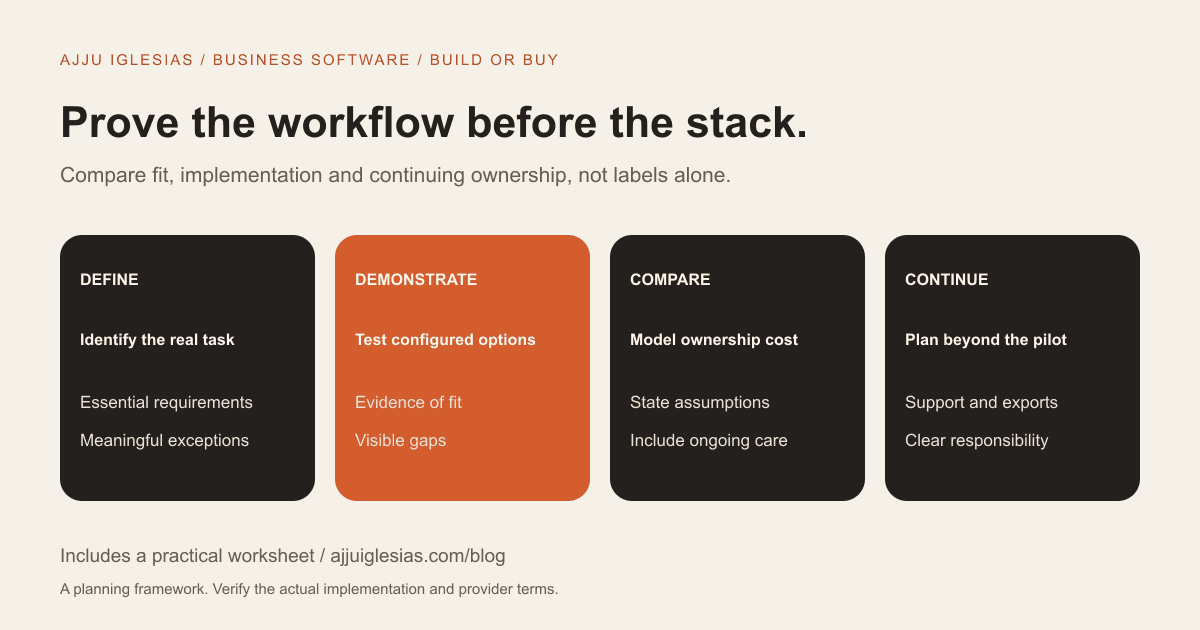
Buying SaaS is often worth considering when an existing product fits the business workflow well enough to operate reliably. Custom software deserves investigation when an important requirement cannot be met sensibly through configuration, integration or a manageable change in process.
The decision should account for implementation, adoption, support and exit options. Comparing a subscription fee with a development quote ignores much of the work on both sides.
This guide provides a build-versus-buy framework for small businesses considering a CRM, client portal, internal dashboard or other operational system. It includes a decision worksheet and a hypothetical three-year cost example.
Describe the workflow first
Write the process in plain language before listing desired software features. Who starts the work, what information is needed, what decisions are made and what result completes the task?
A service team might receive an enquiry, review suitability, prepare a proposal and track delivery. A property business may handle availability requests and reservation follow-up. The useful requirements come from those actual steps.
Identify the current pain and its evidence. Examples include repeated copying, unclear ownership or a missing approval record. Avoid treating a preference for a new interface as proof that a custom application is necessary.
The website brief template provides a starting structure, although an operational app will usually need more detail about users, permissions and exceptions.
Separate needs from preferences
Divide requirements into essential, valuable and optional. An essential requirement should have a clear explanation of what fails if it is absent.
For example, an approval record may be essential for the business process, while a preferred dashboard colour is normally a presentation preference. A feature can feel important without needing to block the first release.
Ask whether a requirement reflects a genuinely useful workflow or simply the way the old spreadsheet happened to be organised. New software does not have to preserve every accidental habit.
Record uncertainties rather than promoting them to mandatory scope. A short investigation can sometimes resolve a requirement that would otherwise distort the entire build-versus-buy decision.
Test SaaS against real tasks
Choose a small set of representative tasks and ask the product or implementation supplier to demonstrate them. Use non-sensitive sample data and include an exception, not just the ideal path.
A CRM demonstration might show a new lead, an assignment change, a proposal stage and a record export. A client portal demonstration might include what a customer can see and what staff can approve.
Mark each requirement as supported directly, supported through configuration, dependent on an integration or not yet demonstrated. Those categories are more useful than a checkbox stating that the product has “automation.”
Ask which plan supports the demonstrated setup and what additional services are needed. The relevant cost is the usable configuration, not the smallest advertised plan.
Explore configuration before rebuilding
A workflow gap does not automatically require a new application. It may be addressed through a supported configuration, a focused integration or a change in how the team works.
Ask what the proposed adaptation would require and who maintains it. Several fragile workarounds can become a significant operational burden even when no individual step seems complex.
There is also a limit to reshaping the business around a product. If an essential process becomes harder to control or understand, document that tradeoff.
The goal is not to avoid custom code at all costs. It is to distinguish a real product gap from a requirement that can be solved more simply.
Define a custom system's first release
If custom development remains a serious option, reduce the initial scope to the smallest useful workflow. State who can do what, what information is stored and how completion is verified.
Include the practical parts of running the system: account access, permissions, backups, monitoring, support and handling errors. These should not disappear behind the visible screens.
A first release also needs acceptance criteria. “Users can manage projects” is vague. “An authorised team member can create a project, assign an owner and update its stage” can be tested.
Describe what is intentionally excluded. A bounded first release is easier to evaluate than a wish list called an MVP with no shared definition.
Compare implementation work fairly
SaaS can still require data preparation, configuration, integration, training and a phased rollout. A subscription purchase is not the same as a complete operational transition.
Custom software requires discovery, design, implementation and testing, followed by deployment and continuing care. A prototype does not demonstrate that all those responsibilities have been covered.
Ask both proposals to identify the client's work. Who cleans the existing records, approves permissions and trains the staff who will use the system?
A fair comparison includes the effort required to make each option usable in the business, not just the supplier's billable activities.
Understand data and integrations
List the systems that must exchange information and identify the authoritative source for each important field. A customer address or project status should not be updated inconsistently across several tools without a defined process.
For SaaS, check the actual export and integration capabilities of the chosen plan. For custom development, ask which interfaces are being built and how failures are handled.
Demonstrate a representative transfer using suitable sample data. Examine what happens to missing fields, duplicate records and a failed update.
Do not assume that having an API means an integration is already designed or maintained. The workflow, permissions, limits and operational ownership still need explanation.
Plan permissions and responsibility
Write down the roles and the actions each role needs. A manager, a staff user and a customer may require different access to the same underlying information.
Ask how accounts are created, changed and removed. Identify who is responsible when someone leaves the business or changes role.
For a custom system, permission rules need explicit design and testing. For SaaS, confirm that the configured product and plan can support the required distinctions.
Sensitive or regulated information may need specialist review of the proposed setup. Do not treat either the SaaS label or a claim of full custom control as proof that every requirement has been assessed.
Compare ownership cost
Use the same time horizon and assumptions for both options. Separate implementation, recurring licences or hosting, support, integrations, training and likely changes.
Record costs that vary with usage, users or external services. Identify which figures are confirmed quotes, published provider terms or planning assumptions.
Do not quietly give custom software zero maintenance cost or give SaaS zero implementation cost. Either assumption can make a comparison look decisive while omitting essential work.
Also record costs you cannot yet estimate. An honest model with visible gaps is more useful than a precise-looking total built from guesses.
A hypothetical three-year example
Suppose an imaginary SaaS option costs ₹1,200 per user per month for five users. The assumed subscription total is ₹72,000 per year, or ₹2,16,000 over three years. Add an assumed ₹20,000 implementation cost and ₹15,000 integration cost: the illustrative total becomes ₹2,51,000.
Now suppose an imaginary custom option has a ₹2,50,000 initial build cost, ₹60,000 annual care allowance and ₹12,000 annual infrastructure allowance. Over three years, those assumptions total ₹4,66,000.
These are invented planning inputs, not provider prices, market averages or my development quote. Taxes, staff time, additional changes and other services are excluded from both totals.
The example does not prove that SaaS is always cheaper. It shows how including recurring care changes the comparison. Replace every assumption in the downloadable CSV with a confirmed figure or a clearly labelled estimate.
Consider the cost of an imperfect fit
A subscription may look inexpensive while leaving staff to repeat work manually. Record that work before deciding how important the gap is.
Estimate the task frequency and the time involved using observations rather than a promotional claim. Then ask whether configuration or a limited integration can remove the issue.
Custom development can also create friction if the workflow is poorly understood. Building the current process in software does not automatically improve it.
Assess the fit alongside ownership cost. A higher-cost option needs a credible explanation of the requirement or operational benefit that justifies it.
Think about change and continuity
Ask how each option responds when the business needs a new field, approval stage or connected system. Identify who can make the change and how it is estimated or configured.
A SaaS vendor controls its product roadmap and commercial terms. A custom system also has dependencies: the development team, hosting, libraries and external services.
For either option, keep account ownership, documentation and support responsibility clear. A system depending on knowledge held by one unavailable person creates an avoidable continuity problem.
If you are comparing implementation suppliers, use the freelancer-versus-agency guide to examine people, process and handover rather than supplier labels alone.
Plan an exit before committing
Ask what information can be exported, in which format and how it would be interpreted by another system. Include attachments and application-specific records where relevant.
For custom software, discuss source access, deployment documentation and the intended rights and responsibilities in the project agreement. Do not assume the word custom settles those arrangements automatically.
An export is not the same as a completed migration. Identify the work needed to clean, map and import data elsewhere.
The aim is not to predict that the project will fail. It is to keep a future change understandable enough that the business can make a practical decision.
Choose a pilot you can evaluate
Before committing to a broad rollout, define a pilot covering the core task and one meaningful exception. Decide what evidence would support continuing, adjusting or stopping.
For SaaS, the pilot can test the real configured workflow with appropriate sample data. For custom work, a scoped discovery or prototype can help examine an uncertain interaction, but it should be labelled clearly as a prototype.
An AI-assisted prototype can be useful for exploration. It still needs review, testing and an operational plan before being treated as a production system.
Record what the pilot cannot prove. A demonstration of a screen is not evidence that a system will handle every permission, data-quality issue or integration failure.
Make the decision explainable
Summarise the requirement, the evidence from demonstrations, the ownership cost assumptions, unresolved risks and the next step. The decision should be understandable to someone who did not attend every supplier meeting.
Buy when a suitable configured product meets the important needs with manageable tradeoffs. Investigate building when a justified gap remains and the business can support delivery and ongoing ownership. Consider a hybrid when it solves a bounded integration problem without recreating an entire product.
These are decision principles, not automatic rules. The right outcome depends on the actual workflow and evidence.
Discuss the work before the stack
If you want to assess a custom web app, dashboard or client portal, send the current workflow and the requirement you cannot meet. Include what you have already tested in existing tools.
The full-stack development service can be scoped around a defined first release. A useful first conversation may also conclude that an existing tool or a smaller integration is the better fit.
The framework, examples and cost model here are editorial planning tools. No financial saving, productivity gain or successful project outcome is claimed without a real assessment.


