

Client portal permissions decide who can see a project, change a deliverable and approve a particular version. Those decisions deserve attention before the dashboard design. A portal can look organised while leaving the team uncertain about whose feedback counts as approval.
Start with one real business process. For a design project, that might be sharing a proposal, collecting comments and recording a client's decision on the final document. Define the boundaries and exceptions before adding more modules.
This guide provides a planning approach, three diagrams and a permissions and approvals worksheet. The examples are hypothetical requirements, not a security assessment or evidence of an implemented client portal. For the wider project scope, start with the client portal development guide.
Start with one approval decision
Write a sentence that explains what the client is deciding. “Approve the homepage design in version 2 for the next development stage” is more useful than “approve project.” It identifies the object, version and consequence.
Then define what the decision excludes. A design approval might not authorise extra work, confirm a final invoice or accept every future revision. Put those boundaries beside the action so the person understands what happens next.
Choose an ordinary case and an awkward one. The ordinary case has one named approver reviewing the latest version. The awkward case might involve a colleague commenting on an older file while the approver is away. A workable specification explains both without relying on a developer to invent the business rule.
Keep this first workflow small enough to demonstrate. The MVP feature prioritisation guide explains how to separate an essential release from useful later additions.
Separate roles from project access
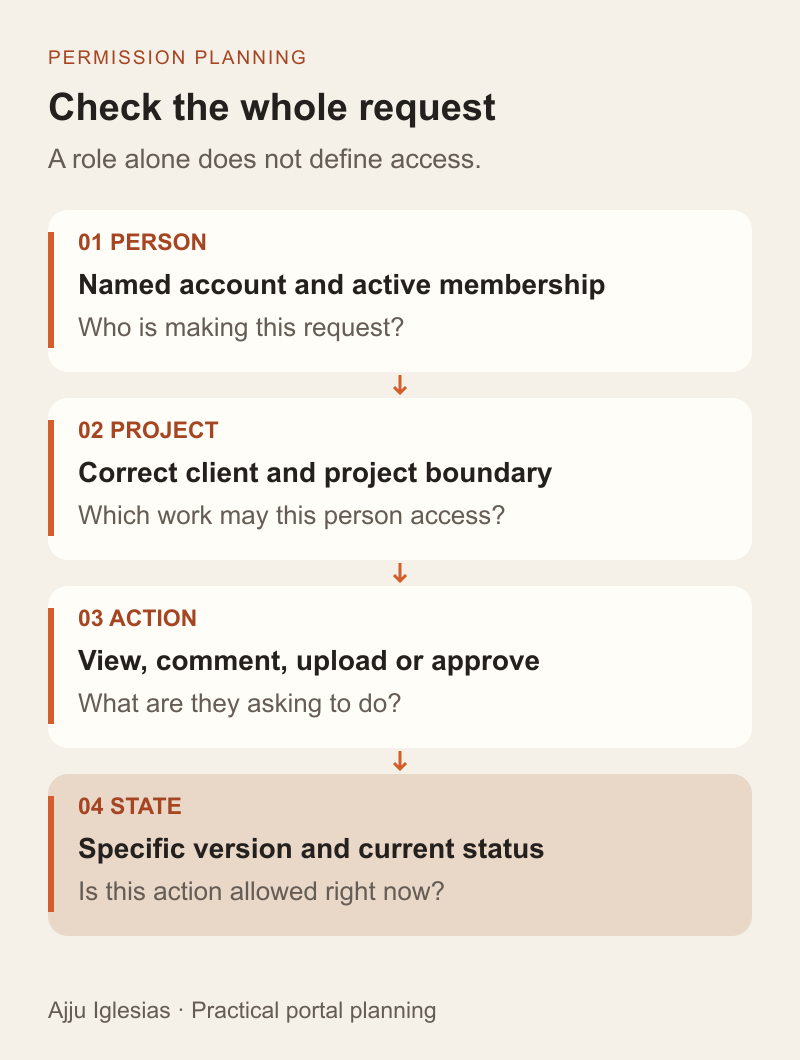
A role describes a kind of responsibility. A project membership describes where that responsibility applies. A client approver for one organisation should not gain approval rights over another organisation's documents merely because both use the same role name.
Write the permission as a complete statement: this named person, acting for this client, can perform this action on this project's document while it is in this state. Include an organisation boundary when one portal serves multiple businesses.
Start your action list with the work people actually perform:
- View a released deliverable and its earlier versions.
- Comment on a version without making a final decision.
- Upload a replacement or submit a draft for review.
- Approve a submitted version or request changes.
- Invite another person or change project access.
Avoid giving every client contact the same package by convenience. A finance contact may need an invoice but have no reason to see an unfinished creative draft. Record exceptions explicitly instead of making “client” mean unrestricted access to everything.
Keep feedback separate from approval
Comments help improve the work. Approval moves the work into an agreed next state. Make those actions visibly different, with clear confirmation text and a named decision-maker.
For a hypothetical studio project, two client reviewers can add feedback, while one client lead can approve the submitted design. The studio editor can upload drafts but cannot record approval on the client's behalf. This is a sample arrangement to discuss, not a universal role model.
Define whether one approver is enough or several are required. If several people must agree, state how conflicting decisions are handled and when review closes. Do not let the interface imply unanimous acceptance when only one person responded.
Also name a fallback process. If the approver is unavailable, an authorised person can assign a delegate with a recorded scope and expiry. Sharing the original person's login makes it harder to know who acted and should not be the planned solution.
Attach each decision to a version
An approval needs an identifiable document version. A filename such as “final-final.pdf” is a poor substitute for a version record that the system can reference consistently.
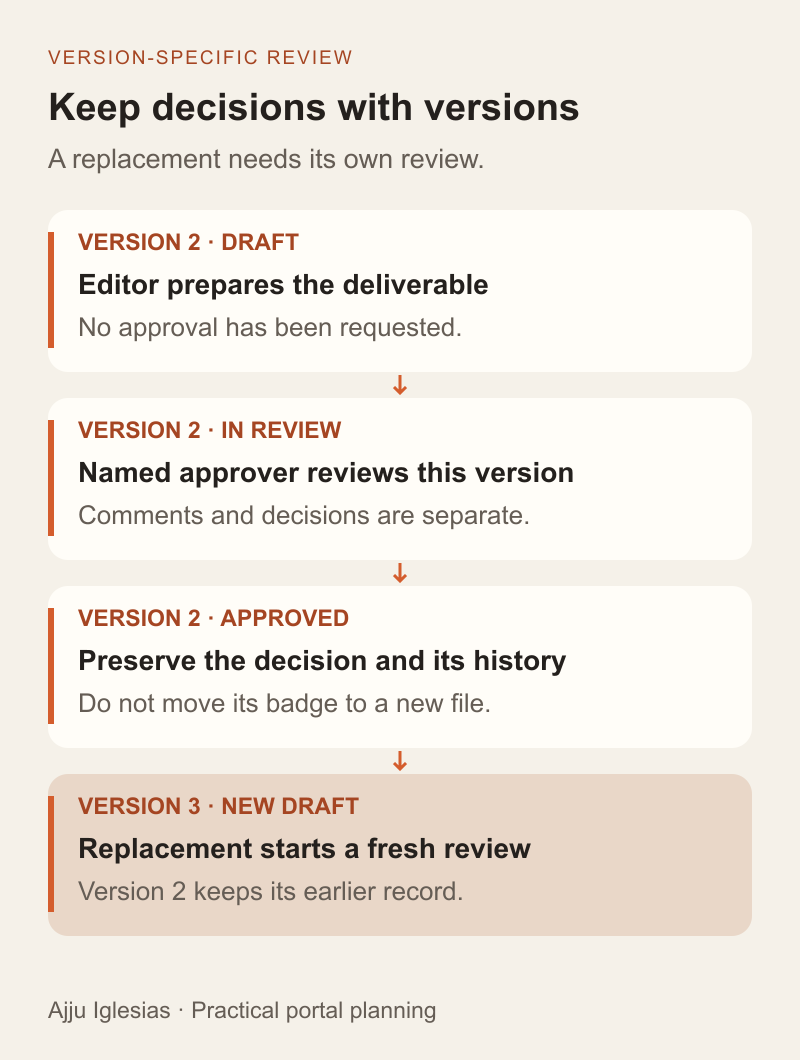
In this example, version 2 is submitted and approved. When an editor uploads version 3, version 2 retains its approval history, while version 3 needs a new submission and decision. The project should show both facts rather than presenting the latest file under an old approval badge.
Decide what happens to a review link after replacement. A useful behaviour is to show the referenced version, explain that a newer version exists and prevent a stale decision from silently applying to the replacement. The exact screen can vary; the meaning must remain clear.
Preserve the reviewed material according to the project's retention requirements. Replacing the bytes behind the same download address can undermine the team's ability to understand what was approved. Include version storage and retrieval in the specification, not just a version number on screen.
Define every state transition
List the states in plain language: draft, awaiting review, changes requested, approved and withdrawn, if withdrawal is needed. Then name the action and person allowed to move between them.
Saving a comment should not submit a draft. Uploading a file should not approve it. A successful-looking click should not be shown as a completed decision until the server confirms that the transition was accepted.
Plan what happens when two people act at nearly the same time. If a document changed after a reviewer opened it, require the application to detect the stale state and explain what needs reviewing again. A second click or a retried request should not create conflicting decisions or duplicate downstream work.
Specify reopening as a separate action with an explanation. Quietly changing an approved status to a draft can confuse everyone following the project. The history should let a colleague understand why the earlier decision no longer controls the next step.
Check access beyond the interface
Hiding a button helps communicate available actions, but the server must decide whether a request is allowed. The same boundary needs to hold when someone requests a document directly rather than navigating through the dashboard.
OWASP's Authorization Cheat Sheet recommends least privilege, denying access by default and checking permissions on every request. It also addresses protection of static resources. Use those principles when specifying server checks for portal actions and file delivery.
Ask the implementation team to demonstrate the chosen file access model. A private-looking page is insufficient if the underlying download is openly available. Define whether download links expire, which identity or scope they rely on and how access changes affect them. These are requirements to verify against the selected platform, not capabilities to assume from its marketing.
Record enough to explain a decision
A useful business history answers who acted, which version they reviewed, what they decided and when the system accepted it. Record the previous and resulting state so another team member can follow the sequence.
Keep optional decision notes purposeful. A short reason for requesting changes may help the delivery team, while copying an entire sensitive document into an event record adds unnecessary exposure. Define who can see the history and how long it needs to remain available.
OWASP's Logging Cheat Sheet distinguishes application logging needs and describes information to exclude or protect. Use it to review the technical logging design separately from the client-visible approval history. Neither a history screen nor a timestamp alone establishes a particular legal effect for an approval.
For the project brief, describe the questions the records must answer. Let the implementation plan explain storage, access, monitoring and retention instead of treating “add audit log” as a complete requirement.
Make notifications point to the record
An email can tell a reviewer that work is ready. The portal should remain the place where the current version, decision and permissions are checked.
Specify what a notification means. Sending an email does not establish that the intended person read the document or approved it. A forwarded message should not automatically give the recipient permission to view or decide on the work.
Keep notification failures separate from approval failures. If a valid approval is saved but a notification cannot be delivered, the screen should report the saved decision accurately and provide an appropriate recovery path for the notification. Retrying an email should not repeat the approval or its downstream tasks.
For an initial release, a reliable review notification and a clear pending-work list may be enough. Add reminders after you know who owns overdue reviews and how a reminder should stop when the state changes.
Plan invitations and departures
Write down who can invite someone, which projects the invitation covers and what happens when it expires. Joining one project should not accidentally become membership of every project belonging to the same client.
Name an owner for access reviews. A client contact moving to another company, a contractor finishing work or an employee changing responsibilities should trigger a review of their memberships and decision rights.
Ask how deactivation affects existing sessions and previously issued download links. Test the actual implementation rather than assuming that disabling a visible account instantly invalidates every access route. Keep historical decisions attributable without leaving the former user active.
Access management itself needs acceptance criteria. Include a way to recover legitimate administration when the usual project owner leaves, with a clear process for verifying and recording the reassignment.
Test allowed and blocked actions
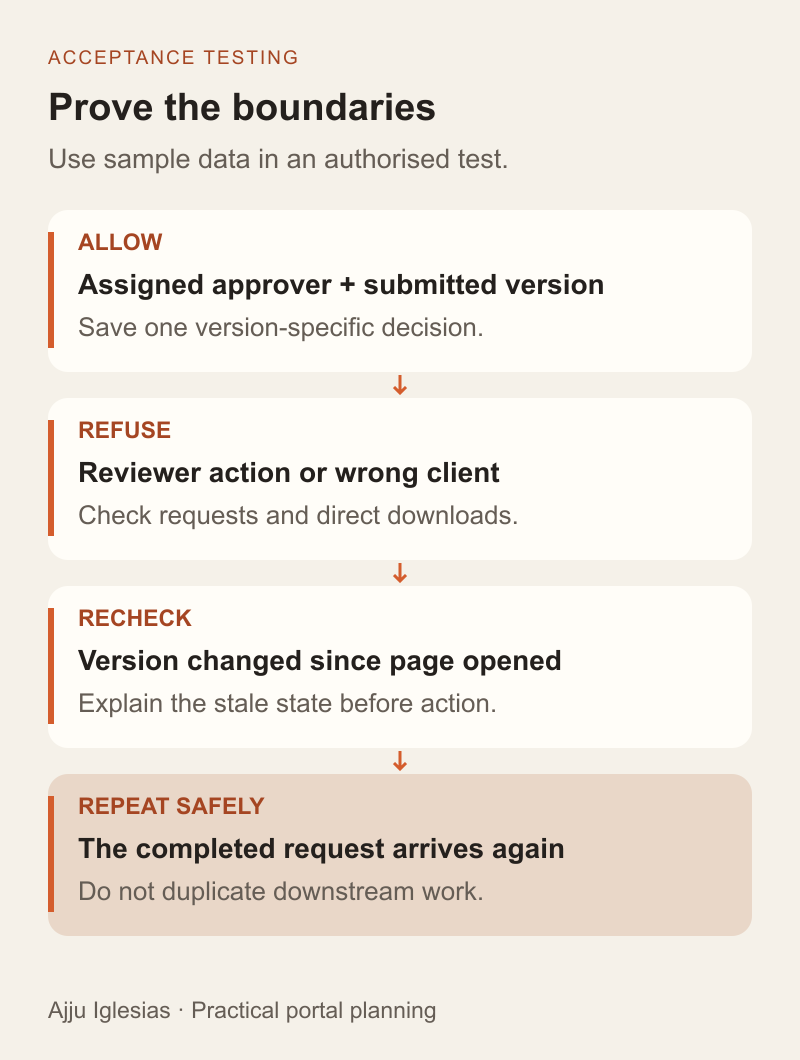
Use sample organisations and documents in an authorised test environment. Pair each successful action with a related action that must be refused. This tests the boundary rather than just proving that a button works once.
- A project approver can approve the submitted version in their project.
- A reviewer can comment but cannot approve through the interface or a direct request.
- A user from sample client B cannot retrieve sample client A's document.
- A deactivated member cannot continue using the access routes covered by the agreed deactivation policy.
- An expired invitation cannot be used to join a project.
- A stale version cannot be approved as though it were the current submission.
- Repeating a completed decision does not create another completion event.
Record the expected result and evidence for each case. Do not place real client files in a test merely to make the demonstration convincing. Release decisions should reflect the observed results and any unresolved exceptions.
Turn the rules into a build brief
Download the client portal permissions worksheet and complete one workflow before requesting a quote. Include a sample document, named roles, project boundaries, approval states and the acceptance cases that matter to your business.
Use that brief to compare an existing platform with custom development. The custom software vs SaaS guide provides a wider decision framework. Demonstrate the required behaviour in the shortlisted option before assuming that a feature labelled “approvals” meets your process.
If you want help turning the workflow into a portal scope, send the project details. Describe one decision the portal must handle, the people involved and what should happen when a new version arrives. Those details make a development conversation far more concrete than a request for a dashboard with user roles.


