

A hotel website booking integration should carry the guest from an accurate room description into a reservation process the property can operate. Adding a Book Now button is the visible part; the important work is understanding where availability comes from and how a reservation reaches the team.
Start with the software the hotel already uses. A new website does not automatically require a new property management system, channel manager or booking engine. It needs a clear connection to the agreed reservation workflow.
This guide covers planning and acceptance rather than a specific installation tutorial. It includes three diagrams and a booking integration worksheet. If you are still deciding whether to accept bookings or only requests, read the booking engine versus enquiry form guide first.
Inventory the existing systems
List the property management system, booking engine, channel manager and any separate reservation or payment services involved. Record the provider, account owner, current configuration and support contact for each.
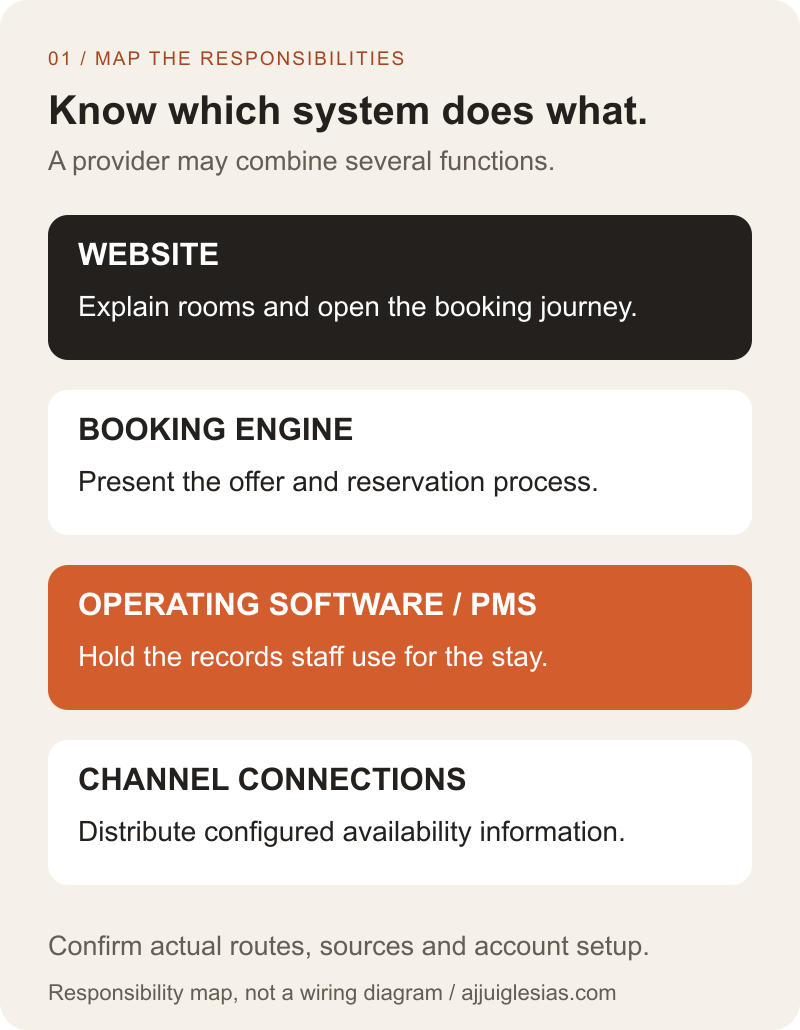
A property management system supports hotel operations and reservation records. A booking engine provides the guest-facing reservation journey. A channel manager handles configured distribution connections. A single product may combine functions, so document the actual arrangement rather than assuming three separate products are required.
Ask staff to demonstrate a current reservation from receipt through to the place they use it operationally. Identify manual steps and checks that are easy to miss in a software diagram.
The first diagram maps responsibilities, not a mandatory technical architecture. Some connections may be direct and others may pass through another service. The provider should confirm the exact route for the property.
Choose a supported connection method
Ask the booking provider which website connection methods are available for the property's account. Possibilities can include a hosted booking link, an embedded widget or an approved custom integration. Compare the complete journey each option supports.
For example, the Mews integration guide documents standalone, widget and API approaches, with account conditions for its API option. That example demonstrates why the available route must be checked with the actual provider; it is not a recommendation that every hotel needs custom development.
A hosted destination can be a suitable choice if it preserves the necessary context and gives guests a clear experience. An embedded interface still needs checks for mobile usability, loading failures and the transition back to the website.
Commission a custom connection only when there is a defined requirement the supported options do not meet. Include ongoing maintenance, provider changes and acceptance evidence in that scope.
Name the source of each fact
Decide which system owns room descriptions, photographs, availability, rates, restrictions and reservation status. These may come from different places. Write down who can change each fact and how it reaches the guest.
Avoid maintaining a second live availability count in the website CMS unless its relationship to the reservation system is deliberately designed. A manually updated statement can become stale while the booking engine continues to use current inventory.
Separate marketing copy from transactional facts. A room page may describe a category, while the booking engine returns availability for specific dates and occupancy. The page should not imply that a general description guarantees a room for the selected stay.
Record what happens when a source cannot be reached. Showing old information as current is a different behaviour from presenting a clear unavailable state and a useful alternative contact route.
Map room categories and rate plans
Create a mapping register for website room names, provider identifiers and rate plans. Confirm which physical or sellable inventory each category represents. Similar labels do not establish that two records refer to the same offer.
Record occupancy assumptions, relevant inclusions and restrictions beside the mapping. A standard double room with one rate plan can differ from the same room sold with meals or a different cancellation arrangement.
The Cloudbeds booking-engine integration documentation describes room-type and rate-plan mapping as well as reservation flows. Use your provider's current documentation and account setup to establish the corresponding fields rather than copying another platform's identifiers.
Have a property representative review the map before development depends on it. The website team can connect identifiers correctly while still presenting the wrong room if the business meaning was never confirmed.
Preserve the guest's selected context
Decide whether the website passes dates, occupancy, room category or a promotional code into the reservation journey. Confirm which parameters the supported connection accepts and how unsupported or invalid values are handled.
Test the destination after each important entry point. A room-specific button may correctly open the engine but lose the selected category. A mobile visitor should not have to infer that the room they were viewing is no longer selected.
Keep arrival and departure dates clear. Include the property's relevant time-zone and date conventions in the implementation brief where they affect the connection. Do not rely on a developer's local settings as the definition of a hotel stay.
Explain when a selection must be made again. A clear request to choose valid dates is more useful than silently replacing them and allowing the guest to continue under a different assumption.
Review the full price and policy display
Check that the room page and booking flow describe inclusions consistently. Review the actual currency, charges, occupancy and rate conditions shown for representative stays in the agreed test setup.
If the website shows a starting price, explain its context accurately and decide how it is maintained. A manually written price and a date-specific booking total answer different questions; presenting them without context can create confusion.
Identify where guests can inspect the conditions relevant to their selected rate before committing. The integration brief should name the source and owner of that information rather than leaving the website and booking provider to display inconsistent versions.
Keep the test about the complete offer. A visually correct amount on the first screen does not verify the final summary or the reservation recorded for staff.
Define reservation states precisely
Agree what each message means: searching, available, submitted, pending, accepted and confirmed. Use only the states that fit the actual system, with evidence for the transitions that matter.
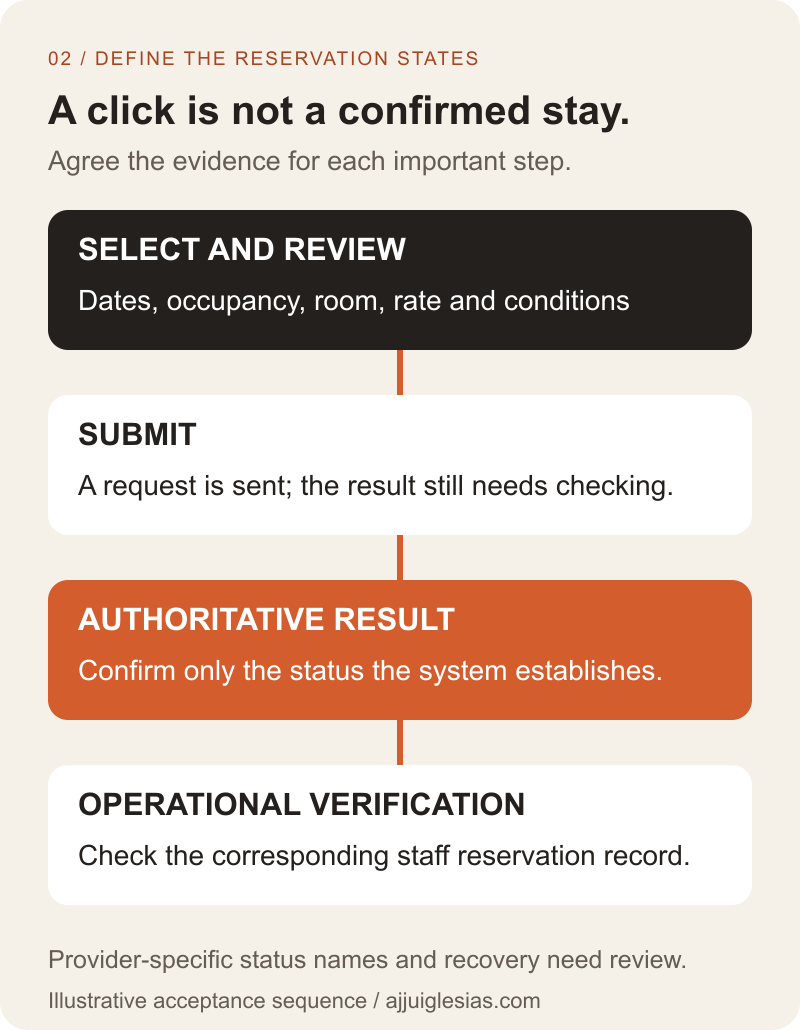
Opening a reservation page is not a booking. A guest submitting details does not necessarily mean the property has a confirmed reservation. Establish which authoritative result lets the interface make that claim.
Payment and reservation status can also need separate interpretation. Ask the provider to explain the supported journey and test it using its approved tools. Do not collect real payment details in an ordinary planning worksheet or use unapproved live transactions as test records.
The state diagram below separates a guest action from an accepted reservation and its operational verification. It is a planning aid; the provider must confirm the actual status names and behaviour.
Plan duplicate and failure handling
Discuss the response to a timeout, repeat click or interrupted connection. The guest may not know whether the first attempt succeeded. A retry should not create extra reservations merely because the screen did not finish updating.
Ask how the provider identifies a reservation and how the website can determine its status after an uncertain result. The appropriate recovery mechanism depends on the supported connection; it should be documented rather than improvised after launch.
Define a useful guest message for unavailable services. Avoid presenting an enquiry fallback as a confirmed reservation. If the property accepts requests while a booking path is unavailable, make that different commitment clear.
Give staff a way to identify affected attempts and a support route for investigation. Keep diagnostic information limited to what is needed and use the approved process for accessing private reservation data.
Check amendments and cancellations
Establish whether changes and cancellations are supported online, handled by staff or passed to another provider interface. Explain the route in guest-facing messages and in the operating instructions.
Include confirmation responsibilities. Identify which system sends the original reservation message, which sends subsequent changes and how duplicate or contradictory messages are prevented.
Test the supported change process in an agreed environment. Verify the resulting record and any relevant inventory effect, rather than only checking that a notification was sent.
Do not assume a new website includes every feature the provider's platform can support. Record the included journeys and any intentional exclusions so staff can answer guest questions accurately.
Run a property-specific acceptance test
Prepare labelled sample scenarios with the provider and property team. Use the approved sandbox or test arrangements, identify the expected result and agree cleanup responsibilities before beginning.
Include a normal available stay, a restricted or unavailable stay, different supported occupancy choices and the important room/rate combinations. Check mobile use, an interrupted journey and the supported recovery path.
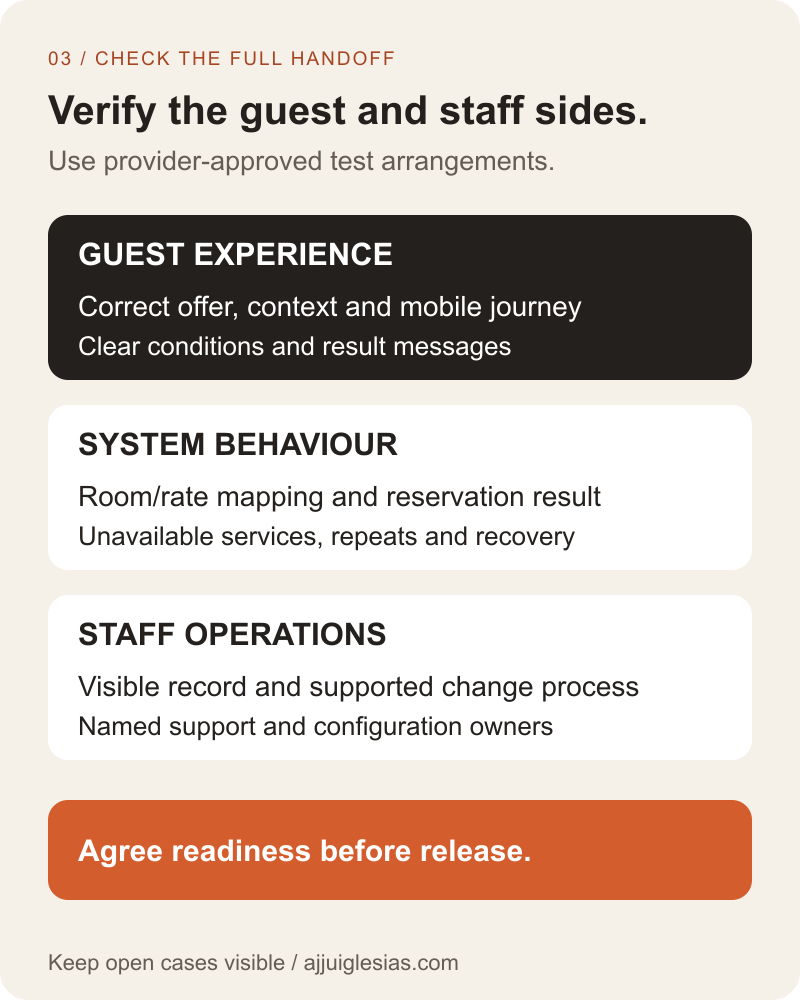
The acceptance diagram groups evidence into guest, system and staff checks. A successful journey needs the expected offer, a dependable result and the operational record the property will actually use.
For example, a hypothetical hotel may discover that a twin-room button opens a general search without retaining the room category. The team can correct the supported link or explain the next selection step, then repeat the test. This is an illustrative issue, not a completed client case study.
Assign support before release
Name the person who owns website changes and the person who owns booking configuration. Identify who contacts each provider when a guest reports a problem and who can approve a temporary fallback.
Agree what monitoring covers. A homepage availability check cannot establish that the full booking journey works. Any deeper checks need an approved design that avoids creating unintended reservations or messages.
Use the integration worksheet to record mappings, states, tests and unresolved questions. The hotel room-page guide helps align the content before the reservation handoff, while the website support response-time guide covers incident responsibilities.
For help scoping the website connection, share the existing booking provider, room categories and intended guest journey. Those details make it possible to choose a supported approach and define what needs to be demonstrated before launch.


