
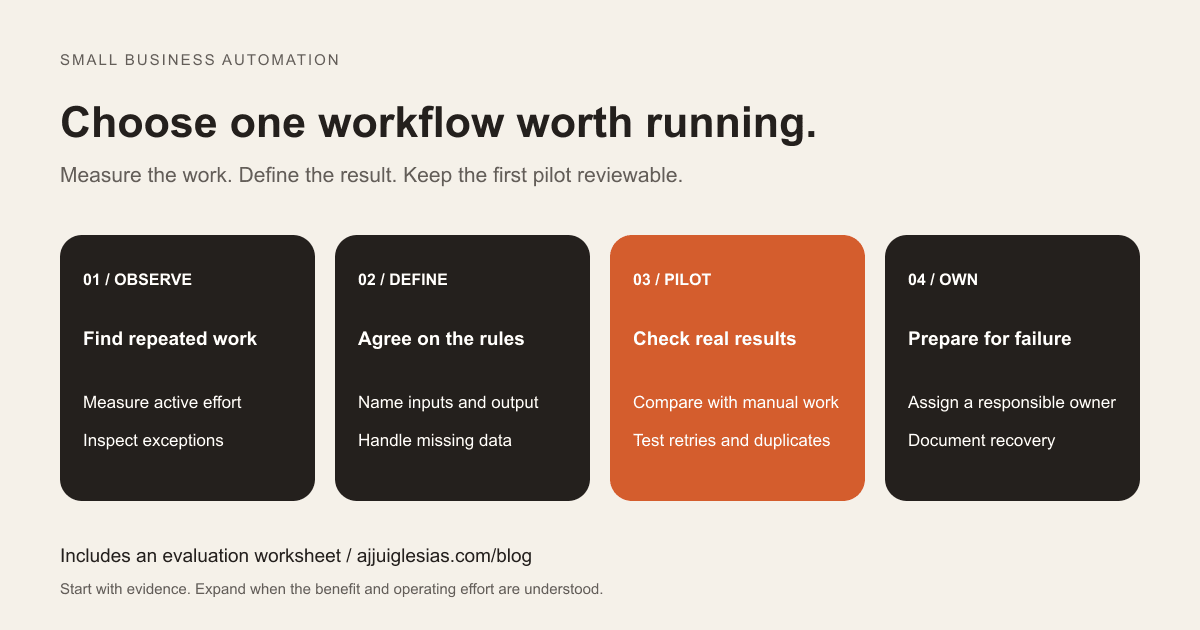
The best first small business automation is usually a recurring task whose rules your team already understands. It should remove a measurable piece of work, leave a clear result and be easy to pause when something unexpected happens.
That might be preparing a weekly operations report, creating an internal follow-up task or collecting documents into a review queue. The right starting point depends on what your team actually repeats, where mistakes occur and who can maintain the workflow.
This guide explains how to choose that first task, evaluate the effort and run a controlled pilot. The worked example is illustrative, not a client result or a promise of savings. Use the automation evaluation worksheet to apply the process to your own business.
Start with observed work
Before choosing a platform, watch a complete working cycle. Ask the person doing the task to describe what happens on an ordinary day and show a recent difficult case. Record the systems they open, the information they copy and the decisions they make.
Observe a representative period. A daily task may be understandable after several normal days; a month-end report needs its month-end conditions included. Record active working time separately from waiting for somebody else to respond.
Look for repeated movement of structured information: a confirmed status copied into a report, a completed submission assigned for review, or a known deadline turned into an internal reminder. Also note workarounds. A person may quietly fix missing information before completing the apparent task, and the automation will need a defined response to that gap.
If different team members describe different rules, resolve those differences before implementing them. Otherwise, the workflow simply performs an inconsistent process faster.
Shortlist useful automation ideas
Choose a few candidates with different levels of complexity. These are starting points to investigate, rather than recommendations for every business:
- Prepare a draft weekly report from a structured project register.
- Create an internal review task when a complete document submission arrives.
- Remind the responsible colleague about an approaching milestone.
- Assemble a list of records missing information for someone to correct.
- Copy approved information into a second system when an existing integration supports the required fields.
For each candidate, write one sentence describing the finished result and its recipient. “Prepare a draft of open project items for the operations manager every Friday” is specific enough to evaluate. “Automate operations” is not.
Keep customer-facing messages, payments and destructive changes out of an initial pilot unless their controls are already understood and tested. The practical aim is to learn how the business will operate an automation while keeping failures recoverable.
Compare candidates consistently
Frequency matters, but so do consistency and consequences. A frequent task that requires substantial judgment may be a worse starting point than a smaller, predictable task.
Compare each candidate against five questions:
- How often does it happen, and how much active work does it require?
- Are the inputs complete and available in a dependable format?
- Can someone explain the rules and the common exceptions?
- What happens if the workflow runs twice, runs late or produces a wrong result?
- Who will review failures and maintain the process?
Write the evidence beside each answer. “Consistent inputs” should refer to inspected records, rather than an assumption about how people ought to fill them in.
You can use a simple high, medium or low assessment to organise a discussion. Do not let a total score hide a critical problem. A missing owner or an unacceptable failure consequence needs a direct decision, regardless of the candidate's other strengths.
Define one complete workflow
Describe the proposed workflow before building it. A useful definition includes its trigger, inputs, rules, output and owner. Add the conditions under which it must stop and request review.
For example: every Friday, read the approved project register, select active projects with open actions, create a dated internal draft and notify the operations manager that it is ready. Missing owners or invalid dates go into an exception list.
Define where the workflow starts and ends. Does it prepare a draft, update a record or send a message? Who accepts the result? What evidence shows that the run finished successfully?
This boundary also helps with supplier proposals. You can evaluate whether a proposed implementation covers the full task, instead of comparing a list of platform features. The website brief template offers a related approach to documenting requirements before commissioning work.
Work through a realistic example
Consider an illustrative business with a structured register of active projects. Every Friday, a coordinator checks open actions and prepares an internal summary. A manager then reviews priorities before communicating with clients.
The first automation prepares that internal summary. It does not infer progress from scattered messages, decide which delays are acceptable or email clients. Each project has a stable identifier, an owner, a status and an action date.
The draft groups open actions by owner and flags missing values. The manager checks it against the register during the pilot. If the source cannot be read, the workflow reports a failed run instead of producing a reassuring empty report.
Acceptance requires more than a formatted document. The team checks whether every eligible project appears once, whether excluded projects stay excluded, and whether exception items remain visible. They also confirm that the report clearly states when it was prepared and who must review it.
This narrow workflow still delivers a complete result: a reliable draft for a named reviewer. Further automation can be considered after the team has evidence that the draft is useful.
Calculate the effort honestly
Suppose observation shows that preparing the weekly summary takes 50 minutes. Across four weekly runs, that is 200 minutes of preparation. This calculation excludes the manager's decision-making, which continues in either version.
Assume the pilot still needs 15 minutes of checking per run and another 20 minutes across those four runs for exception handling. The remaining effort is 80 minutes, leaving a provisional reduction of 120 minutes over that period.
Those numbers are hypothetical. Replace them with observed pilot measurements. Include troubleshooting, correcting source data and maintaining the workflow. If setup takes eight hours, do not describe two hours of monthly capacity as immediate payback; setup recovery depends on sustained performance and ongoing costs.
Time released is also different from cash saved. It may let a coordinator handle other work without reducing payroll. Decide what useful outcome the capacity supports, then compare it with implementation effort, recurring platform charges and support responsibilities.
Check existing software first
Inspect the software you already use. A saved view, scheduled report, built-in reminder or existing integration may cover the requirement with less operating effort than a separate workflow.
If you need an automation platform, test the exact connection and action required. A supported application name does not prove that a connector exposes every field, permission or operation your process needs.
Compare authentication, usage limits, error visibility, ownership and export options alongside recurring charges. Pricing can depend on plan and usage; check the current Zapier pricing information against a realistic execution estimate instead of relying on a remembered subscription price.
Self-hosting also creates work. The n8n hosting documentation covers operating considerations such as configuration and maintaining an installation. Include that responsibility when comparing it with a hosted service. For a broader buying decision, read custom software versus SaaS for a small business.
Make exceptions visible
A workflow needs a response for incomplete inputs, unavailable systems and unclear results. Define those responses while the task is still small.
For the report example, missing project owners belong in an exception list. An unavailable source should produce a visible failure. A duplicate trigger should not create two reports that appear to be separate approved updates.
Agree how repeated runs identify the same work. That might involve a reporting period and a stable source identifier. The implementation depends on the systems involved, but the business requirement should be explicit before anyone chooses a technical approach.
Do not silently replace missing information with guesses. If a rule cannot determine the right outcome, route the item to a person with enough context to resolve it. Record what was skipped so that an apparently successful run cannot conceal unfinished work.
Test a controlled pilot
Begin with sample records or a limited copy of the process. Compare the automated output with a manually checked result before allowing broader use.
Test normal records, missing fields, invalid values and an empty input set. Also test an unavailable connection, the same trigger arriving twice, a delayed run and a retry after partial completion. These cases reveal whether the workflow can recover without losing or duplicating work.
Keep the pilot reviewable. Label drafts, restrict who receives them and document how to pause the workflow. Retain a workable manual fallback so that the business can complete the task while a problem is investigated.
Choose a pilot period that includes representative conditions. A few successful runs support a limited conclusion about those runs; they do not establish that every future variation is handled. Expand only when the remaining uncertainties and responsibilities are understood.
Give failures an owner
An error notification is useful when someone receives it, understands the affected task and knows what to do next. Name that person and a backup. Decide how quickly they need to respond for this particular workflow.
For example, n8n documents error workflows that can react to failed executions. That capability still requires configuration and testing in the actual workflow. Check the failure path deliberately during acceptance.
The response instructions should explain how to find the affected run, determine whether an output was created and recover without repeating completed work. Include the manual fallback and the conditions for restarting automation.
Store only the diagnostic information needed to operate the task. A useful failure record can identify the affected item and error without copying every customer detail into a notification. Review access to execution histories as part of the handover.
Plan access and ongoing care
Use accounts and connections that the business can maintain when staff or suppliers change. Document who controls each connection, how access is granted and where the handover instructions are kept. Do not place passwords or tokens in the evaluation worksheet.
Give the workflow the access it needs for its defined task. For a draft reporting pilot, check whether read access to the source is sufficient and whether output permissions can be limited to the review destination.
Schedule reviews around meaningful changes: renamed fields, new business rules, altered permissions, expired connections and platform updates. Assign responsibility for checking that the workflow still produces the intended result.
If the process grows into an application with accounts, approvals and shared documents, revisit the product scope. The client portal development guide explains how to plan that broader workflow without assuming that every new requirement belongs in the original automation.
Decide whether to expand
Review the pilot against its original purpose. Did it produce an accurate result? How much work remained? Which exceptions needed help? Did the owner understand the recovery steps?
Continue when the benefit is worthwhile and operating effort is manageable. Revise the task if unreliable inputs dominate the work. Pause if the team cannot explain failures or if the expected benefit disappears after review and support are included.
Download the first automation worksheet and illustrative candidate register to document your decision. The register contains examples to replace with observations, not prevalidated savings or universal rankings.
For help scoping an implementation, send a description of the recurring task, the systems involved and one representative exception. A useful starting conversation establishes the workflow, success criteria and ownership before selecting a platform.


